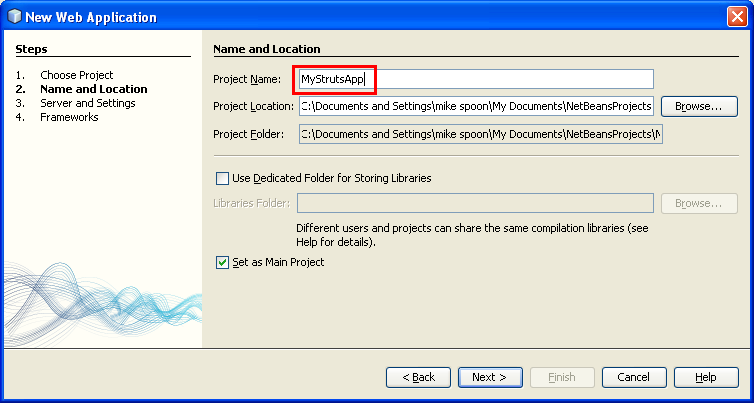
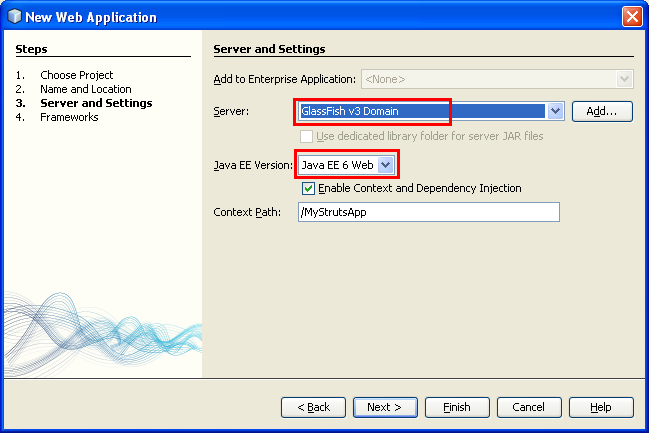
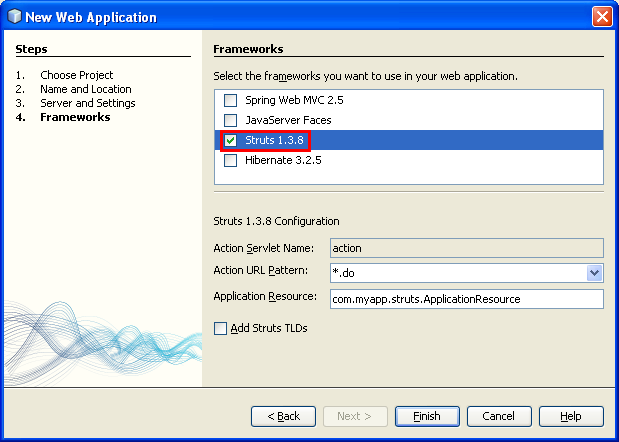
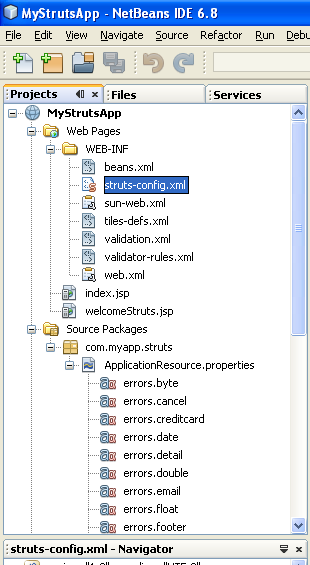
ÿþ<html> <head> <meta http-equiv="Content-Type" content="text/html; charset=unicode" /> <meta http-equiv="Content-Language" content="en-us" /> <style> <!-- p.MsoNormal, li.MsoNormal {margin-top:0mm; margin-right:0mm; margin-bottom:10.0pt; margin-left:0mm; line-height:115%; font-size:12.0pt; font-family:"Times New Roman","serif";} h1 {margin-right:0mm; margin-left:0mm; font-size:24.0pt; font-family:"Times New Roman","serif"; font-weight:bold} a:link {color:blue; text-decoration:underline;} a:visited {color:purple; text-decoration:underline;} p {margin-right:0mm; margin-left:0mm; font-size:12.0pt; font-family:"Times New Roman","serif";} ul {margin-bottom:0mm;} --> </style> <title>A tutorial on Java Structs web framework through program example</title> <meta name="keywords" content="Java, opensource, technology, web, web server, hosting, applications, development, projects, data, database, system, structs, framework" /> <meta name="description" content="This tutorial shows how Java Structs web framework used in web development with sample project that include MVC architecture" /> </head> <body lang="EN-US" link="#0000FF" vlink="#800080" topmargin="20" leftmargin="20" rightmargin="20" bottommargin="20"> <div class="WordSection1"> <h1 align="center" style="margin-bottom:0mm;margin-bottom:0; text-align:center;background:white; margin-top:0; margin-right:0"> <font size="6" face="Arial"><span style="font-weight:400">Introduction to the Struts Web Framework 1</span></font></h1> <p class="MsoNormal" style="margin-bottom:0mm;margin-bottom:0;background:white; margin-top:0; margin-right:0">&nbsp;</p> <p class="MsoNormal" style="margin-bottom:0mm;margin-bottom:0;background:white; margin-top:0; margin-right:0">&nbsp;</p> <p class="MsoNormal" style="margin-bottom:0mm;margin-bottom:0;background:white; margin-top:0; margin-right:0" align="center"><script type="text/javascript"><!-- google_ad_client = "pub-8089415323104206"; /* 728x90, created 5/16/08 javaos */ google_ad_slot = "1917524460"; google_ad_width = 728; google_ad_height = 90; //--> </script> <script type="text/javascript" src="http://pagead2.googlesyndication.com/pagead/show_ads.js"> </script></p> <p class="MsoNormal" style="margin-bottom:0mm;margin-bottom:0;background:white; margin-top:0; margin-right:0">&nbsp;</p> <p class="MsoNormal" style="margin-bottom:0mm;margin-bottom:0;background:white; margin-top:0; margin-right:0">&nbsp;</p> <p class="MsoNormal" style="margin-bottom:0mm;margin-bottom:0;background:white; margin-top:0; margin-right:0"> <font size="3" face="Arial"><span style="font-size:12.0pt">Note: The original document can be found at: <a href="http://netbeans.org/kb/docs/web/quickstart-webapps-struts.html" target="_blank" title="An Intro to Struts web framework &amp; NetBeans"> An Intro to Struts web framework &amp; NetBeans</a>. This is a refined version with details steps.</span></font></p> <p class="MsoNormal" style="margin-bottom:0mm;margin-bottom:0;background:white; margin-top:0; margin-right:0"> <font size="3" face="Arial"><span style="font-size:12.0pt">&nbsp;</span></font></p> <p class="MsoNormal" style="margin-bottom:0mm;margin-bottom:0;background:white; margin-top:0; margin-right:0"> <font size="3" face="Arial"><span style="font-size:12.0pt">This document takes you through the basics of using NetBeans IDE to develop web applications using the Struts web framework. Struts is an open source framework that extends the Java Servlet API and employs a <b><span style="font-weight:bold">Model, View, Controller (MVC) architecture</span></b>. It enables you to create maintainable, extensible, and flexible web applications based on standard technologies, such as JSP pages, JavaBeans, resource bundles, and XML.</span></font></p> <p class="MsoNormal" style="margin-bottom:0mm;margin-bottom:0;background:white; margin-top:0; margin-right:0"> <font size="3" face="Arial"><span style="font-size:12.0pt">This tutorial teaches you how to build a simple MVC application that displays a login page and returns a success page upon submitting data that passes validation. You learn several basic features provided by Struts, as well as how these features are implemented using the IDE. Specifically, you use Struts tags in JSP pages, maintain user data with a Struts </span></font><font size="2" face="Courier New"> <span style="font-size: 10.0pt;font-family:&quot;Arial&quot;">ActionForm</span></font><font face="Arial"> bean, and implement forwarding logic using a Struts </font> <font size="2" face="Courier New"> <span style="font-size:10.0pt;font-family:&quot;Arial&quot;">Action</span></font><font face="Arial"> object. You are also shown how to implement simple validation to your application, including setting up warning message for a failed login attempt.</font></p> <p class="MsoNormal" style="margin-bottom:0mm;margin-bottom:0;background:white; margin-top:0; margin-right:0"> <font size="3" face="Arial"><span style="font-size:12.0pt">For a more fine-grained introduction to Struts, see How does Struts work? On the <a href="http://struts.apache.org/" target="_blank" title="The Struts framework"> official Struts website</a>. Also, make use of the IDE&#39;s Javadoc Index Search (Help &gt; Javadoc Index Search) to view the Struts Framework API, which is packaged with the Struts libraries.</span></font></p> <p class="MsoNormal" style="margin-bottom:0mm;margin-bottom:0;background:white; margin-top:0; margin-right:0"> <font size="3" face="Arial"><span style="font-size:12.0pt">&nbsp;</span></font></p> <p class="MsoNormal" style="margin-bottom:0mm;margin-bottom:0;background:white; margin-top:0; margin-right:0"> <b><font size="3" face="Arial"> <span style="font-size:12.0pt;font-weight:bold">Contents</span></font></b></p> <ol> <li> <h1 style="margin-top:0;margin-bottom:0mm; margin-bottom:0;background:white"><span style="font-weight: 400"> <font size="3" face="Arial">Overview of the Application</font></span></h1> </li> <li> <h1 style="margin-top:0;margin-bottom:0mm; margin-bottom:0;background:white"><span style="font-weight: 400"> <font size="3" face="Arial">Setting Up a Struts Application</font></span></h1> </li> <li> <h1 style="margin-top:0;margin-bottom:0mm; margin-bottom:0;background:white"><span style="font-weight: 400"> <font size="3" face="Arial">Creating JSP Pages</font></span></h1> </li> </ol> <blockquote> <ol type="a"> <li> <h1 style="margin-top:0;margin-bottom:0mm; margin-bottom:0;background:white"><span style="font-weight: 400"> <font size="3" face="Arial">Creating a Login Page</font></span></h1> </li> <li> <h1 style="margin-top:0;margin-bottom:0mm; margin-bottom:0;background:white"><span style="font-weight: 400"> <font size="3" face="Arial">Creating a Success Page</font></span></h1> </li> </ol> </blockquote> <ol start="4"> <li> <h1 style="margin-top:0;margin-bottom:0mm; margin-bottom:0;background:white"><span style="font-weight: 400"> <font size="3" face="Arial">Creating an ActionForm Bean</font></span></h1> </li> <li> <h1 style="margin-top:0;margin-bottom:0mm; margin-bottom:0;background:white"><span style="font-weight: 400"> <font size="3" face="Arial">Creating an Action Class</font></span></h1> </li> <li> <h1 style="margin-top:0;margin-bottom:0mm; margin-bottom:0;background:white"><span style="font-weight: 400"> <font size="3" face="Arial">Implementing Validation</font></span></h1> </li> </ol> <blockquote> <ol type="a"> <li> <h1 style="margin-top:0;margin-bottom:0mm; margin-bottom:0;background:white"><span style="font-weight: 400"> <font size="3" face="Arial">Accessing Bean Data and Preparing a Forwarding Condition</font></span></h1> </li> <li> <h1 style="margin-top:0;margin-bottom:0mm; margin-bottom:0;background:white"><span style="font-weight: 400"> <font size="3" face="Arial">Setting Up an Error Message</font></span></h1> </li> </ol> </blockquote> <ol start="7"> <li> <h1 style="margin-top:0;margin-bottom:0mm; margin-bottom:0;background:white"><span style="font-weight: 400"> <font size="3" face="Arial">Adding forward Entries to struts-config.xml</font></span></h1> </li> <li> <h1 style="margin-top:0;margin-bottom:0mm; margin-bottom:0;background:white"><span style="font-weight: 400"> <font size="3" face="Arial">Configuring and Running the Application</font></span></h1> </li> </ol> <blockquote> <ol type="a"> <li> <h1 style="margin-top:0;margin-bottom:0mm; margin-bottom:0;background:white"><span style="font-weight: 400"> <font size="3" face="Arial">Setting the Welcome Page</font></span></h1> </li> <li> <h1 style="margin-top:0;margin-bottom:0mm; margin-bottom:0;background:white"><span style="font-weight: 400"> <font size="3" face="Arial">Attaching a Stylesheet</font></span></h1> </li> <li> <h1 style="margin-top:0;margin-bottom:0mm; margin-bottom:0;background:white"><span style="font-weight: 400"> <font size="3" face="Arial">Running the Application</font></span></h1> </li> </ol> </blockquote> <p class="MsoNormal" style="margin-bottom:0mm;margin-bottom:0;background:white; margin-top:0; margin-right:0"> <font size="3" face="Arial"><span style="font-size:12.0pt">&nbsp;</span></font></p> <p class="MsoNormal" style="margin-bottom:0mm;margin-bottom:0;background:white; margin-top:0; margin-right:0"> <b><font size="3" face="Arial"> <span style="font-size:12.0pt;font-weight:bold">To complete this tutorial, you need the following software and resources.</span></font></b></p> <p class="MsoNormal" style="margin-bottom:0mm;margin-bottom:0;background:white; margin-top:0; margin-right:0"> <font size="3" face="Arial"><span style="font-size:12.0pt">&nbsp;</span></font></p> <div align="center"> <table class="MsoNormalTable" border="1" cellspacing="0" cellpadding="0" style="border-collapse:collapse;border:none"> <tr> <td width="251" valign="top" bgcolor="#BFBFBF" style="width:188.45pt;border:solid black 1.0pt; background:#BFBFBF;padding:0mm 5.4pt 0mm 5.4pt"> <p class="MsoNormal" align="center" style="margin-bottom:0mm;margin-bottom:0; text-align:center;margin-top:0; margin-right:0"><b> <font size="3" face="Arial"> <span style="font-size:12.0pt;font-weight:bold">Software or Resource</span></font></b></p> </td> <td width="214" valign="top" bgcolor="#BFBFBF" style="width:160.2pt;border:solid black 1.0pt; border-left:none;background:#BFBFBF;padding:0mm 5.4pt 0mm 5.4pt"> <p class="MsoNormal" align="center" style="margin-bottom:0mm;margin-bottom:0; text-align:center;margin-top:0; margin-right:0"><b> <font size="3" face="Arial"> <span style="font-size:12.0pt;font-weight:bold">Version Required</span></font></b></p> </td> </tr> <tr> <td width="251" valign="top" style="width:188.45pt;border:solid black 1.0pt; border-top:none;padding:0mm 5.4pt 0mm 5.4pt"> <p class="MsoNormal" style="margin-bottom:0mm;margin-bottom:0;margin-top:0; margin-right:0"> <font size="3" face="Arial"><span style="font-size:12.0pt">NetBeans IDE</span></font></p> </td> <td width="214" valign="top" style="width:160.2pt;border-top:none;border-left: none;border-bottom:solid black 1.0pt;border-right:solid black 1.0pt; padding:0mm 5.4pt 0mm 5.4pt"> <p class="MsoNormal" style="margin-bottom:0mm;margin-bottom:0;margin-top:0; margin-right:0"> <font size="3" face="Arial"><span style="font-size:12.0pt">Java, version 6.8</span></font></p> </td> </tr> <tr> <td width="251" valign="top" style="width:188.45pt;border:solid black 1.0pt; border-top:none;padding:0mm 5.4pt 0mm 5.4pt"> <p class="MsoNormal" style="margin-bottom:0mm;margin-bottom:0;margin-top:0; margin-right:0"> <font size="3" face="Arial"><span style="font-size:12.0pt">Java Development Kit (JDK)</span></font></p> </td> <td width="214" valign="top" style="width:160.2pt;border-top:none;border-left: none;border-bottom:solid black 1.0pt;border-right:solid black 1.0pt; padding:0mm 5.4pt 0mm 5.4pt"> <p class="MsoNormal" style="margin-bottom:0mm;margin-bottom:0;margin-top:0; margin-right:0"> <font size="3" face="Arial"><span style="font-size:12.0pt">version 5 or 6</span></font></p> </td> </tr> <tr> <td width="251" valign="top" style="width:188.45pt;border:solid black 1.0pt; border-top:none;padding:0mm 5.4pt 0mm 5.4pt"> <p class="MsoNormal" style="margin-bottom:0mm;margin-bottom:0;margin-top:0; margin-right:0"> <font size="3" face="Arial"><span style="font-size:12.0pt">GlassFish application server or Tomcat Servlet container</span></font></p> </td> <td width="214" valign="top" style="width:160.2pt;border-top:none;border-left: none;border-bottom:solid black 1.0pt;border-right:solid black 1.0pt; padding:0mm 5.4pt 0mm 5.4pt"> <p class="MsoNormal" style="margin-bottom:0mm;margin-bottom:0;margin-top:0; margin-right:0"> <font size="3" face="Arial"><span style="font-size:12.0pt">v2 or v3</span></font></p> <p class="MsoNormal" style="margin-bottom:0mm;margin-bottom:0;margin-top:0; margin-right:0"> <font size="3" face="Arial"><span style="font-size:12.0pt">version 6.x</span></font></p> </td> </tr> </table> </div> <p class="MsoNormal" style="margin-bottom:0mm;margin-bottom:0;background:white; margin-top:0; margin-right:0"> <font size="3" face="Arial"><span style="font-size:12.0pt">&nbsp;</span></font></p> <p class="MsoNormal" style="margin-bottom:0mm;margin-bottom:0;background:white; margin-top:0; margin-right:0"> <b><font size="3" face="Arial"> <span style="font-size:12.0pt;font-weight:bold">Notes:</span></font></b></p> <ol> <li> <p class="MsoNormal" style="margin-top:0;margin-right:0;margin-bottom:0mm; margin-left:18.0pt;margin-bottom:0;text-indent:-18.0pt;background:white"> <font face="Arial">The Web and Java EE installation enables you to optionally install the GlassFish (v2 or v3) application server and the Apache Tomcat Servlet container 6.0.18. You must install one of these (or register a different server in the IDE) to work through this tutorial.</font></p> </li> <li> <p class="MsoNormal" style="margin-top:0;margin-right:0;margin-bottom:0mm; margin-left:18.0pt;margin-bottom:0;text-indent:-18.0pt;background:white"> <font face="Arial">If you need to compare your project with a working solution <a href="http://netbeans.org/projects/samples/downloads/download/Samples%252FJava%2520Web%252FMyStrutsApp.zip" target="_blank"> download it here</a>.</font></p> </li> </ol> <p class="MsoNormal" style="margin-bottom:0mm;margin-bottom:0;background:white; margin-top:0; margin-right:0"> <font size="3" face="Arial"><span style="font-size:12.0pt">&nbsp;</span></font></p> <p class="MsoNormal" style="margin-bottom:0mm;margin-bottom:0;background:white; margin-top:0; margin-right:0"> <b><font size="3" face="Arial"> <span style="font-size:12.0pt;font-weight:bold">Overview of the Application</span></font></b></p> <p class="MsoNormal" style="margin-bottom:0mm;margin-bottom:0;background:white; margin-top:0; margin-right:0"> <font size="3" face="Arial"><span style="font-size:12.0pt">&nbsp;</span></font></p> <p class="MsoNormal" style="margin-bottom:0mm;margin-bottom:0;background:white; margin-top:0; margin-right:0"> <font size="3" face="Arial"><span style="font-size:12.0pt">When you use Struts, the framework provides you with a controller servlet, </span></font> <font face="Courier New"> <span style="font-family:&quot;Arial&quot;; font-weight:700">ActionServlet</span></font><font face="Arial">, which is defined in the Struts libraries that are included in the IDE, and which is automatically registered in the </font><font face="Courier New"> <span style="font-family:&quot;Arial&quot;">web.xml</span></font><font face="Arial"> deployment descriptor as shown below. The controller servlet uses a </font> <font face="Courier New"><span style="font-family:&quot;Arial&quot;">struts-config.xml</span></font><font face="Arial"> file to map incoming requests to Struts </font><font face="Courier New"> <span style="font-family: &quot;Arial&quot;">Action</span></font><font face="Arial"> objects, and instantiate any </font><font face="Courier New"> <span style="font-family:&quot;Arial&quot;">ActionForm</span></font><font face="Arial"> objects associated with the action to temporarily store form data. The </font><font face="Courier New"><span style="font-family:&quot;Arial&quot;"> Action</span></font><font face="Arial"> object processes requests using its </font><font face="Courier New"><span style="font-family:&quot;Arial&quot;"> execute</span></font><font face="Arial"> method, while making use of any data stored in the form bean. Once the </font><font face="Courier New"> <span style="font-family:&quot;Arial&quot;">Action</span></font><font face="Arial"> object processes a request, it stores any new data (i.e., in the form bean, or in a separate result bean), and forwards the results to the appropriate view.</font></p> <p class="MsoNormal" style="margin-bottom:0mm;margin-bottom:0;background:white; margin-top:0; margin-right:0"> <font size="3" face="Arial"><span style="font-size:12.0pt">&nbsp;</span></font></p> <p class="MsoNormal" align="center" style="margin-bottom:0mm;margin-bottom:0; text-align:center;background:white; margin-top:0; margin-right:0"> <font size="3" face="Arial"><span style="font-size:12.0pt"> <img border="0" width="800" height="533" id="Picture 2" src="StrutsWebFrameworkwithMVCNetbeans_files/structsjavawebservernetbeans001.png" alt="Struts workflow diagram" /></span></font></p> <p class="MsoNormal" style="margin-bottom:0mm;margin-bottom:0;background:white; margin-top:0; margin-right:0"> <font size="3" face="Arial"><span style="font-size:12.0pt">&nbsp;</span></font></p> <p class="MsoNormal" style="margin-bottom:0mm;margin-bottom:0;background:white; margin-top:0; margin-right:0"> <font size="3" face="Arial"><span style="font-size:12.0pt">Developing a <b> <span style="font-weight:bold">Struts application</span></b> is similar to developing any other kind of web application in NetBeans IDE. However, you complement your web development toolkit by taking advantage of the Struts support provided by the IDE. For example, you use templates in the IDE to create Struts </span> </font><font face="Courier New"><span style="font-family:&quot;Arial&quot;"> Action</span></font><font face="Arial"> objects and </font> <font face="Courier New"><span style="font-family:&quot;Arial&quot;">ActionForm</span></font><font face="Arial"> beans. Upon creation, the IDE automatically registers these classes in the </font><font face="Courier New"><span style="font-family:&quot;Arial&quot;"> struts-config.xml</span></font><font face="Arial"> file and lets you extend this file very easily using menu items in the Source Editor&#39;s right-click menu. Because many web applications use JSP pages for the view, Struts also provides <b><span style="font-weight:bold">custom tag libraries</span></b> which facilitate interaction with HTML forms. Within the IDE&#39;s Source Editor, you can invoke code completion and Javadoc support that helps you to work efficiently with these libraries.</font></p> <p class="MsoNormal" style="margin-bottom:0mm;margin-bottom:0;background:white; margin-top:0; margin-right:0"> <font size="3" face="Arial"><span style="font-size:12.0pt">The following steps demonstrate how to create a <b><span style="font-weight:bold">simple form that collects user data, performs simple validation, and outputs the data on a success page</span></b>.</span></font></p> <p class="MsoNormal" style="margin-bottom:0mm;margin-bottom:0;background:white; margin-top:0; margin-right:0"> <font size="3" face="Arial"><span style="font-size:12.0pt">&nbsp;</span></font></p> <p class="MsoNormal" style="margin-bottom:0mm;margin-bottom:0;background:white; margin-top:0; margin-right:0"> <b><font size="3" face="Arial"> <span style="font-size:12.0pt;font-weight:bold">Setting Up a Struts Application</span></font></b></p> <p class="MsoNormal" style="margin-bottom:0mm;margin-bottom:0;background:white; margin-top:0; margin-right:0"> <font size="3" face="Arial"><span style="font-size:12.0pt">&nbsp;</span></font></p> <p class="MsoNormal" style="margin-bottom:0mm;margin-bottom:0;background:white; margin-top:0; margin-right:0"> <font size="3" face="Arial"><span style="font-size:12.0pt">In the IDE, a Struts application is nothing more than a <b><span style="font-weight:bold">normal web application accompanied by the Struts libraries and configuration files</span></b>. You create a Struts application in the same way as you create any other web application in the IDE - using the New Web Application wizard, with the additional step of indicating that you want the Struts libraries and configuration files to be included in your application.</span></font></p> <p class="MsoNormal" style="margin-bottom:0mm;margin-bottom:0;background:white; margin-top:0; margin-right:0"> <font size="3" face="Arial"><span style="font-size:12.0pt">&nbsp;</span></font></p> <p class="MsoNormal" style="margin-top:0;margin-right:0;margin-bottom:0mm; margin-left:18.0pt;margin-bottom:0;text-indent:-18.0pt;background:white"> <span style="font-size: 12.0pt"><font size="3" face="Arial">1.</font><font size="1" face="Times New Roman"><span style="font-style:normal; font-variant:normal; font-weight:normal; font-size:7.0pt; font-family:Arial">&nbsp;&nbsp;&nbsp;&nbsp;&nbsp; </span></font></span><font face="Arial">Choose <b> <span style="font-weight:bold">File</span></b> &gt; <b> <span style="font-weight:bold">New Project</span></b>. Under <b> <span style="font-weight:bold">Categories</span></b>, select <b> <span style="font-weight:bold">Java Web</span></b>. Under <b> <span style="font-weight: bold">Projects</span></b>, select <b><span style="font-weight:bold">Web Application</span></b> and click <b><span style="font-weight:bold">Next</span></b>.</font></p> <p class="MsoNormal" style="margin-bottom:0mm;margin-bottom:0;background:white; margin-top:0; margin-right:0"> <font size="3" face="Arial"><span style="font-size:12.0pt">&nbsp;</span></font></p> <p class="MsoNormal" align="center" style="margin-bottom:0mm;margin-bottom:0; text-align:center;background:white; margin-top:0; margin-right:0"> <font size="3" face="Arial"><span style="font-size:12.0pt"> <img border="0" width="246" height="158" src="StrutsWebFrameworkwithMVCNetbeans_files/structsjavawebservernetbeans002.png" alt="NetBeans - New Project menu" /></span></font></p> <p class="MsoNormal" style="margin-bottom:0mm;margin-bottom:0;background:white; margin-top:0; margin-right:0"> <font size="3" face="Arial"><span style="font-size:12.0pt">&nbsp;</span></font></p> <p class="MsoNormal" align="center" style="margin-bottom:0mm;margin-bottom:0; text-align:center;background:white; margin-top:0; margin-right:0"> <font size="3" face="Arial"><span style="font-size:12.0pt"> <img border="0" width="623" height="337" src="StrutsWebFrameworkwithMVCNetbeans_files/structsjavawebservernetbeans003.png" alt="New Java web application NetBeans project template" /></span></font></p> <p class="MsoNormal" style="margin-bottom:0mm;margin-bottom:0;background:white; margin-top:0; margin-right:0"> <font size="3" face="Arial"><span style="font-size:12.0pt">&nbsp;</span></font></p> <p class="MsoNormal" style="margin-top:0;margin-right:0;margin-bottom:0mm; margin-left:18.0pt;margin-bottom:0;text-indent:-18.0pt;background:white"> <span style="font-size: 12.0pt"><font size="3" face="Arial">2.</font><font size="1" face="Times New Roman"><span style="font-style:normal; font-variant:normal; font-weight:normal; font-size:7.0pt; font-family:Arial">&nbsp;&nbsp;&nbsp;&nbsp;&nbsp; </span></font></span><font face="Arial">In the <b> <span style="font-weight:bold">Name and Location</span></b> panel, enter </font><font face="Courier New"><span style="font-family:&quot;Arial&quot;"> MyStrutsApp</span></font><font face="Arial"> for <b> <span style="font-weight:bold">Project Name</span></b> and click <b> <span style="font-weight:bold">Next</span></b>. You may want to change the project location and folder if needed.</font></p> <p class="MsoNormal" style="margin-bottom:0mm;margin-bottom:0;background:white; margin-top:0; margin-right:0"> <font size="3" face="Arial"><span style="font-size:12.0pt">&nbsp;</span></font></p> <p class="MsoNormal" align="center" style="margin-bottom:0mm;margin-bottom:0; text-align:center;background:white; margin-top:0; margin-right:0"> <font size="3" face="Arial"><span style="font-size:12.0pt"> <img border="0" width="754" height="402" src="StrutsWebFrameworkwithMVCNetbeans_files/structsjavawebservernetbeans004.png" alt="NetBeans New Web Application project template" /></span></font></p> <p class="MsoNormal" style="margin-bottom:0mm;margin-bottom:0;background:white; margin-top:0; margin-right:0"> <font size="3" face="Arial"><span style="font-size:12.0pt">&nbsp;</span></font></p> <p class="MsoNormal" style="margin-top:0;margin-right:0;margin-bottom:0mm; margin-left:18.0pt;margin-bottom:0;text-indent:-18.0pt;background:white"> <span style="font-size: 12.0pt"><font size="3" face="Arial">3.</font><font size="1" face="Times New Roman"><span style="font-style:normal; font-variant:normal; font-weight:normal; font-size:7.0pt; font-family:Arial">&nbsp;&nbsp;&nbsp;&nbsp;&nbsp; </span></font></span><font face="Arial">In the <b> <span style="font-weight:bold">Server and Settings</span></b> panel, select the server to which you want to deploy your application. Only servers that are registered with the IDE are listed. (To register a server, click <b> <span style="font-weight:bold">Add</span></b> next to the <b> <span style="font-weight:bold">Server:</span></b> drop-down list.) Also, note that the <b><span style="font-weight:bold">Context Path</span></b> to your deployed application becomes </font><font face="Courier New"> <span style="font-family:&quot;Arial&quot;; font-weight:700">/MyStrutsApp</span></font><font face="Arial">. Click <b><span style="font-weight:bold">Next</span></b>.</font></p> <p class="MsoNormal" style="margin-bottom:0mm;margin-bottom:0;background:white; margin-top:0; margin-right:0"> <font size="3" face="Arial"><span style="font-size:12.0pt">&nbsp;</span></font></p> <p class="MsoNormal" align="center" style="margin-bottom:0mm;margin-bottom:0; text-align:center;background:white; margin-top:0; margin-right:0"> <font size="3" face="Arial"><span style="font-size:12.0pt"> <img border="0" width="649" height="433" src="StrutsWebFrameworkwithMVCNetbeans_files/structsjavawebservernetbeans005.png" alt="NetBeans new web application web server selection and Java EE version" /></span></font></p> <p class="MsoNormal" style="margin-bottom:0mm;margin-bottom:0;background:white; margin-top:0; margin-right:0"> <font size="3" face="Arial"><span style="font-size:12.0pt">&nbsp;</span></font></p> <p class="MsoNormal" style="margin-top:0;margin-right:0;margin-bottom:0mm; margin-left:18.0pt;margin-bottom:0;text-indent:-18.0pt;background:white"> <span style="font-size: 12.0pt"><font size="3" face="Arial">4.</font><font size="1" face="Times New Roman"><span style="font-style:normal; font-variant:normal; font-weight:normal; font-size:7.0pt; font-family:Arial">&nbsp;&nbsp;&nbsp;&nbsp;&nbsp; </span></font></span><font face="Arial">In the <b> <span style="font-weight:bold">Frameworks</span></b> panel, select <b> <span style="font-weight:bold">Struts</span></b> (Struts 1.3.8 in this case).</font></p> <p class="MsoNormal" style="margin-bottom:0mm;margin-bottom:0;background:white; margin-top:0; margin-right:0"> &nbsp;</p> <p class="MsoNormal" style="margin-bottom:0mm;margin-bottom:0;background:white; margin-top:0; margin-right:0"> &nbsp;</p> <p class="MsoNormal" style="margin-bottom:0mm;margin-bottom:0;background:white; margin-top:0; margin-right:0"> &nbsp;</p> <p class="MsoNormal" style="margin-bottom:0mm;margin-bottom:0;background:white; margin-top:0; margin-right:0" align="center"> <script type="text/javascript"><!-- google_ad_client = "pub-8089415323104206"; /* 300x250, created 5/16/08javaos */ google_ad_slot = "8146009330"; google_ad_width = 300; google_ad_height = 250; //--> </script> <script type="text/javascript" src="http://pagead2.googlesyndication.com/pagead/show_ads.js"> </script></p> <p class="MsoNormal" style="margin-bottom:0mm;margin-bottom:0;background:white; margin-top:0; margin-right:0"> &nbsp;</p> <p class="MsoNormal" style="margin-bottom:0mm;margin-bottom:0;background:white; margin-top:0; margin-right:0"> &nbsp;</p> <p class="MsoNormal" style="margin-bottom:0mm;margin-bottom:0;background:white; margin-top:0; margin-right:0"> &nbsp;</p> <p class="MsoNormal" style="margin-bottom:0mm;margin-bottom:0;background:white; margin-top:0; margin-right:0" align="center"> <font face="Arial"> ----------------------------------------------------------</font></p> <p class="MsoNormal" style="margin-bottom:0mm;margin-bottom:0;background:white; margin-top:0; margin-right:0"> &nbsp;</p> <p class="MsoNormal" align="center" style="margin-bottom:0mm;margin-bottom:0; text-align:center;background:white; margin-top:0; margin-right:0"> <font size="3" face="Arial"><span style="font-size:12.0pt"> <img border="0" width="619" height="442" src="StrutsWebFrameworkwithMVCNetbeans_files/structsjavawebservernetbeans006.png" alt="NetBeans new web application - Struts framework selection" /></span></font></p> <p class="MsoNormal" style="margin-bottom:0mm;margin-bottom:0;background:white; margin-top:0; margin-right:0">&nbsp;</p> <p class="MsoNormal" style="margin-bottom:0mm;margin-bottom:0;background:white; margin-top:0; margin-right:0"> <font size="3" face="Arial"><span style="font-size:12.0pt">For purposes of this tutorial, do not change any of the configuration values in the lower region of this panel. These are the following:</span></font></p> <p class="MsoNormal" style="margin-bottom:0mm;margin-bottom:0;background:white; margin-top:0; margin-right:0"> <font size="3" face="Arial"><span style="font-size:12.0pt">&nbsp;</span></font></p> <ul style="margin-top:0mm" type="square"> <li class="MsoNormal" style="margin-bottom:0mm;margin-bottom:.0001pt;line-height: normal;background:white"> <p style="line-height: 100%; margin-top: 0; margin-bottom: 0; margin-right:0"> <b><font size="3" face="Arial"> <span style="font-size:12.0pt;font-weight:bold">Action Servlet Name</span></font></b><font face="Arial">: The name of the Struts action servlet used in the application. The </font><font face="Courier New"> <span style="font-family:&quot;Arial&quot;">web.xml</span></font><font face="Arial"> deployment descriptor contains an entry for the action Servlet and specifies the appropriate Struts-specific parameters, such as the path to the servlet class within the Struts library and to the </font> <font face="Courier New"><span style="font-family:&quot;Arial&quot;">struts-config.xml</span></font><font face="Arial"> configuration file within the application.</font></p> </li> <li class="MsoNormal" style="margin-bottom:0mm;margin-bottom:.0001pt;line-height: normal;background:white"> <p style="line-height: 100%; margin-top: 0; margin-bottom: 0; margin-right:0"> <b><font size="3" face="Arial"> <span style="font-size:12.0pt;font-weight:bold">Action URL Pattern</span></font></b><font face="Arial">: Specifies the patterns of incoming requests which are mapped to the Struts action controller. This generates a mapping entry in the deployment descriptor. By default, only the </font><font face="Courier New"> <span style="font-family:&quot;Arial&quot;">*.do</span></font><font face="Arial"> pattern is mapped.</font></p> </li> <li class="MsoNormal" style="margin-bottom:0mm;margin-bottom:.0001pt;line-height: normal;background:white"> <p style="line-height: 100%; margin-top: 0; margin-bottom: 0; margin-right:0"> <b><font size="3" face="Arial"> <span style="font-size:12.0pt;font-weight:bold">Application Resource</span></font></b><font face="Arial">: Lets you specify the resource bundle which will be used in the </font> <font face="Courier New"><span style="font-family:&quot;Arial&quot;">struts-config.xml</span></font><font face="Arial"> file for localizing messages. By default, this is </font> <font face="Courier New"> <span style="font-family:&quot;Arial&quot;; font-weight:700">com.myapp.struts.ApplicationResource</span></font><font face="Arial">.</font></p> </li> <li class="MsoNormal" style="margin-bottom:0mm;margin-bottom:.0001pt;line-height: normal;background:white"> <p style="line-height: 100%; margin-top: 0; margin-bottom: 0; margin-right:0"> <b><font size="3" face="Arial"> <span style="font-size:12.0pt;font-weight:bold">Add Struts TLDs</span></font></b><font face="Arial">: Lets you generate tag library descriptors for the Struts tag libraries. A tag library descriptor is an XML document which contains additional information about the entire tag library as well as each individual tag. In general this is not necessary, because you can refer to on-line URIs rather than local TLD files.</font></p> </li> </ul> <p class="MsoNormal" style="margin-bottom:0mm;margin-bottom:0;background:white; margin-top:0; margin-right:0"> <font size="3" face="Arial"><span style="font-size:12.0pt">&nbsp;</span></font></p> <p class="MsoNormal" style="margin-top:0;margin-right:0;margin-bottom:0mm; margin-left:18.0pt;margin-bottom:0;text-indent:-18.0pt;background:white"> <span style="font-size: 12.0pt"><font size="3" face="Arial">5.</font><font size="1" face="Times New Roman"><span style="font-style:normal; font-variant:normal; font-weight:normal; font-size:7.0pt; font-family:Arial">&nbsp;&nbsp;&nbsp;&nbsp;&nbsp; </span></font></span><font face="Arial">Click <b> <span style="font-weight:bold">Finish</span></b>. The IDE creates the project folder in your file system. As with any web application in the IDE, the project folder contains all of your sources and the IDE&#39;s project metadata, such as the Ant build script. However, your web application in addition has all of the Struts libraries on its classpath. Not only are they on the application&#39;s classpath, but they are included in the project and will be packaged with it later when you build the project.</font></p> <p class="MsoNormal" style="margin-bottom:0mm;margin-bottom:0;background:white; margin-top:0; margin-right:0"> <font size="3" face="Arial"><span style="font-size:12.0pt">&nbsp;</span></font></p> <p class="MsoNormal" align="center" style="margin-bottom:0mm;margin-bottom:0; text-align:center;background:white; margin-top:0; margin-right:0"> <font size="3" face="Arial"><span style="font-size:12.0pt"> <img border="0" width="619" height="442" src="StrutsWebFrameworkwithMVCNetbeans_files/structsjavawebservernetbeans007.png" alt="NetBeans new web application struts framework project template creation in progress" /></span></font></p> <p class="MsoNormal" style="margin-bottom:0mm;margin-bottom:0;background:white; margin-top:0; margin-right:0"> <font size="3" face="Arial"><span style="font-size:12.0pt">&nbsp;</span></font></p> <p class="MsoNormal" style="margin-bottom:0mm;margin-bottom:0;background:white; margin-top:0; margin-right:0"> <font size="3" face="Arial"><span style="font-size:12.0pt">The project opens in the IDE. The Projects window is the main entry point to your project sources. It shows a logical view of important project contents. For example, if you expand several nodes within the new project, it may appear as follows:</span></font></p> <p class="MsoNormal" style="margin-bottom:0mm;margin-bottom:0;background:white; margin-top:0; margin-right:0"> <font size="3" face="Arial"><span style="font-size:12.0pt">&nbsp;</span></font></p> <p class="MsoNormal" align="center" style="margin-bottom:0mm;margin-bottom:0; text-align:center;background:white; margin-top:0; margin-right:0"> <font size="3" face="Arial"><span style="font-size:12.0pt"> <img border="0" width="310" height="565" src="StrutsWebFrameworkwithMVCNetbeans_files/structsjavawebservernetbeans008.png" alt="NetBeans with struts framework project - struts-config.xml file" /></span></font></p> <p class="MsoNormal" style="margin-bottom:0mm;margin-bottom:0;background:white; margin-top:0; margin-right:0"> <font size="3" face="Arial"><span style="font-size:12.0pt">&nbsp;</span></font></p> <p class="MsoNormal" style="margin-bottom:0mm;margin-bottom:0;background:white; margin-top:0; margin-right:0"> <b><font size="3" face="Arial"> <span style="font-size:12.0pt;font-weight:bold">Note: </span></font></b> <font face="Arial">Use the Files window (Window &gt; Files) to see all of your project contents in a directory-based view.</font></p> <p class="MsoNormal" style="margin-bottom:0mm;margin-bottom:0;background:white; margin-top:0; margin-right:0"> <font size="3" face="Arial"><span style="font-size:12.0pt">&nbsp;</span></font></p> <p class="MsoNormal" align="center" style="margin-bottom:0mm;margin-bottom:0; text-align:center;background:white; margin-top:0; margin-right:0"> <font size="3" face="Arial"><span style="font-size:12.0pt"> <img border="0" width="346" height="609" src="StrutsWebFrameworkwithMVCNetbeans_files/structsjavawebservernetbeans009.png" alt="NetBeans with struts framework project - generated files and folders template" /></span></font></p> <p class="MsoNormal" style="margin-bottom:0mm;margin-bottom:0;background:white; margin-top:0; margin-right:0"> <font size="3" face="Arial"><span style="font-size:12.0pt">&nbsp;</span></font></p> <p class="MsoNormal" style="margin-bottom:0mm;margin-bottom:0;background:white; margin-top:0; margin-right:0"> <font size="3" face="Arial"><span style="font-size:12.0pt">The Struts-specific configuration files, as well as the application&#39;s deployment descriptor, are conveniently placed within the WEB-INF folder. Open the deployment descriptor (double-click the </span></font><font face="Courier New"> <span style="font-family:&quot;Arial&quot;">web.xml</span></font><font face="Arial"> file node to have it display in the Source Editor). In order to handle Struts processing, a mapping is provided for the Struts controller servlet:</font></p> <p class="MsoNormal" style="margin-bottom:0mm;margin-bottom:0;background:white; margin-top:0; margin-right:0"> <font size="3" face="Arial"><span style="font-size:12.0pt">&nbsp;</span></font></p> <blockquote> <p class="MsoNormal" style="margin-bottom:0mm;margin-bottom:0;background:white; margin-top:0; margin-right:0"> <font size="3" face="Courier New"> <span style="font-size:12.0pt;font-family:&quot;Arial&quot;; font-weight:700"> &lt;servlet&gt;</span></font></p> <p class="MsoNormal" style="margin-bottom:0mm;margin-bottom:0;background:white; margin-top:0; margin-right:0"> <font size="3" face="Courier New"> <span style="font-size:12.0pt;font-family:&quot;Arial&quot;; font-weight:700">&nbsp;&nbsp;&nbsp; &lt;servlet-name&gt;action&lt;/servlet-name&gt;</span></font></p> <p class="MsoNormal" style="margin-bottom:0mm;margin-bottom:0;background:white; margin-top:0; margin-right:0"> <font size="3" face="Courier New"> <span style="font-size:12.0pt;font-family:&quot;Arial&quot;; font-weight:700">&nbsp;&nbsp;&nbsp; &lt;servlet-class&gt;org.apache.struts.action.ActionServlet&lt;/servlet-class&gt;</span></font></p> <p class="MsoNormal" style="margin-bottom:0mm;margin-bottom:0;background:white; margin-top:0; margin-right:0"> <font size="3" face="Courier New"> <span style="font-size:12.0pt;font-family:&quot;Arial&quot;; font-weight:700">&nbsp;&nbsp;&nbsp; &lt;init-param&gt;</span></font></p> <p class="MsoNormal" style="margin-bottom:0mm;margin-bottom:0;background:white; margin-top:0; margin-right:0"> <font size="3" face="Courier New"> <span style="font-size:12.0pt;font-family:&quot;Arial&quot;; font-weight:700">&nbsp;&nbsp;&nbsp;&nbsp;&nbsp;&nbsp;&nbsp; &lt;param-name&gt;config&lt;/param-name&gt;</span></font></p> <p class="MsoNormal" style="margin-bottom:0mm;margin-bottom:0;background:white; margin-top:0; margin-right:0"> <font size="3" face="Courier New"> <span style="font-size:12.0pt;font-family:&quot;Arial&quot;; font-weight:700">&nbsp;&nbsp;&nbsp;&nbsp;&nbsp;&nbsp;&nbsp; &lt;param-value&gt;/WEB-INF/struts-config.xml&lt;/param-value&gt;</span></font></p> <p class="MsoNormal" style="margin-bottom:0mm;margin-bottom:0;background:white; margin-top:0; margin-right:0"> <font size="3" face="Courier New"> <span style="font-size:12.0pt;font-family:&quot;Arial&quot;; font-weight:700">&nbsp;&nbsp;&nbsp; &lt;/init-param&gt;</span></font></p> <p class="MsoNormal" style="margin-bottom:0mm;margin-bottom:0;background:white; margin-top:0; margin-right:0"> <font size="3" face="Courier New"> <span style="font-size:12.0pt;font-family:&quot;Arial&quot;; font-weight:700">&nbsp;&nbsp;&nbsp; &lt;init-param&gt;</span></font></p> <p class="MsoNormal" style="margin-bottom:0mm;margin-bottom:0;background:white; margin-top:0; margin-right:0"> <font size="3" face="Courier New"> <span style="font-size:12.0pt;font-family:&quot;Arial&quot;; font-weight:700">&nbsp;&nbsp;&nbsp;&nbsp;&nbsp;&nbsp;&nbsp; &lt;param-name&gt;debug&lt;/param-name&gt;</span></font></p> <p class="MsoNormal" style="margin-bottom:0mm;margin-bottom:0;background:white; margin-top:0; margin-right:0"> <font size="3" face="Courier New"> <span style="font-size:12.0pt;font-family:&quot;Arial&quot;; font-weight:700">&nbsp;&nbsp;&nbsp;&nbsp;&nbsp;&nbsp;&nbsp; &lt;param-value&gt;2&lt;/param-value&gt;</span></font></p> <p class="MsoNormal" style="margin-bottom:0mm;margin-bottom:0;background:white; margin-top:0; margin-right:0"> <font size="3" face="Courier New"> <span style="font-size:12.0pt;font-family:&quot;Arial&quot;; font-weight:700">&nbsp;&nbsp;&nbsp; &lt;/init-param&gt;</span></font></p> <p class="MsoNormal" style="margin-bottom:0mm;margin-bottom:0;background:white; margin-top:0; margin-right:0"> <font size="3" face="Courier New"> <span style="font-size:12.0pt;font-family:&quot;Arial&quot;; font-weight:700">&nbsp;&nbsp;&nbsp; &lt;init-param&gt;</span></font></p> <p class="MsoNormal" style="margin-bottom:0mm;margin-bottom:0;background:white; margin-top:0; margin-right:0"> <font size="3" face="Courier New"> <span style="font-size:12.0pt;font-family:&quot;Arial&quot;; font-weight:700">&nbsp;&nbsp;&nbsp;&nbsp;&nbsp;&nbsp; &lt;param-name&gt;detail&lt;/param-name&gt;</span></font></p> <p class="MsoNormal" style="margin-bottom:0mm;margin-bottom:0;background:white; margin-top:0; margin-right:0"> <font size="3" face="Courier New"> <span style="font-size:12.0pt;font-family:&quot;Arial&quot;; font-weight:700">&nbsp;&nbsp;&nbsp;&nbsp;&nbsp;&nbsp; &lt;param-value&gt;2&lt;/param-value&gt;</span></font></p> <p class="MsoNormal" style="margin-bottom:0mm;margin-bottom:0;background:white; margin-top:0; margin-right:0"> <font size="3" face="Courier New"> <span style="font-size:12.0pt;font-family:&quot;Arial&quot;; font-weight:700">&nbsp;&nbsp;&nbsp; &lt;/init-param&gt;</span></font></p> <p class="MsoNormal" style="margin-bottom:0mm;margin-bottom:0;background:white; margin-top:0; margin-right:0"> <font size="3" face="Courier New"> <span style="font-size:12.0pt;font-family:&quot;Arial&quot;; font-weight:700">&nbsp;&nbsp;&nbsp; &lt;load-on-startup&gt;2&lt;/load-on-startup&gt;</span></font></p> <p class="MsoNormal" style="margin-bottom:0mm;margin-bottom:0;background:white; margin-top:0; margin-right:0"> <font size="3" face="Courier New"> <span style="font-size:12.0pt;font-family:&quot;Arial&quot;; font-weight:700"> &lt;/servlet&gt;</span></font></p> <p class="MsoNormal" style="margin-bottom:0mm;margin-bottom:0;background:white; margin-top:0; margin-right:0"> <font size="3" face="Courier New"> <span style="font-size:12.0pt;font-family:&quot;Arial&quot;; font-weight:700"> &lt;servlet-mapping&gt;</span></font></p> <p class="MsoNormal" style="margin-bottom:0mm;margin-bottom:0;background:white; margin-top:0; margin-right:0"> <font size="3" face="Courier New"> <span style="font-size:12.0pt;font-family:&quot;Arial&quot;; font-weight:700">&nbsp;&nbsp;&nbsp; &lt;servlet-name&gt;action&lt;/servlet-name&gt;</span></font></p> <p class="MsoNormal" style="margin-bottom:0mm;margin-bottom:0;background:white; margin-top:0; margin-right:0"> <font size="3" face="Courier New"> <span style="font-size:12.0pt;font-family:&quot;Arial&quot;; font-weight:700">&nbsp;&nbsp;&nbsp; &lt;url-pattern&gt;*.do&lt;/url-pattern&gt;</span></font></p> <p class="MsoNormal" style="margin-bottom:0mm;margin-bottom:0;background:white; margin-top:0; margin-right:0"> <font size="3" face="Courier New"> <span style="font-size:12.0pt;font-family:&quot;Arial&quot;; font-weight:700"> &lt;/servlet-mapping&gt;</span></font></p> </blockquote> <p class="MsoNormal" style="margin-bottom:0mm;margin-bottom:0;background:white; margin-top:0; margin-right:0"> <font size="3" face="Arial"><span style="font-size:12.0pt">&nbsp;</span></font></p> <p class="MsoNormal" align="center" style="margin-bottom:0mm;margin-bottom:0; text-align:center;background:white; margin-top:0; margin-right:0"> <font size="3" face="Arial"><span style="font-size:12.0pt"> <img border="0" width="710" height="513" src="StrutsWebFrameworkwithMVCNetbeans_files/structsjavawebservernetbeans010.png" alt="NetBeans with struts framework project - the web.xml file content" /></span></font></p> <p class="MsoNormal" style="margin-bottom:0mm;margin-bottom:0;background:white; margin-top:0; margin-right:0">&nbsp;</p> <p class="MsoNormal" style="margin-bottom:0mm;margin-bottom:0;background:white; margin-top:0; margin-right:0"> <font size="3" face="Arial"><span style="font-size:12.0pt">Above, the Struts controller servlet is named </span></font><font face="Courier New"> <span style="font-family:&quot;Arial&quot;">action</span></font><font face="Arial"> and is defined in the Struts library (</font><font face="Courier New"><span style="font-family:&quot;Arial&quot;">org.apache.struts.action.ActionServlet</span></font><font face="Arial">). It is set to handle all requests that satisfy the </font> <font face="Courier New"><span style="font-family:&quot;Arial&quot;">*.do</span></font><font face="Arial"> mapping. In addition, initialization parameters for the servlet are specified by means of the </font><font face="Courier New"> <span style="font-family:&quot;Arial&quot;">struts-config.xml</span></font><font face="Arial"> file, also contained in the </font><font face="Courier New"> <span style="font-family: &quot;Arial&quot;">WEB-INF</span></font><font face="Arial"> folder.</font></p> <p class="MsoNormal" style="margin-bottom:0mm;margin-bottom:0;background:white; margin-top:0; margin-right:0">&nbsp;</p> <p class="MsoNormal" style="margin-bottom:0mm;margin-bottom:0;background:white; margin-top:0; margin-right:0">&nbsp;</p> <p class="MsoNormal" style="margin-bottom:0mm;margin-bottom:0;background:white; margin-top:0; margin-right:0" align="center"><script type="text/javascript"><!-- google_ad_client = "pub-8089415323104206"; /* 728x15, created 5/16/08javaos */ google_ad_slot = "3545464564"; google_ad_width = 728; google_ad_height = 15; //--> </script> <script type="text/javascript" src="http://pagead2.googlesyndication.com/pagead/show_ads.js"> </script></p> <hr color="#FF0000" /> <p class="MsoNormal" style="line-height: 100%; margin-top: 0; margin-bottom: 0" align="center"> <font face="Arial" size="5"> <a title="The Java and open source applications" target="_top" href="http://www.javaguicodexample.com/"> Back to Main</a> | <a title="Creating JSP Pages" target="_top" href="http://www.visualcplusdotnet.com/javaopensource/StrutsWebFrameworkwithMVCNetbeans.html"> Strut &amp; Web 2</a></font></p> <p class="MsoNormal" style="line-height: 100%; margin-top: 0; margin-bottom: 0" align="left"> &nbsp;</p><div align="center"><script src="http://tag.contextweb.com/TagPublish/getjs.aspx?action=VIEWAD&cwrun=200&cwadformat=728X90&cwpid=527221&cwwidth=728&cwheight=90&cwpnet=1&cwtagid=85440"></script></div> </div> </body> </html>