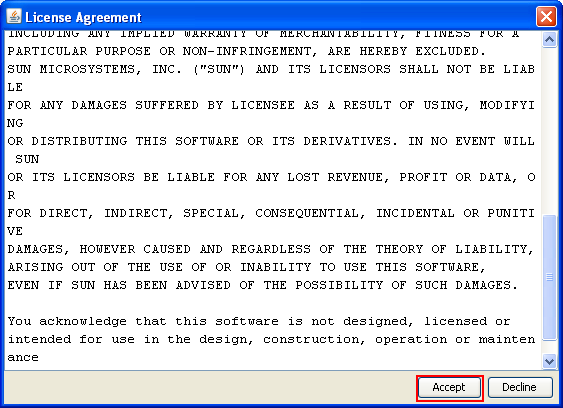
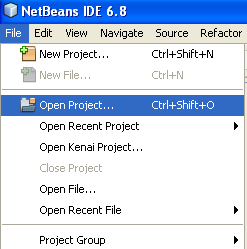
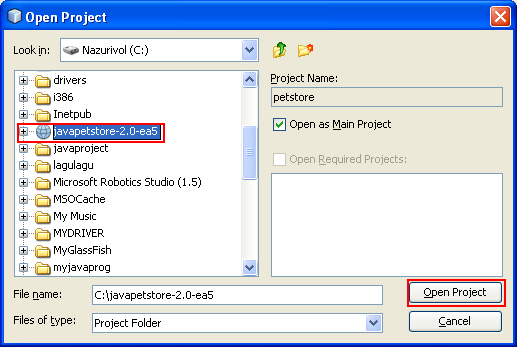
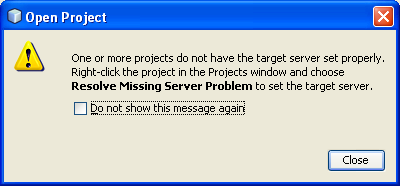
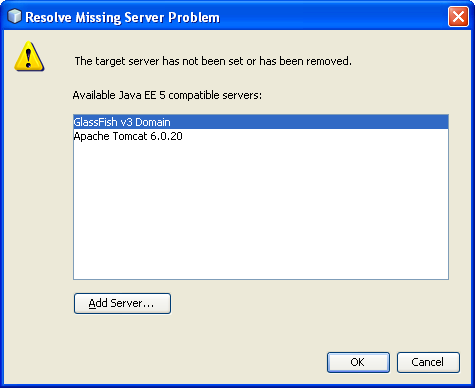
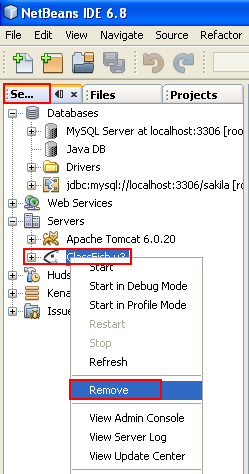
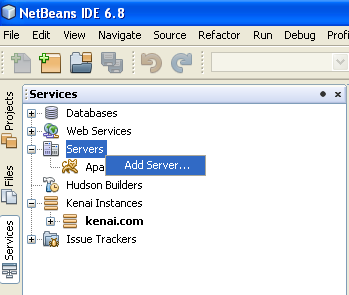
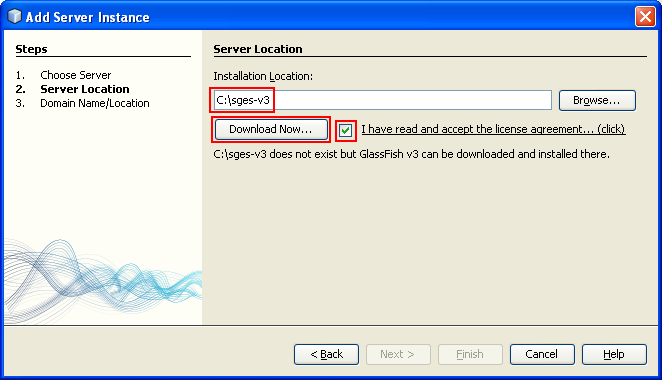
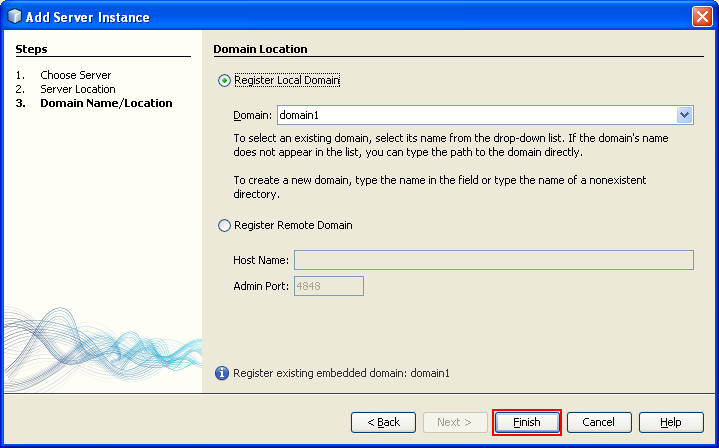
ÿþ<html> <head> <meta http-equiv="Content-Type" content="text/html; charset=unicode" /> <meta http-equiv="Content-Language" content="en-us" /> <style> <!-- p.MsoNormal {margin-top:0mm; margin-right:0mm; margin-bottom:10.0pt; margin-left:0mm; line-height:115%; font-size:12.0pt; font-family:"Times New Roman","serif";} a:link {color:blue; text-decoration:underline;} a:visited {color:purple; text-decoration:underline;} ol {margin-bottom:0mm;} --> </style> <title>A tutorial of the Java Pet Store example</title> <meta name="keywords" content="Java, example, pet store, application, open source, program, technology, java web, java web framework, data acess object, dao" /> <meta name="description" content="This tutorial shows how to run the Java Pet Store application example" /> </head> <body lang="EN-US" link="#0000FF" vlink="#800080" topmargin="20" leftmargin="20" rightmargin="20" bottommargin="20"> <div class="WordSection1"> <p class="MsoNormal" style="margin-bottom:0mm;margin-bottom:0; line-height:100%; margin-top:0">&nbsp;</p> <h1 align="center" style="margin-bottom:0mm;margin-bottom:0; text-align:center; line-height:100%; margin-top:0"><b><font face="Arial"> <span style="line-height:115%;font-weight:bold">Data Access Object (DAO), Java Pet Store Example and</span></font></b></h1> <h1 align="center" style="margin-bottom:0mm;margin-bottom:0; text-align:center; line-height:100%; margin-top:0"><b><font face="Arial"> <span style="line-height:115%;font-weight:bold">Other Java Technologies 1</span></font></b></h1> <p class="MsoNormal" style="margin-bottom:0mm;margin-bottom:0; line-height:100%; margin-top:0">&nbsp;</p> <p class="MsoNormal" style="margin-bottom:0mm;margin-bottom:0; line-height:100%; margin-top:0">&nbsp;</p> <p class="MsoNormal" style="margin-bottom:0mm;margin-bottom:0; line-height:100%; margin-top:0">&nbsp;</p> <p class="MsoNormal" style="margin-bottom:0mm;margin-bottom:0; line-height:100%; margin-top:0" align="center"><script src="http://tag.contextweb.com/TagPublish/getjs.aspx?action=VIEWAD&cwrun=200&cwadformat=728X90&cwpid=527221&cwwidth=728&cwheight=90&cwpnet=1&cwtagid=85440"></script></p> <p class="MsoNormal" style="margin-bottom:0mm;margin-bottom:0; line-height:100%; margin-top:0">&nbsp;</p> <p class="MsoNormal" style="margin-bottom:0mm;margin-bottom:0; line-height:100%; margin-top:0">&nbsp;</p> <p class="MsoNormal" style="margin-bottom:0mm;margin-bottom:0; line-height:100%; margin-top:0">&nbsp;</p> <p class="MsoNormal" style="margin-bottom:0mm;margin-bottom:0; line-height:100%; margin-top:0"> <font size="3" face="Arial"><span style="font-size:12.0pt;line-height:115%"> The NetBeans project environment setup includes:</span></font></p> <ol type="a"> <li> <p class="MsoNormal" style="margin-bottom:0mm;margin-bottom:0; line-height:100%; margin-top:0"> <font size="3" face="Arial"> <span style="font-size:12.0pt;line-height:115%">NetBeans 6.8 IDE</span></font></p> </li> <li> <p class="MsoNormal" style="margin-bottom:0mm;margin-bottom:0; line-height:100%; margin-top:0"> <font size="3" face="Arial"> <span style="font-size:12.0pt;line-height:115%">JDK 1.6</span></font></p> </li> <li> <p class="MsoNormal" style="margin-bottom:0mm;margin-bottom:0; line-height:100%; margin-top:0"> <font size="3" face="Arial"> <span style="font-size:12.0pt;line-height:115%">GlassFish v3 web server</span></font></p> </li> <li> <p class="MsoNormal" style="margin-bottom:0mm;margin-bottom:0; line-height:100%; margin-top:0"> <font size="3" face="Arial"> <span style="font-size:12.0pt;line-height:115%">JavaDB/Derby database</span></font></p> </li> <li> <p class="MsoNormal" style="margin-bottom:0mm;margin-bottom:0; line-height:100%; margin-top:0"> <font size="3" face="Arial"> <span style="font-size:12.0pt;line-height:115%">Java Pet Store Example in JAR</span></font></p> </li> </ol> <p class="MsoNormal" style="margin-bottom:0mm;margin-bottom:0; line-height:100%; margin-top:0"> <font size="3" face="Arial"><span style="font-size:12.0pt;line-height:115%">&nbsp;</span></font></p> <p class="MsoNormal" style="margin-bottom:0mm;margin-bottom:0; line-height:100%; margin-top:0"> <font size="3" face="Arial"><span style="font-size:12.0pt;line-height:115%"> What do we have in this session?</span></font></p> <ol> <li> <h1 style="margin-top:0;margin-right:0mm;margin-bottom:0mm; margin-bottom:0;"><span style="font-weight: 400"><font face="Arial" size="3">Download Java Pet Store Demo Project JAR File</font></span></h1> </li> <li> <h1 style="margin-top:0;margin-right:0mm;margin-bottom:0mm; margin-bottom:0;"><span style="font-weight: 400"><font face="Arial" size="3">Uncompress the JAR File</font></span></h1> </li> <li> <h1 style="margin-top:0;margin-right:0mm;margin-bottom:0mm; margin-bottom:0;"><span style="font-weight: 400"><font face="Arial" size="3">Opening the Project in NetBeans IDE</font></span></h1> </li> <li> <h1 style="margin-top:0;margin-right:0mm;margin-bottom:0mm; margin-bottom:0;"><span style="font-weight: 400"><font face="Arial" size="3">Resolving Some Errors</font></span></h1> </li> <li> <h1 style="margin-top:0;margin-right:0mm;margin-bottom:0mm; margin-bottom:0;"><span style="font-weight: 400"><font face="Arial" size="3">Removing and Re-installing Web Server in NetBeans</font></span></h1> </li> <li> <h1 style="margin-top:0;margin-right:0mm;margin-bottom:0mm; margin-bottom:0;"><span style="font-weight: 400"><font face="Arial" size="3">Editing the New Web Server Path</font></span></h1> </li> <li> <h1 style="margin-top:0;margin-right:0mm;margin-bottom:0mm; margin-bottom:0;"><span style="font-weight: 400"><font face="Arial" size="3">Changing Glassfish Web Server admin Password</font></span></h1> </li> <li> <h1 style="margin-top:0;margin-right:0mm;margin-bottom:0mm; margin-bottom:0;"><span style="font-weight: 400"><font face="Arial" size="3">Starting JavaDB Database</font></span></h1> </li> <li> <h1 style="margin-top:0;margin-right:0mm;margin-bottom:0mm; margin-bottom:0;"><span style="font-weight: 400"><font face="Arial" size="3">Starting the Glassfish Web Server</font></span></h1> </li> <li> <h1 style="margin-top:0;margin-right:0mm;margin-bottom:0mm; margin-bottom:0;"><span style="font-weight: 400"><font face="Arial" size="3">Testing Glassfish Web Server</font></span></h1> </li> <li> <h1 style="margin-top:0;margin-right:0mm;margin-bottom:0mm; margin-bottom:0;"><span style="font-weight: 400"><font face="Arial" size="3">Running Java Pet Store Application</font></span></h1> </li> <li> <h1 style="margin-top:0;margin-right:0mm;margin-bottom:0mm; margin-bottom:0;"><span style="font-weight: 400"><font face="Arial" size="3">Java Pet Store in Action</font></span></h1> </li> </ol> <p class="MsoNormal" style="margin-bottom:0mm;margin-bottom:0; line-height:100%; margin-top:0"> <font size="3" face="Arial"><span style="font-size:12.0pt;line-height:115%">&nbsp;</span></font></p> <p class="MsoNormal" style="margin-bottom:0mm;margin-bottom:0; line-height:100%; margin-top:0"> <font size="3" face="Arial"><span style="font-size:12.0pt;line-height:115%">&nbsp;</span></font></p> <p class="MsoNormal" style="margin-bottom:0mm;margin-bottom:0; line-height:100%; margin-top:0"> <font size="3" face="Arial"><span style="font-size:12.0pt;line-height:115%"> In this short hands-on tutorial we will try to run Java Pet Store demo example in NetBeans 6.8 IDE. Java Pet Store demonstrates many Java technologies and in this tutorial we will see how the Data Access Object (DAO) was implemented.</span></font></p> <p class="MsoNormal" style="margin-bottom:0mm;margin-bottom:0; line-height:100%; margin-top:0"> <font size="3" face="Arial"><span style="font-size:12.0pt;line-height:115%">&nbsp;</span></font></p> <p class="MsoNormal" style="margin-bottom:0mm;margin-bottom:0; line-height:100%; margin-top:0"> <b><font size="3" face="Arial"> <span style="font-size:12.0pt;line-height:115%; font-weight:bold">Download Java Pet Store Demo Project JAR File</span></font></b></p> <p class="MsoNormal" style="margin-bottom:0mm;margin-bottom:0; line-height:100%; margin-top:0"> <font size="3" face="Arial"><span style="font-size:12.0pt;line-height:115%">&nbsp;</span></font></p> <p class="MsoNormal" style="margin-bottom:0mm;margin-bottom:0; line-height:100%; margin-top:0"> <font size="3" face="Arial"><span style="font-size:12.0pt;line-height:115%"> Firstly, download latest jar file for Java Pet Store demo project at: <a target="_blank" title="Running the Java Pet Store Demo Project in NetBeans IDE" href="http://www.javaguicodexample.com/javapetstore-2.0-ea5-installer.jar">Java Pet Store Demo Project</a>.</span></font></p> <p class="MsoNormal" style="margin-bottom:0mm;margin-bottom:0; line-height:100%; margin-top:0"> <font size="3" face="Arial"><span style="font-size:12.0pt;line-height:115%">&nbsp;</span></font></p> <p class="MsoNormal" align="center" style="margin-bottom:0mm;margin-bottom:0; text-align:center; line-height:100%; margin-top:0"><font size="3" face="Arial"> <span style="font-size: 12.0pt;line-height:115%"> <img border="0" width="912" height="412" src="dataaccessobjectdaoNetbeansjavapetstore_files/daojavapetstorejarderbyglassfish001.png" alt="Java Pet Store Demo project download page" /></span></font></p> <p class="MsoNormal" style="margin-bottom:0mm;margin-bottom:0; line-height:100%; margin-top:0"> <font size="3" face="Arial"><span style="font-size:12.0pt;line-height:115%">&nbsp;</span></font></p> <p class="MsoNormal" style="margin-bottom:0mm;margin-bottom:0; line-height:100%; margin-top:0"> <b><font size="3" face="Arial"> <span style="font-size:12.0pt;line-height:115%; font-weight:bold">Uncompress the JAR File</span></font></b></p> <p class="MsoNormal" style="margin-bottom:0mm;margin-bottom:0; line-height:100%; margin-top:0"> <font size="3" face="Arial"><span style="font-size:12.0pt;line-height:115%">&nbsp;</span></font></p> <p class="MsoNormal" style="margin-bottom:0mm;margin-bottom:0; line-height:100%; margin-top:0"> <font size="3" face="Arial"><span style="font-size:12.0pt;line-height:115%"> Uncompress the jar file by double clicking the jar file or run the 'java -jar javapetstore-2.0-ea5-installer.jar' at the command line.</span></font></p> <p class="MsoNormal" style="margin-bottom:0mm;margin-bottom:0; line-height:100%; margin-top:0"> <font size="3" face="Arial"><span style="font-size:12.0pt;line-height:115%">&nbsp;</span></font></p> <p class="MsoNormal" align="center" style="margin-bottom:0mm;margin-bottom:0; text-align:center; line-height:100%; margin-top:0"><font size="3" face="Arial"> <span style="font-size: 12.0pt;line-height:115%"> <img border="0" width="601" height="151" src="dataaccessobjectdaoNetbeansjavapetstore_files/daojavapetstorejarderbyglassfish002.png" alt="Java pet store JAR file" /></span></font></p> <p class="MsoNormal" style="margin-bottom:0mm;margin-bottom:0; line-height:100%; margin-top:0"> <font size="3" face="Arial"><span style="font-size:12.0pt;line-height:115%">&nbsp;</span></font></p> <p class="MsoNormal" style="margin-bottom:0mm;margin-bottom:0; line-height:100%; margin-top:0"> <font size="3" face="Arial"><span style="font-size:12.0pt;line-height:115%"> Accept the License Agreement. Click Accept.</span></font></p> <p class="MsoNormal" style="margin-bottom:0mm;margin-bottom:0; line-height:100%; margin-top:0"> <font size="3" face="Arial"><span style="font-size:12.0pt;line-height:115%">&nbsp;</span></font></p> <p class="MsoNormal" align="center" style="margin-bottom:0mm;margin-bottom:0; text-align:center; line-height:100%; margin-top:0"><font size="3" face="Arial"> <span style="font-size: 12.0pt;line-height:115%"> <img border="0" width="563" height="408" src="dataaccessobjectdaoNetbeansjavapetstore_files/daojavapetstorejarderbyglassfish003.png" alt="Java Pet Store License Agreement" /></span></font></p> <p class="MsoNormal" style="margin-bottom:0mm;margin-bottom:0; line-height:100%; margin-top:0"> <font size="3" face="Arial"><span style="font-size:12.0pt;line-height:115%">&nbsp;</span></font></p> <p class="MsoNormal" style="margin-bottom:0mm;margin-bottom:0; line-height:100%; margin-top:0"> <font size="3" face="Arial"><span style="font-size:12.0pt;line-height:115%"> The following are the files and folders of Java Pet Store.</span></font></p> <p class="MsoNormal" style="margin-bottom:0mm;margin-bottom:0; line-height:100%; margin-top:0"> <font size="3" face="Arial"><span style="font-size:12.0pt;line-height:115%">&nbsp;</span></font></p> <p class="MsoNormal" align="center" style="margin-bottom:0mm;margin-bottom:0; text-align:center; line-height:100%; margin-top:0"><font size="3" face="Arial"> <span style="font-size: 12.0pt;line-height:115%"> <img border="0" width="559" height="226" src="dataaccessobjectdaoNetbeansjavapetstore_files/daojavapetstorejarderbyglassfish004.png" alt="Uncompressed Java Pet Store files and folders" /></span></font></p> <p class="MsoNormal" style="margin-bottom:0mm;margin-bottom:0; line-height:100%; margin-top:0"> <font size="3" face="Arial"><span style="font-size:12.0pt;line-height:115%">&nbsp;</span></font></p> <p class="MsoNormal" style="margin-bottom:0mm;margin-bottom:0; line-height:100%; margin-top:0"> <b><font size="3" face="Arial"> <span style="font-size:12.0pt;line-height:115%; font-weight:bold">Optional step:</span></font></b><font face="Arial"> Copy the javapetstore-2.0-ea5 folder to C:\ drive (if needed) to make the path is shorter when used in the NetBeans project file and if you put the demo example in the other folder, make sure the path doesn t have white space(s). White space in the path name will make the project failed to be built/run later.</font></p> <p class="MsoNormal" style="margin-bottom:0mm;margin-bottom:0; line-height:100%; margin-top:0"> <font size="3" face="Arial"><span style="font-size:12.0pt;line-height:115%">&nbsp;</span></font></p> <p class="MsoNormal" align="center" style="margin-bottom:0mm;margin-bottom:0; text-align:center; line-height:100%; margin-top:0"><font size="3" face="Arial"> <span style="font-size: 12.0pt;line-height:115%"> <img border="0" width="481" height="357" src="dataaccessobjectdaoNetbeansjavapetstore_files/daojavapetstorejarderbyglassfish005.png" alt="Java Pet Store project folder saved at C drive" /></span></font></p> <p class="MsoNormal" style="margin-bottom:0mm;margin-bottom:0; line-height:100%; margin-top:0"> <font size="3" face="Arial"><span style="font-size:12.0pt;line-height:115%">&nbsp;</span></font></p> <p class="MsoNormal" style="margin-bottom:0mm;margin-bottom:0; line-height:100%; margin-top:0"> <b><font size="3" face="Arial"> <span style="font-size:12.0pt;line-height:115%; font-weight:bold">Opening the Project in NetBeans IDE</span></font></b></p> <p class="MsoNormal" style="margin-bottom:0mm;margin-bottom:0; line-height:100%; margin-top:0"> <font size="3" face="Arial"><span style="font-size:12.0pt;line-height:115%">&nbsp;</span></font></p> <p class="MsoNormal" style="margin-bottom:0mm;margin-bottom:0; line-height:100%; margin-top:0"> <font size="3" face="Arial"><span style="font-size:12.0pt;line-height:115%"> Launch NetBeans (in this case version 6.8) IDE.</span></font></p> <p class="MsoNormal" style="margin-bottom:0mm;margin-bottom:0; line-height:100%; margin-top:0"> <font size="3" face="Arial"><span style="font-size:12.0pt;line-height:115%">&nbsp;</span></font></p> <p class="MsoNormal" align="center" style="margin-bottom:0mm;margin-bottom:0; text-align:center; line-height:100%; margin-top:0"><font size="3" face="Arial"> <span style="font-size: 12.0pt;line-height:115%"> <img border="0" width="473" height="300" src="dataaccessobjectdaoNetbeansjavapetstore_files/daojavapetstorejarderbyglassfish006.png" alt="NetBeans 6.8 welcome flash screen" /></span></font></p> <p class="MsoNormal" style="margin-bottom:0mm;margin-bottom:0; line-height:100%; margin-top:0"> <font size="3" face="Arial"><span style="font-size:12.0pt;line-height:115%">&nbsp;</span></font></p> <p class="MsoNormal" style="margin-bottom:0mm;margin-bottom:0; line-height:100%; margin-top:0"> <font size="3" face="Arial"><span style="font-size:12.0pt;line-height:115%"> Open the Java pet store project in NetBeans. Click File menu &gt; Open Project sub menu.</span></font></p> <p class="MsoNormal" style="margin-bottom:0mm;margin-bottom:0; line-height:100%; margin-top:0"> <font size="3" face="Arial"><span style="font-size:12.0pt;line-height:115%">&nbsp;</span></font></p> <p class="MsoNormal" align="center" style="margin-bottom:0mm;margin-bottom:0; text-align:center; line-height:100%; margin-top:0"><font size="3" face="Arial"> <span style="font-size: 12.0pt;line-height:115%"> <img border="0" width="247" height="249" src="dataaccessobjectdaoNetbeansjavapetstore_files/daojavapetstorejarderbyglassfish007.png" alt="Opening existing Java project in NetBeans IDE" /></span></font></p> <p class="MsoNormal" style="margin-bottom:0mm;margin-bottom:0; line-height:100%; margin-top:0"> <font size="3" face="Arial"><span style="font-size:12.0pt;line-height:115%">&nbsp;</span></font></p> <p class="MsoNormal" style="margin-bottom:0mm;margin-bottom:0; line-height:100%; margin-top:0"> <font size="3" face="Arial"><span style="font-size:12.0pt;line-height:115%"> Select the Java pet store demo example project folder and click Open Project button.</span></font></p> <p class="MsoNormal" style="margin-bottom:0mm;margin-bottom:0; line-height:100%; margin-top:0"> <font size="3" face="Arial"><span style="font-size:12.0pt;line-height:115%">&nbsp;</span></font></p> <p class="MsoNormal" align="center" style="margin-bottom:0mm;margin-bottom:0; text-align:center; line-height:100%; margin-top:0"><font size="3" face="Arial"> <span style="font-size: 12.0pt;line-height:115%"> <img border="0" width="517" height="347" src="dataaccessobjectdaoNetbeansjavapetstore_files/daojavapetstorejarderbyglassfish008.png" alt="Selecting the java pet store project folder" /></span></font></p> <p class="MsoNormal" style="margin-bottom:0mm;margin-bottom:0; line-height:100%; margin-top:0"> <font size="3" face="Arial"><span style="font-size:12.0pt;line-height:115%">&nbsp;</span></font></p> <p class="MsoNormal" style="margin-bottom:0mm;margin-bottom:0; line-height:100%; margin-top:0"> <b><font size="3" face="Arial"> <span style="font-size:12.0pt;line-height:115%; font-weight:bold">Resolving Some Errors</span></font></b></p> <p class="MsoNormal" style="margin-bottom:0mm;margin-bottom:0; line-height:100%; margin-top:0"> <font size="3" face="Arial"><span style="font-size:12.0pt;line-height:115%">&nbsp;</span></font></p> <p class="MsoNormal" style="margin-bottom:0mm;margin-bottom:0; line-height:100%; margin-top:0"> <b><font size="3" face="Arial"> <span style="font-size:12.0pt;line-height:115%; font-weight:bold">Optional step:</span></font></b><font face="Arial"> If you encounter the <i><span style="font-style:italic">&quot;target server error&quot;</span></i> (with errors in the project/files as shown below), complete the following steps, else just skip them until the &quot;Glassfish server setup&quot; section.</font></p> <p class="MsoNormal" style="margin-bottom:0mm;margin-bottom:0; line-height:100%; margin-top:0"> <font size="3" face="Arial"><span style="font-size:12.0pt;line-height:115%">&nbsp;</span></font></p> <p class="MsoNormal" align="center" style="margin-bottom:0mm;margin-bottom:0; text-align:center; line-height:100%; margin-top:0"><font size="3" face="Arial"> <span style="font-size: 12.0pt;line-height:115%"> <img border="0" width="400" height="186" src="dataaccessobjectdaoNetbeansjavapetstore_files/daojavapetstorejarderbyglassfish009.png" alt="Missing Server Problem for NetBeans IDE message" /></span></font></p> <p class="MsoNormal" style="margin-bottom:0mm;margin-bottom:0; line-height:100%; margin-top:0"> <font size="3" face="Arial"><span style="font-size:12.0pt;line-height:115%">&nbsp;</span></font></p> <p class="MsoNormal" style="margin-bottom:0mm;margin-bottom:0; line-height:100%; margin-top:0"> <font size="3" face="Arial"><span style="font-size:12.0pt;line-height:115%"> The &quot;<b>target server error</b>&quot; produces the following source code errors.</span></font></p> <p class="MsoNormal" style="margin-bottom:0mm;margin-bottom:0; line-height:100%; margin-top:0"> <font size="3" face="Arial"><span style="font-size:12.0pt;line-height:115%">&nbsp;</span></font></p> <p class="MsoNormal" align="center" style="margin-bottom:0mm;margin-bottom:0; text-align:center; line-height:100%; margin-top:0"><font size="3" face="Arial"> <span style="font-size: 12.0pt;line-height:115%"> <img border="0" width="492" height="384" src="dataaccessobjectdaoNetbeansjavapetstore_files/daojavapetstorejarderbyglassfish010.png" alt="Missing Server Problem errors seen in the opened project in NetBeans" /></span></font></p> <p class="MsoNormal" style="margin-bottom:0mm;margin-bottom:0; line-height:100%; margin-top:0"> <font size="3" face="Arial"><span style="font-size:12.0pt;line-height:115%">&nbsp;</span></font></p> <p class="MsoNormal" style="margin-bottom:0mm;margin-bottom:0; line-height:100%; margin-top:0"> <font size="3" face="Arial"><span style="font-size:12.0pt;line-height:115%"> To resolve the &quot;<b>missing server problem</b>&quot;, select the project folder in the Projects page &gt; right click mouse &gt; select Resolve Missing Server Problem menu.</span></font></p> <p class="MsoNormal" style="margin-bottom:0mm;margin-bottom:0; line-height:100%; margin-top:0"> &nbsp;</p> <p class="MsoNormal" style="margin-bottom:0mm;margin-bottom:0; line-height:100%; margin-top:0"> &nbsp;</p> <p class="MsoNormal" style="margin-bottom:0mm;margin-bottom:0; line-height:100%; margin-top:0"> &nbsp;</p> <p class="MsoNormal" style="margin-bottom:0mm;margin-bottom:0; line-height:100%; margin-top:0"> &nbsp;</p> <p class="MsoNormal" style="margin-bottom:0mm;margin-bottom:0; line-height:100%; margin-top:0"> &nbsp;</p> <p class="MsoNormal" style="margin-bottom:0mm;margin-bottom:0; line-height:100%; margin-top:0" align="center"> &nbsp;<script type="text/javascript"><!-- google_ad_client = "pub-8089415323104206"; /* 300x250, created 5/16/08javaos */ google_ad_slot = "8146009330"; google_ad_width = 300; google_ad_height = 250; //--> </script><script type="text/javascript" src="http://pagead2.googlesyndication.com/pagead/show_ads.js"> </script></p> <p class="MsoNormal" style="margin-bottom:0mm;margin-bottom:0; line-height:100%; margin-top:0"> &nbsp;</p> <p class="MsoNormal" style="margin-bottom:0mm;margin-bottom:0; line-height:100%; margin-top:0"> &nbsp;</p> <p class="MsoNormal" style="margin-bottom:0mm;margin-bottom:0; line-height:100%; margin-top:0"> &nbsp;</p> <p class="MsoNormal" style="margin-bottom:0mm;margin-bottom:0; line-height:100%; margin-top:0"> &nbsp;</p> <p class="MsoNormal" style="margin-bottom:0mm;margin-bottom:0; line-height:100%; margin-top:0" align="center"> <font face="Arial"> ------------------------------------------------------------</font></p> <p class="MsoNormal" style="margin-bottom:0mm;margin-bottom:0; line-height:100%; margin-top:0" align="left"> &nbsp;</p> <p class="MsoNormal" align="center" style="margin-bottom:0mm;margin-bottom:0; text-align:center; line-height:100%; margin-top:0"><font size="3" face="Arial"> <span style="font-size: 12.0pt;line-height:115%"> <img border="0" width="291" height="565" src="dataaccessobjectdaoNetbeansjavapetstore_files/daojavapetstorejarderbyglassfish011.png" alt="Resolving Missing Server Problem in NetBeans" /></span></font></p> <p class="MsoNormal" style="margin-bottom:0mm;margin-bottom:0; line-height:100%; margin-top:0"> <font size="3" face="Arial"><span style="font-size:12.0pt;line-height:115%">&nbsp;</span></font></p> <p class="MsoNormal" style="margin-bottom:0mm;margin-bottom:0; line-height:100%; margin-top:0"> <font size="3" face="Arial"><span style="font-size:12.0pt;line-height:115%"> Select Glassfish v3 web server (or your desired web server) and click OK.</span></font></p> <p class="MsoNormal" style="margin-bottom:0mm;margin-bottom:0; line-height:100%; margin-top:0"> <font size="3" face="Arial"><span style="font-size:12.0pt;line-height:115%">&nbsp;</span></font></p> <p class="MsoNormal" align="center" style="margin-bottom:0mm;margin-bottom:0; text-align:center; line-height:100%; margin-top:0"><font size="3" face="Arial"> <span style="font-size: 12.0pt;line-height:115%"> <img border="0" width="475" height="388" src="dataaccessobjectdaoNetbeansjavapetstore_files/daojavapetstorejarderbyglassfish012.png" alt="Selecting GlassFish v3 Domain" /></span></font></p> <p class="MsoNormal" style="margin-bottom:0mm;margin-bottom:0; line-height:100%; margin-top:0"> <font size="3" face="Arial"><span style="font-size:12.0pt;line-height:115%">&nbsp;</span></font></p> <p class="MsoNormal" style="margin-bottom:0mm;margin-bottom:0; line-height:100%; margin-top:0"> <b><font size="3" face="Arial"> <span style="font-size:12.0pt;line-height:115%; font-weight:bold">Removing and Re-installing Web Server in NetBeans</span></font></b></p> <p class="MsoNormal" style="margin-bottom:0mm;margin-bottom:0; line-height:100%; margin-top:0"> <font size="3" face="Arial"><span style="font-size:12.0pt;line-height:115%">&nbsp;</span></font></p> <p class="MsoNormal" style="margin-bottom:0mm;margin-bottom:0; line-height:100%; margin-top:0"> <b><font size="3" face="Arial"> <span style="font-size:12.0pt;line-height:115%; font-weight:bold">Optional step:</span></font></b><font face="Arial"> Next, we have to make sure the Glassfish installation folder (and path) also doesn t have whitespace(s) else the project building will fail. If your GlassFish installation folder (path) having whitespace(s) then remove the server and re-install it. The steps are shown in the following section. If the installation folder doesn t have whitespace(s) then you can skip the following steps until the &quot;modify the Glassfish root folder&quot; section.</font></p> <p class="MsoNormal" style="margin-bottom:0mm;margin-bottom:0; line-height:100%; margin-top:0"> <font size="3" face="Arial"><span style="font-size:12.0pt;line-height:115%"> Firstly, remove the existing Glassfish web server. From NetBeans IDE, select Services tab &gt; under the Servers folder, expand it &gt; select the server that will be removed &gt; right click mouse &gt; select Remove context menu.</span></font></p> <p class="MsoNormal" style="margin-bottom:0mm;margin-bottom:0; line-height:100%; margin-top:0"> <font size="3" face="Arial"><span style="font-size:12.0pt;line-height:115%">&nbsp;</span></font></p> <p class="MsoNormal" align="center" style="margin-bottom:0mm;margin-bottom:0; text-align:center; line-height:100%; margin-top:0"><font size="3" face="Arial"> <span style="font-size: 12.0pt;line-height:115%"> <img border="0" width="249" height="474" src="dataaccessobjectdaoNetbeansjavapetstore_files/daojavapetstorejarderbyglassfish013.png" alt="Removing web server in NetBeans" /></span></font></p> <p class="MsoNormal" style="margin-bottom:0mm;margin-bottom:0; line-height:100%; margin-top:0"> <font size="3" face="Arial"><span style="font-size:12.0pt;line-height:115%">&nbsp;</span></font></p> <p class="MsoNormal" style="margin-bottom:0mm;margin-bottom:0; line-height:100%; margin-top:0"> <font size="3" face="Arial"><span style="font-size:12.0pt;line-height:115%"> Then, 're-install' the Glassfish v3 web server. In the Services page select Servers folder &gt; right click mouse &gt; select Add Server menu.</span></font></p> <p class="MsoNormal" style="margin-bottom:0mm;margin-bottom:0; line-height:100%; margin-top:0"> <font size="3" face="Arial"><span style="font-size:12.0pt;line-height:115%">&nbsp;</span></font></p> <p class="MsoNormal" align="center" style="margin-bottom:0mm;margin-bottom:0; text-align:center; line-height:100%; margin-top:0"><font size="3" face="Arial"> <span style="font-size: 12.0pt;line-height:115%"> <img border="0" width="349" height="295" src="dataaccessobjectdaoNetbeansjavapetstore_files/daojavapetstorejarderbyglassfish014.png" alt="Adding new web server in NetBeans" /></span></font></p> <p class="MsoNormal" style="margin-bottom:0mm;margin-bottom:0; line-height:100%; margin-top:0"> <font size="3" face="Arial"><span style="font-size:12.0pt;line-height:115%">&nbsp;</span></font></p> <p class="MsoNormal" style="margin-bottom:0mm;margin-bottom:0; line-height:100%; margin-top:0"> <font size="3" face="Arial"><span style="font-size:12.0pt;line-height:115%"> From Add Server Instance page, select GlassFish v3 from Server: text box &gt; click Next.</span></font></p> <p class="MsoNormal" style="margin-bottom:0mm;margin-bottom:0; line-height:100%; margin-top:0"> <font size="3" face="Arial"><span style="font-size:12.0pt;line-height:115%">&nbsp;</span></font></p> <p class="MsoNormal" align="center" style="margin-bottom:0mm;margin-bottom:0; text-align:center; line-height:100%; margin-top:0"><font size="3" face="Arial"> <span style="font-size: 12.0pt;line-height:115%"> <img border="0" width="526" height="398" src="dataaccessobjectdaoNetbeansjavapetstore_files/daojavapetstorejarderbyglassfish015.png" alt="Selecting new GlassFish v3 web server" /></span></font></p> <p class="MsoNormal" style="margin-bottom:0mm;margin-bottom:0; line-height:100%; margin-top:0"> <font size="3" face="Arial"><span style="font-size:12.0pt;line-height:115%">&nbsp;</span></font></p> <p class="MsoNormal" style="margin-bottom:0mm;margin-bottom:0; line-height:100%; margin-top:0"> <font size="3" face="Arial"><span style="font-size:12.0pt;line-height:115%"> You need to create the <b><span style="font-weight:bold">sges-v3</span></b> folder manually (in this case at C: drive) and then point the Installation Location: to C:\sges-v3. Select the license agreement and click the Download Now button. This is an online installation/update.</span></font></p> <p class="MsoNormal" style="margin-bottom:0mm;margin-bottom:0; line-height:100%; margin-top:0"> <font size="3" face="Arial"><span style="font-size:12.0pt;line-height:115%">&nbsp;</span></font></p> <p class="MsoNormal" align="center" style="margin-bottom:0mm;margin-bottom:0; text-align:center; line-height:100%; margin-top:0"><font size="3" face="Arial"> <span style="font-size: 12.0pt;line-height:115%"> <img border="0" width="662" height="380" src="dataaccessobjectdaoNetbeansjavapetstore_files/daojavapetstorejarderbyglassfish016.png" alt="Setting the Web server installation path. The name must be sges-v3 and can start downloading the files" /></span></font></p> <p class="MsoNormal" style="margin-bottom:0mm;margin-bottom:0; line-height:100%; margin-top:0"> <font size="3" face="Arial"><span style="font-size:12.0pt;line-height:115%">&nbsp;</span></font></p> <p class="MsoNormal" style="margin-bottom:0mm;margin-bottom:0; line-height:100%; margin-top:0"> <font size="3" face="Arial"><span style="font-size:12.0pt;line-height:115%"> Wait until the online installation complete.</span></font></p> <p class="MsoNormal" style="margin-bottom:0mm;margin-bottom:0; line-height:100%; margin-top:0"> <font size="3" face="Arial"><span style="font-size:12.0pt;line-height:115%">&nbsp;</span></font></p> <p class="MsoNormal" align="center" style="margin-bottom:0mm;margin-bottom:0; text-align:center; line-height:100%; margin-top:0"><font size="3" face="Arial"> <span style="font-size: 12.0pt;line-height:115%"> <img border="0" width="662" height="380" src="dataaccessobjectdaoNetbeansjavapetstore_files/daojavapetstorejarderbyglassfish017.png" alt="The new web server installation begins" /></span></font></p> <p class="MsoNormal" style="margin-bottom:0mm;margin-bottom:0; line-height:100%; margin-top:0"> <font size="3" face="Arial"><span style="font-size:12.0pt;line-height:115%">&nbsp;</span></font></p> <p class="MsoNormal" style="margin-bottom:0mm;margin-bottom:0; line-height:100%; margin-top:0"> <font size="3" face="Arial"><span style="font-size:12.0pt;line-height:115%"> After the online installation finish, click the Next button.</span></font></p> <p class="MsoNormal" style="margin-bottom:0mm;margin-bottom:0; line-height:100%; margin-top:0"> <font size="3" face="Arial"><span style="font-size:12.0pt;line-height:115%">&nbsp;</span></font></p> <p class="MsoNormal" align="center" style="margin-bottom:0mm;margin-bottom:0; text-align:center; line-height:100%; margin-top:0"><font size="3" face="Arial"> <span style="font-size: 12.0pt;line-height:115%"> <img border="0" width="667" height="378" src="dataaccessobjectdaoNetbeansjavapetstore_files/daojavapetstorejarderbyglassfish018.png" alt="The web server download and install was completed successfully" /></span></font></p> <p class="MsoNormal" style="margin-bottom:0mm;margin-bottom:0; line-height:100%; margin-top:0"> <font size="3" face="Arial"><span style="font-size:12.0pt;line-height:115%">&nbsp;</span></font></p> <p class="MsoNormal" style="margin-bottom:0mm;margin-bottom:0; line-height:100%; margin-top:0"> <font size="3" face="Arial"><span style="font-size:12.0pt;line-height:115%"> Select <b><span style="font-weight:bold">domain1</span></b> (default first domain) as the domain and click Finish button.</span></font></p> <p class="MsoNormal" style="margin-bottom:0mm;margin-bottom:0; line-height:100%; margin-top:0"> <font size="3" face="Arial"><span style="font-size:12.0pt;line-height:115%">&nbsp;</span></font></p> <p class="MsoNormal" align="center" style="margin-bottom:0mm;margin-bottom:0; text-align:center; line-height:100%; margin-top:0"><font size="3" face="Arial"> <span style="font-size: 12.0pt;line-height:115%"> <img border="0" width="719" height="448" src="dataaccessobjectdaoNetbeansjavapetstore_files/daojavapetstorejarderbyglassfish019.png" alt="Selecting the domain for the GlassFish web server" /></span></font></p> <p class="MsoNormal" style="margin-bottom:0mm;margin-bottom:0; line-height:100%; margin-top:0"> <font size="3" face="Arial"><span style="font-size:12.0pt;line-height:115%">&nbsp;</span></font></p> <p class="MsoNormal" style="margin-bottom:0mm;margin-bottom:0; line-height:100%; margin-top:0"> <font size="3" face="Arial"><span style="font-size:12.0pt;line-height:115%">&nbsp;</span></font></p> <p class="MsoNormal" style="margin-bottom:0mm;margin-bottom:0; line-height:100%; margin-top:0"> <font size="3" face="Arial"><span style="font-size:12.0pt;line-height:115%">&nbsp;</span></font></p> <hr color="#FF0000" /> <p class="MsoNormal" style="margin-bottom:0mm;margin-bottom:0; line-height:100%; margin-top:0" align="center"> <font face="Arial" size="5">&nbsp;<a title="The Java and open source applications" target="_top" href="http://www.javaguicodexample.com/">Back to Main</a> | <a title="The Java pet store tutorial" target="_top" href="http://www.visualcplusdotnet.com/javaopensource/dataaccessobjectdaoNetbeansjavapetstore2.html"> java Pet Store 2</a></font></p> <p class="MsoNormal" style="margin-bottom:0mm;margin-bottom:0; line-height:100%; margin-top:0">&nbsp;</p> <p class="MsoNormal" style="margin-bottom:0mm;margin-bottom:0; line-height:100%; margin-top:0" align="center"><script type="text/javascript"><!-- google_ad_client = "pub-8089415323104206"; /* 728x90, created 5/16/08 javaos */ google_ad_slot = "1917524460"; google_ad_width = 728; google_ad_height = 90; //--> </script> <script type="text/javascript" src="http://pagead2.googlesyndication.com/pagead/show_ads.js"> </script></p> </div> </body> </html>