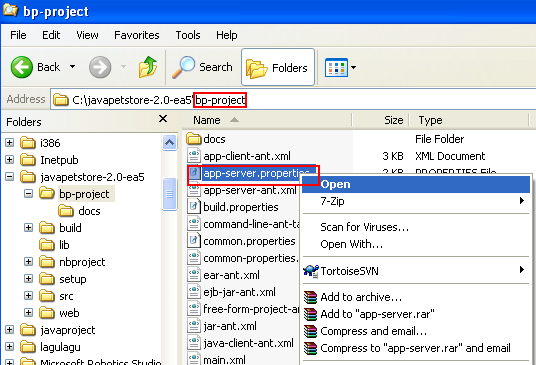
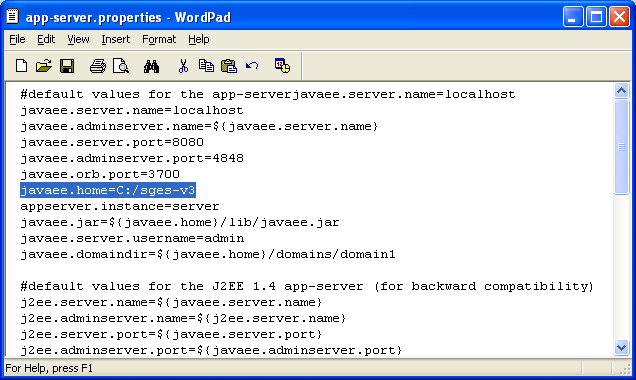
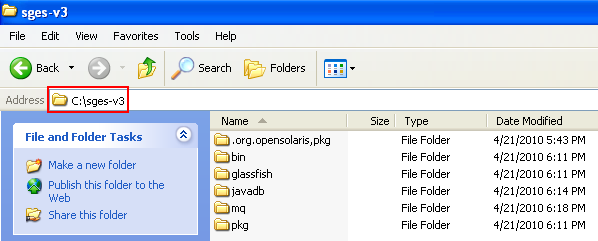
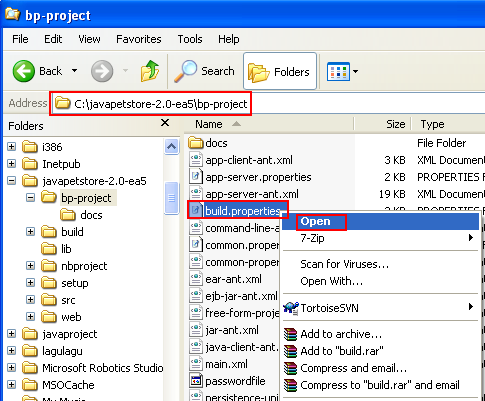
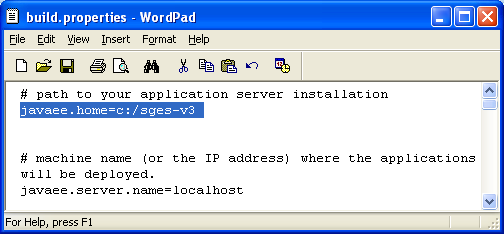
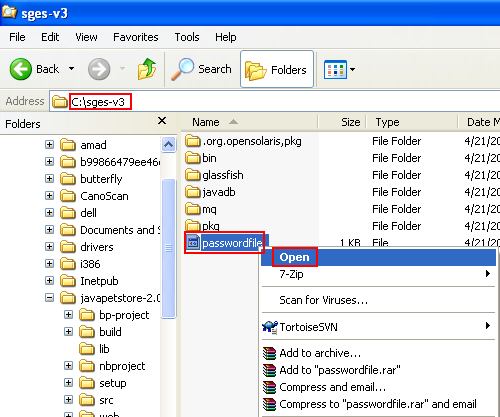
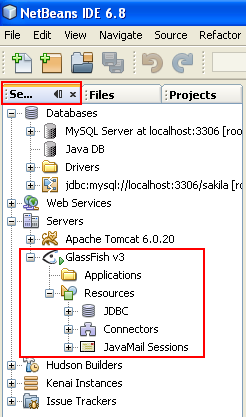
ÿþ<html> <head> <meta http-equiv="Content-Type" content="text/html; charset=unicode" /> <meta http-equiv="Content-Language" content="en-us" /> <style> <!-- p.MsoNormal {margin-top:0mm; margin-right:0mm; margin-bottom:10.0pt; margin-left:0mm; line-height:115%; font-size:12.0pt; font-family:"Times New Roman","serif";} a:link {color:blue; text-decoration:underline;} a:visited {color:purple; text-decoration:underline;} ol {margin-bottom:0mm;} --> </style> <title>Building and testing Java Data Access Object sample application</title> <meta name="keywords" content="Data Access Object, DAO, Java, opensource, technology, application, database, data, server, hosting, samples, examples" /> <meta name="description" content="This tutorial shows you how to build and run the Java Data Access Object using Java Pet Store example" /> </head> <body lang="EN-US" link="#0000FF" vlink="#800080" topmargin="20" leftmargin="20" rightmargin="20" bottommargin="20"> <div class="WordSection1"> <p class="MsoNormal" style="margin-bottom:0mm;margin-bottom:0; line-height:100%; margin-top:0"> &nbsp;</p> <h1 align="center" style="margin-bottom:0mm;margin-bottom:0; text-align:center; line-height:100%; margin-top:0"><b><font face="Arial"> <span style="line-height:115%;font-weight:bold">Data Access Object (DAO), Java Pet Store Example and</span></font></b></h1> <h1 align="center" style="margin-bottom:0mm;margin-bottom:0; text-align:center; line-height:100%; margin-top:0"><b><font face="Arial"> <span style="line-height:115%;font-weight:bold">Other Java Technologies 2</span></font></b></h1> <p class="MsoNormal" style="margin-bottom:0mm;margin-bottom:0; line-height:100%; margin-top:0"> &nbsp;</p> <p class="MsoNormal" style="margin-bottom:0mm;margin-bottom:0; line-height:100%; margin-top:0"> &nbsp;</p> <p class="MsoNormal" style="margin-bottom:0mm;margin-bottom:0; line-height:100%; margin-top:0"> &nbsp;</p> <p class="MsoNormal" style="margin-bottom:0mm;margin-bottom:0; line-height:100%; margin-top:0" align="center"> <script src="http://tag.contextweb.com/TagPublish/getjs.aspx?action=VIEWAD&cwrun=200&cwadformat=728X90&cwpid=527221&cwwidth=728&cwheight=90&cwpnet=1&cwtagid=85440"></script></p> <p class="MsoNormal" style="margin-bottom:0mm;margin-bottom:0; line-height:100%; margin-top:0"> &nbsp;</p> <p class="MsoNormal" style="margin-bottom:0mm;margin-bottom:0; line-height:100%; margin-top:0"> &nbsp;</p> <p class="MsoNormal" style="margin-bottom:0mm;margin-bottom:0; line-height:100%; margin-top:0"> <b><font size="3" face="Arial"> <span style="font-size:12.0pt;line-height:115%; font-weight:bold">Editing the New Web Server Path</span></font></b></p> <p class="MsoNormal" style="margin-bottom:0mm;margin-bottom:0; line-height:100%; margin-top:0"> <font size="3" face="Arial"><span style="font-size:12.0pt;line-height:115%">&nbsp;</span></font></p> <p class="MsoNormal" style="margin-bottom:0mm;margin-bottom:0; line-height:100%; margin-top:0"> <font size="3" face="Arial"><span style="font-size:12.0pt;line-height:115%"> Now, in this case, both of the folders (Glassfish installation and pet demo project paths) do not having whitespace(s) anymore.</span></font></p> <p class="MsoNormal" style="margin-bottom:0mm;margin-bottom:0; line-height:100%; margin-top:0"> <font size="3" face="Arial"><span style="font-size:12.0pt;line-height:115%"> Next, we need to modify the Glassfish root folder because the original project based on the <b><span style="font-weight:bold">Sun application server</span></b>. Open <b><span style="font-weight:bold">app-server.properties</span></b> file in any unformatted text editor.</span></font></p> <p class="MsoNormal" style="margin-bottom:0mm;margin-bottom:0; line-height:100%; margin-top:0"> <font size="3" face="Arial"><span style="font-size:12.0pt;line-height:115%">&nbsp;</span></font></p> <p class="MsoNormal" align="center" style="margin-bottom:0mm;margin-bottom:0; text-align:center; line-height:100%; margin-top:0"><font size="3" face="Arial"> <span style="font-size: 12.0pt;line-height:115%"> <img border="0" width="536" height="365" src="dataaccessobjectdaoNetbeansjavapetstore_files/daojavapetstorejarderbyglassfish020.png" alt="Setting new web server path" /></span></font></p> <p class="MsoNormal" style="margin-bottom:0mm;margin-bottom:0; line-height:100%; margin-top:0"> <font size="3" face="Arial"><span style="font-size:12.0pt;line-height:115%">&nbsp;</span></font></p> <p class="MsoNormal" style="margin-bottom:0mm;margin-bottom:0; line-height:100%; margin-top:0"> <font size="3" face="Arial"><span style="font-size:12.0pt;line-height:115%"> Then, change the following setting:</span></font></p> <p class="MsoNormal" style="margin-bottom:0mm;margin-bottom:0; line-height:100%; margin-top:0"> <font size="3" face="Arial"><span style="font-size:12.0pt;line-height:115%">&nbsp;</span></font></p> <blockquote> <p class="MsoNormal" style="margin-bottom:0mm;margin-bottom:0; line-height:100%; margin-top:0"> <font size="3" face="Courier New"> <span style="font-size:12.0pt;line-height:115%; font-family:&quot;Arial&quot;; font-weight:700">javaee.home=c:/Sun/AppServer</span></font></p> </blockquote> <p class="MsoNormal" style="margin-bottom:0mm;margin-bottom:0; line-height:100%; margin-top:0"> <font size="3" face="Arial"><span style="font-size:12.0pt;line-height:115%">&nbsp;</span></font></p> <p class="MsoNormal" style="margin-bottom:0mm;margin-bottom:0; line-height:100%; margin-top:0"> <font size="3" face="Arial"><span style="font-size:12.0pt;line-height:115%"> To the Glassfish installation path and in this case (yours may be different and change accordingly),</span></font></p> <p class="MsoNormal" style="margin-bottom:0mm;margin-bottom:0; line-height:100%; margin-top:0"> <font size="3" face="Arial"><span style="font-size:12.0pt;line-height:115%">&nbsp;</span></font></p> <blockquote> <p class="MsoNormal" style="margin-bottom:0mm;margin-bottom:0; line-height:100%; margin-top:0"> <b><font size="3" face="Arial"> <span style="font-size:12.0pt;line-height:115%; font-weight:bold">C:\sges-v3</span></font></b></p> </blockquote> <p class="MsoNormal" style="margin-bottom:0mm;margin-bottom:0; line-height:100%; margin-top:0"> <font size="3" face="Arial"><span style="font-size:12.0pt;line-height:115%">&nbsp;</span></font></p> <p class="MsoNormal" style="margin-bottom:0mm;margin-bottom:0; line-height:100%; margin-top:0"> <font size="3" face="Arial"><span style="font-size:12.0pt;line-height:115%"> Save the file and close it.</span></font></p> <p class="MsoNormal" style="margin-bottom:0mm;margin-bottom:0; line-height:100%; margin-top:0"> <font size="3" face="Arial"><span style="font-size:12.0pt;line-height:115%">&nbsp;</span></font></p> <p class="MsoNormal" align="center" style="margin-bottom:0mm;margin-bottom:0; text-align:center; line-height:100%; margin-top:0"><font size="3" face="Arial"> <span style="font-size: 12.0pt;line-height:115%"> <img border="0" width="636" height="380" src="dataaccessobjectdaoNetbeansjavapetstore_files/daojavapetstorejarderbyglassfish021.png" alt="The app-server.properties file content with edited new web server path" /></span></font></p> <p class="MsoNormal" style="margin-bottom:0mm;margin-bottom:0; line-height:100%; margin-top:0"> <font size="3" face="Arial"><span style="font-size:12.0pt;line-height:115%">&nbsp;</span></font></p> <p class="MsoNormal" style="margin-bottom:0mm;margin-bottom:0; line-height:100%; margin-top:0"> <font size="3" face="Arial"><span style="font-size:12.0pt;line-height:115%"> The path should match with the physical path as shown below (yours may be different and change accordingly)</span></font></p> <p class="MsoNormal" style="margin-bottom:0mm;margin-bottom:0; line-height:100%; margin-top:0"> <font size="3" face="Arial"><span style="font-size:12.0pt;line-height:115%">&nbsp;</span></font></p> <p class="MsoNormal" align="center" style="margin-bottom:0mm;margin-bottom:0; text-align:center; line-height:100%; margin-top:0"><font size="3" face="Arial"> <span style="font-size: 12.0pt;line-height:115%"> <img border="0" width="598" height="241" src="dataaccessobjectdaoNetbeansjavapetstore_files/daojavapetstorejarderbyglassfish022.png" alt="The web server physical path on the local drive" /></span></font></p> <p class="MsoNormal" style="margin-bottom:0mm;margin-bottom:0; line-height:100%; margin-top:0"> <font size="3" face="Arial"><span style="font-size:12.0pt;line-height:115%">&nbsp;</span></font></p> <p class="MsoNormal" style="margin-bottom:0mm;margin-bottom:0; line-height:100%; margin-top:0"> <font size="3" face="Arial"><span style="font-size:12.0pt;line-height:115%"> Next, open <b><span style="font-weight:bold">build.properties</span></b> file in any unformatted text editor.</span></font></p> <p class="MsoNormal" style="margin-bottom:0mm;margin-bottom:0; line-height:100%; margin-top:0"> <font size="3" face="Arial"><span style="font-size:12.0pt;line-height:115%">&nbsp;</span></font></p> <p class="MsoNormal" align="center" style="margin-bottom:0mm;margin-bottom:0; text-align:center; line-height:100%; margin-top:0"><font size="3" face="Arial"> <span style="font-size: 12.0pt;line-height:115%"> <img border="0" width="485" height="401" src="dataaccessobjectdaoNetbeansjavapetstore_files/daojavapetstorejarderbyglassfish023.png" alt="Opening the build.properties file" /></span></font></p> <p class="MsoNormal" style="margin-bottom:0mm;margin-bottom:0; line-height:100%; margin-top:0"> <font size="3" face="Arial"><span style="font-size:12.0pt;line-height:115%">&nbsp;</span></font></p> <p class="MsoNormal" align="center" style="margin-bottom:0mm;margin-bottom:0; text-align:center; line-height:100%; margin-top:0"><font size="3" face="Arial"> <span style="font-size: 12.0pt;line-height:115%"> <img border="0" width="654" height="444" src="dataaccessobjectdaoNetbeansjavapetstore_files/daojavapetstorejarderbyglassfish024.png" alt="The build.properties file content" /></span></font></p> <p class="MsoNormal" style="margin-bottom:0mm;margin-bottom:0; line-height:100%; margin-top:0"> <font size="3" face="Arial"><span style="font-size:12.0pt;line-height:115%">&nbsp;</span></font></p> <p class="MsoNormal" style="margin-bottom:0mm;margin-bottom:0; line-height:100%; margin-top:0"> <font size="3" face="Arial"><span style="font-size:12.0pt;line-height:115%">&nbsp;</span></font></p> <p class="MsoNormal" style="margin-bottom:0mm;margin-bottom:0; line-height:100%; margin-top:0"> <font size="3" face="Arial"><span style="font-size:12.0pt;line-height:115%"> Change the Glassfish installation path from,</span></font></p> <p class="MsoNormal" style="margin-bottom:0mm;margin-bottom:0; line-height:100%; margin-top:0"> <font size="3" face="Arial"><span style="font-size:12.0pt;line-height:115%">&nbsp;</span></font></p> <blockquote> <p class="MsoNormal" style="margin-bottom:0mm;margin-bottom:0;line-height: 100%;text-autospace:none; margin-top:0"><font size="3" face="Courier New"> <span style="font-size:12.0pt;font-family:&quot;Arial&quot;; font-weight:700"> # path to your application server installation</span></font></p> <p class="MsoNormal" style="margin-bottom:0mm;margin-bottom:0; line-height:100%; margin-top:0"> <font size="3" face="Courier New"> <span style="font-size:12.0pt;line-height:115%; font-family:&quot;Arial&quot;; font-weight:700">javaee.home=c:/Sun/SDK</span></font></p> </blockquote> <p class="MsoNormal" style="margin-bottom:0mm;margin-bottom:0; line-height:100%; margin-top:0"> <font size="3" face="Arial"><span style="font-size:12.0pt;line-height:115%">&nbsp;</span></font></p> <p class="MsoNormal" style="margin-bottom:0mm;margin-bottom:0; line-height:100%; margin-top:0"> <font size="3" face="Arial"><span style="font-size:12.0pt;line-height:115%"> To (as in this case. Yours may be different and change accordingly)</span></font></p> <p class="MsoNormal" style="margin-bottom:0mm;margin-bottom:0; line-height:100%; margin-top:0"> <font size="3" face="Arial"><span style="font-size:12.0pt;line-height:115%">&nbsp;</span></font></p> <blockquote> <p class="MsoNormal" style="margin-bottom:0mm;margin-bottom:0;line-height: 100%;text-autospace:none; margin-top:0"><font size="3" face="Courier New"> <span style="font-size:12.0pt;font-family:&quot;Arial&quot;; font-weight:700"> # path to your application server installation</span></font></p> <p class="MsoNormal" style="margin-bottom:0mm;margin-bottom:0; line-height:100%; margin-top:0"> <font size="3" face="Courier New"> <span style="font-size:12.0pt;line-height:115%; font-family:&quot;Arial&quot;; font-weight:700">javaee.home=c:/sges-v3</span></font></p> </blockquote> <p class="MsoNormal" style="margin-bottom:0mm;margin-bottom:0; line-height:100%; margin-top:0"> <font size="3" face="Arial"><span style="font-size:12.0pt;line-height:115%">&nbsp;</span></font></p> <p class="MsoNormal" align="center" style="margin-bottom:0mm;margin-bottom:0; text-align:center; line-height:100%; margin-top:0"><font size="3" face="Arial"> <span style="font-size: 12.0pt;line-height:115%"> <img border="0" width="504" height="234" src="dataaccessobjectdaoNetbeansjavapetstore_files/daojavapetstorejarderbyglassfish025.png" alt="Editing the build.properties file content for the GlassFish web server path" /></span></font></p> <p class="MsoNormal" style="margin-bottom:0mm;margin-bottom:0; line-height:100%; margin-top:0"> <font size="3" face="Arial"><span style="font-size:12.0pt;line-height:115%">&nbsp;</span></font></p> <p class="MsoNormal" style="margin-bottom:0mm;margin-bottom:0; line-height:100%; margin-top:0"> <b><font size="3" face="Arial"> <span style="font-size:12.0pt;line-height:115%; font-weight:bold">Changing Glassfish Web Server admin Password</span></font></b></p> <p class="MsoNormal" style="margin-bottom:0mm;margin-bottom:0; line-height:100%; margin-top:0"> <font size="3" face="Arial"><span style="font-size:12.0pt;line-height:115%">&nbsp;</span></font></p> <p class="MsoNormal" style="margin-bottom:0mm;margin-bottom:0; line-height:100%; margin-top:0"> <font size="3" face="Arial"><span style="font-size:12.0pt;line-height:115%"> Then, change the following Glassfish admin password file path,</span></font></p> <p class="MsoNormal" style="margin-bottom:0mm;margin-bottom:0; line-height:100%; margin-top:0"> <font size="3" face="Arial"><span style="font-size:12.0pt;line-height:115%">&nbsp;</span></font></p> <blockquote> <p class="MsoNormal" style="margin-bottom:0mm;margin-bottom:0; line-height:100%; margin-top:0"> <font size="3" face="Courier New"> <span style="font-size:12.0pt;line-height:115%; font-family:&quot;Arial&quot;; font-weight:700">javaee.server.passwordfile=${javaee.home}/samples/bp-project/passwordfile</span></font></p> </blockquote> <p class="MsoNormal" style="margin-bottom:0mm;margin-bottom:0; line-height:100%; margin-top:0"> <font size="3" face="Arial"><span style="font-size:12.0pt;line-height:115%">&nbsp;</span></font></p> <p class="MsoNormal" style="margin-bottom:0mm;margin-bottom:0; line-height:100%; margin-top:0"> <font size="3" face="Arial"><span style="font-size:12.0pt;line-height:115%"> To (as in this case. Yours may be different and change accordingly)</span></font></p> <p class="MsoNormal" style="margin-bottom:0mm;margin-bottom:0; line-height:100%; margin-top:0"> <font size="3" face="Arial"><span style="font-size:12.0pt;line-height:115%">&nbsp;</span></font></p> <blockquote> <p class="MsoNormal" style="margin-bottom:0mm;margin-bottom:0; line-height:100%; margin-top:0"> <font size="3" face="Courier New"> <span style="font-size:12.0pt;line-height:115%; font-family:&quot;Arial&quot;; font-weight:700">javaee.server.passwordfile=${javaee.home}/passwordfile</span></font></p> </blockquote> <p class="MsoNormal" style="margin-bottom:0mm;margin-bottom:0; line-height:100%; margin-top:0"> <font size="3" face="Arial"><span style="font-size:12.0pt;line-height:115%">&nbsp;</span></font></p> <p class="MsoNormal" align="center" style="margin-bottom:0mm;margin-bottom:0; text-align:center; line-height:100%; margin-top:0"><font size="3" face="Arial"> <span style="font-size: 12.0pt;line-height:115%"> <img border="0" width="600" height="256" src="dataaccessobjectdaoNetbeansjavapetstore_files/daojavapetstorejarderbyglassfish026.png" alt="Viewing the GlassFish web server admin password in build.properties file" /></span></font></p> <p class="MsoNormal" style="margin-bottom:0mm;margin-bottom:0; line-height:100%; margin-top:0"> <font size="3" face="Arial"><span style="font-size:12.0pt;line-height:115%">&nbsp;</span></font></p> <p class="MsoNormal" style="margin-bottom:0mm;margin-bottom:0; line-height:100%; margin-top:0"> <font size="3" face="Arial"><span style="font-size:12.0pt;line-height:115%"> Save and close the file.</span></font></p> <p class="MsoNormal" style="margin-bottom:0mm;margin-bottom:0; line-height:100%; margin-top:0"> <font size="3" face="Arial"><span style="font-size:12.0pt;line-height:115%"> Then, create the <b><span style="font-weight:bold">passwordfile</span></b> file (without any extension) in the <b>C:\sges-v3 folder</b>.</span></font></p> <p class="MsoNormal" style="margin-bottom:0mm;margin-bottom:0; line-height:100%; margin-top:0"> <font size="3" face="Arial"><span style="font-size:12.0pt;line-height:115%">&nbsp;</span></font></p> <p class="MsoNormal" align="center" style="margin-bottom:0mm;margin-bottom:0; text-align:center; line-height:100%; margin-top:0"><font size="3" face="Arial"> <span style="font-size: 12.0pt;line-height:115%"> <img border="0" width="500" height="417" src="dataaccessobjectdaoNetbeansjavapetstore_files/daojavapetstorejarderbyglassfish027.png" alt="Opening the passwordfile of the GlassFish web server" /></span></font></p> <p class="MsoNormal" style="margin-bottom:0mm;margin-bottom:0; line-height:100%; margin-top:0"> <font size="3" face="Arial"><span style="font-size:12.0pt;line-height:115%">&nbsp;</span></font></p> <p class="MsoNormal" style="margin-bottom:0mm;margin-bottom:0; line-height:100%; margin-top:0"> <font size="3" face="Arial"><span style="font-size:12.0pt;line-height:115%"> Open the <b><span style="font-weight:bold">passwordfile</span></b> with any text editor and put the following line of code (Glassfish default admin s password),</span></font></p> <p class="MsoNormal" style="margin-bottom:0mm;margin-bottom:0; line-height:100%; margin-top:0"> <font size="3" face="Arial"><span style="font-size:12.0pt;line-height:115%">&nbsp;</span></font></p> <p class="MsoNormal" style="margin-top:0;margin-right:0mm;margin-bottom:0mm; margin-left:36.0pt;margin-bottom:0; line-height:100%"><b> <font size="3" face="Courier New"> <span style="font-size:12.0pt;line-height:115%;font-family:&quot;Arial&quot;;font-weight: bold">AS_ADMIN_PASSWORD=adminadmin</span></font></b></p> <p class="MsoNormal" style="margin-bottom:0mm;margin-bottom:0; line-height:100%; margin-top:0"> <font size="3" face="Arial"><span style="font-size:12.0pt;line-height:115%">&nbsp;</span></font></p> <p class="MsoNormal" style="margin-bottom:0mm;margin-bottom:0; line-height:100%; margin-top:0"> <font size="3" face="Arial"><span style="font-size:12.0pt;line-height:115%"> Save and close the file.</span></font></p> <p class="MsoNormal" style="margin-bottom:0mm;margin-bottom:0; line-height:100%; margin-top:0"> <font size="3" face="Arial"><span style="font-size:12.0pt;line-height:115%">&nbsp;</span></font></p> <p class="MsoNormal" align="center" style="margin-bottom:0mm;margin-bottom:0; text-align:center; line-height:100%; margin-top:0"><font size="3" face="Arial"> <span style="font-size: 12.0pt;line-height:115%"> <img border="0" width="554" height="219" src="dataaccessobjectdaoNetbeansjavapetstore_files/daojavapetstorejarderbyglassfish028.png" alt="Resetting the GlassFish web server admin password. However in this case we just reset the password to the original one: adminadmin" /></span></font></p> <p class="MsoNormal" style="margin-bottom:0mm;margin-bottom:0; line-height:100%; margin-top:0"> <font size="3" face="Arial"><span style="font-size:12.0pt;line-height:115%">&nbsp;</span></font></p> <p class="MsoNormal" style="margin-bottom:0mm;margin-bottom:0; line-height:100%; margin-top:0"> <font size="3" face="Arial"><span style="font-size:12.0pt;line-height:115%"> This is the Glassfish default administration username (<i><span style="font-style: italic">admin</span></i>) and password (<i><span style="font-style:italic">adminadmin</span></i>). If yours are different, change accordingly using <b><i> <span style="font-weight: bold;font-style:italic">either</span></i></b> the Glassfish Admin Console (shown below) or the <b><span style="font-weight:bold">passwordfile</span></b> and setting in the <b><span style="font-weight:bold">build.properties</span></b> file as done previously.</span></font></p> <p class="MsoNormal" style="margin-bottom:0mm;margin-bottom:0; line-height:100%; margin-top:0"> <font size="3" face="Arial"><span style="font-size:12.0pt;line-height:115%">&nbsp;</span></font></p> <p class="MsoNormal" align="center" style="margin-bottom:0mm;margin-bottom:0; text-align:center; line-height:100%; margin-top:0"><font size="3" face="Arial"> <span style="font-size: 12.0pt;line-height:115%"> <img border="0" width="246" height="478" src="dataaccessobjectdaoNetbeansjavapetstore_files/daojavapetstorejarderbyglassfish029.png" alt="Changing the GlassFish admin password also can be done through Admin Console provided that you have an access to that page" /></span></font></p> <p class="MsoNormal" style="margin-bottom:0mm;margin-bottom:0; line-height:100%; margin-top:0"> <font size="3" face="Arial"><span style="font-size:12.0pt;line-height:115%">&nbsp;</span></font></p> <p class="MsoNormal" style="margin-bottom:0mm;margin-bottom:0; line-height:100%; margin-top:0"> <b><font size="3" face="Arial"> <span style="font-size:12.0pt;line-height:115%; font-weight:bold">Starting JavaDB Database</span></font></b></p> <p class="MsoNormal" style="margin-bottom:0mm;margin-bottom:0; line-height:100%; margin-top:0"> <font size="3" face="Arial"><span style="font-size:12.0pt;line-height:115%">&nbsp;</span></font></p> <p class="MsoNormal" style="margin-bottom:0mm;margin-bottom:0; line-height:100%; margin-top:0"> <font size="3" face="Arial"><span style="font-size:12.0pt;line-height:115%"> Next, start the JavaDB server if not started yet.</span></font></p> <p class="MsoNormal" style="margin-bottom:0mm;margin-bottom:0; line-height:100%; margin-top:0"> <font size="3" face="Arial"><span style="font-size:12.0pt;line-height:115%">&nbsp;</span></font></p> <p class="MsoNormal" align="center" style="margin-bottom:0mm;margin-bottom:0; text-align:center; line-height:100%; margin-top:0"><font size="3" face="Arial"> <span style="font-size: 12.0pt;line-height:115%"> <img border="0" width="247" height="274" src="dataaccessobjectdaoNetbeansjavapetstore_files/daojavapetstorejarderbyglassfish030.png" alt="Starting the JAvaDB/Derby database engine" /></span></font></p> <p class="MsoNormal" style="margin-bottom:0mm;margin-bottom:0; line-height:100%; margin-top:0"> <font size="3" face="Arial"><span style="font-size:12.0pt;line-height:115%">&nbsp;</span></font></p> <p class="MsoNormal" style="margin-bottom:0mm;margin-bottom:0; line-height:100%; margin-top:0"> <font size="3" face="Arial"><span style="font-size:12.0pt;line-height:115%"> Make sure there is no error.</span></font></p> <p class="MsoNormal" style="margin-bottom:0mm;margin-bottom:0; line-height:100%; margin-top:0"> <font size="3" face="Arial"><span style="font-size:12.0pt;line-height:115%">&nbsp;</span></font></p> <p class="MsoNormal" align="center" style="margin-bottom:0mm;margin-bottom:0; text-align:center; line-height:100%; margin-top:0"><font size="3" face="Arial"> <span style="font-size: 12.0pt;line-height:115%"> <img border="0" width="968" height="154" src="dataaccessobjectdaoNetbeansjavapetstore_files/daojavapetstorejarderbyglassfish031.png" alt="Output for the JavaDB/Derby database server starting process" /></span></font></p> <p class="MsoNormal" style="margin-bottom:0mm;margin-bottom:0; line-height:100%; margin-top:0"> <font size="3" face="Arial"><span style="font-size:12.0pt;line-height:115%">&nbsp;</span></font></p> <p class="MsoNormal" style="margin-bottom:0mm;margin-bottom:0; line-height:100%; margin-top:0"> <b><font size="3" face="Arial"> <span style="font-size:12.0pt;line-height:115%; font-weight:bold">Starting Glassfish Web Server</span></font></b></p> <p class="MsoNormal" style="margin-bottom:0mm;margin-bottom:0; line-height:100%; margin-top:0"> <font size="3" face="Arial"><span style="font-size:12.0pt;line-height:115%">&nbsp;</span></font></p> <p class="MsoNormal" style="margin-bottom:0mm;margin-bottom:0; line-height:100%; margin-top:0"> <font size="3" face="Arial"><span style="font-size:12.0pt;line-height:115%"> Then, start the Glassfish v3 server if not started yet. In Services page, select GlassFish v3 link under Servers folder &gt; right click mouse &gt; select Start.</span></font></p> <p class="MsoNormal" style="margin-bottom:0mm;margin-bottom:0; line-height:100%; margin-top:0"> <font size="3" face="Arial"><span style="font-size:12.0pt;line-height:115%">&nbsp;</span></font></p> <p class="MsoNormal" align="center" style="margin-bottom:0mm;margin-bottom:0; text-align:center; line-height:100%; margin-top:0"><font size="3" face="Arial"> <span style="font-size: 12.0pt;line-height:115%"> <img border="0" width="259" height="381" src="dataaccessobjectdaoNetbeansjavapetstore_files/daojavapetstorejarderbyglassfish032.png" alt="Starting the GlassFish web server" /></span></font></p> <p class="MsoNormal" style="margin-bottom:0mm;margin-bottom:0; line-height:100%; margin-top:0"> <font size="3" face="Arial"><span style="font-size:12.0pt;line-height:115%">&nbsp;</span></font></p> <p class="MsoNormal" style="margin-bottom:0mm;margin-bottom:0; line-height:100%; margin-top:0"> <font size="3" face="Arial"><span style="font-size:12.0pt;line-height:115%">&nbsp;</span></font></p> <p class="MsoNormal" align="center" style="margin-bottom:0mm;margin-bottom:0; text-align:center; line-height:100%; margin-top:0"><font size="3" face="Arial"> <span style="font-size: 12.0pt;line-height:115%"> <img border="0" width="246" height="417" src="dataaccessobjectdaoNetbeansjavapetstore_files/daojavapetstorejarderbyglassfish033.png" alt="The GlassFish v3 web server has been started and running" /></span></font></p> <p class="MsoNormal" style="margin-bottom:0mm;margin-bottom:0; line-height:100%; margin-top:0"> <font size="3" face="Arial"><span style="font-size:12.0pt;line-height:115%">&nbsp;</span></font></p> <p class="MsoNormal" style="margin-bottom:0mm;margin-bottom:0; line-height:100%; margin-top:0"> <font size="3" face="Arial"><span style="font-size:12.0pt;line-height:115%"> Make sure there is no error which is visible in Glassfish v3 output window.</span></font></p> <p class="MsoNormal" style="margin-bottom:0mm;margin-bottom:0; line-height:100%; margin-top:0"> <font size="3" face="Arial"><span style="font-size:12.0pt;line-height:115%">&nbsp;</span></font></p> <p class="MsoNormal" align="center" style="margin-bottom:0mm;margin-bottom:0; text-align:center; line-height:100%; margin-top:0"><font size="3" face="Arial"> <span style="font-size: 12.0pt;line-height:115%"> <img border="0" width="736" height="240" src="dataaccessobjectdaoNetbeansjavapetstore_files/daojavapetstorejarderbyglassfish034.png" alt="The GlassFish v3 web server starting activities log" /></span></font></p> <p class="MsoNormal" style="margin-bottom:0mm;margin-bottom:0; line-height:100%; margin-top:0"> <font size="3" face="Arial"><span style="font-size:12.0pt;line-height:115%">&nbsp;</span></font></p> <p class="MsoNormal" style="margin-bottom:0mm;margin-bottom:0; line-height:100%; margin-top:0"> <b><font size="3" face="Arial"> <span style="font-size:12.0pt;line-height:115%; font-weight:bold">Testing Glassfish Web Server</span></font></b></p> <p class="MsoNormal" style="margin-bottom:0mm;margin-bottom:0; line-height:100%; margin-top:0"> <font size="3" face="Arial"><span style="font-size:12.0pt;line-height:115%">&nbsp;</span></font></p> <p class="MsoNormal" style="margin-bottom:0mm;margin-bottom:0; line-height:100%; margin-top:0"> <font size="3" face="Arial"><span style="font-size:12.0pt;line-height:115%"> The Glassfish should be running now. You can test it by entering <a href="http://localhost:8080/">http://localhost:8080/</a> in the Internet browser address bar as shown in the following screenshot.</span></font></p> <p class="MsoNormal" style="margin-bottom:0mm;margin-bottom:0; line-height:100%; margin-top:0"> &nbsp;</p> <p class="MsoNormal" style="margin-bottom:0mm;margin-bottom:0; line-height:100%; margin-top:0"> &nbsp;</p> <p class="MsoNormal" style="margin-bottom:0mm;margin-bottom:0; line-height:100%; margin-top:0"> &nbsp;</p> <p class="MsoNormal" style="margin-bottom:0mm;margin-bottom:0; line-height:100%; margin-top:0"> &nbsp;</p> <p class="MsoNormal" style="margin-bottom:0mm;margin-bottom:0; line-height:100%; margin-top:0" align="center"> <script type="text/javascript"><!-- google_ad_client = "pub-8089415323104206"; /* 300x250, created 5/16/08javaos */ google_ad_slot = "8146009330"; google_ad_width = 300; google_ad_height = 250; //--> </script> <script type="text/javascript" src="http://pagead2.googlesyndication.com/pagead/show_ads.js"> </script></p> <p class="MsoNormal" style="margin-bottom:0mm;margin-bottom:0; line-height:100%; margin-top:0"> &nbsp;</p> <p class="MsoNormal" style="margin-bottom:0mm;margin-bottom:0; line-height:100%; margin-top:0"> &nbsp;</p> <p class="MsoNormal" style="margin-bottom:0mm;margin-bottom:0; line-height:100%; margin-top:0"> &nbsp;</p> <p class="MsoNormal" style="margin-bottom:0mm;margin-bottom:0; line-height:100%; margin-top:0" align="center"> <font face="Arial"> -----------------------------------------------------------------</font></p> <p class="MsoNormal" style="margin-bottom:0mm;margin-bottom:0; line-height:100%; margin-top:0" align="left"> &nbsp;</p> <p class="MsoNormal" style="margin-bottom:0mm;margin-bottom:0; line-height:100%; margin-top:0" align="left"> &nbsp;</p> <p class="MsoNormal" align="center" style="margin-bottom:0mm;margin-bottom:0; text-align:center; line-height:100%; margin-top:0"><font size="3" face="Arial"> <span style="font-size: 12.0pt;line-height:115%"> <img border="0" width="526" height="511" src="dataaccessobjectdaoNetbeansjavapetstore_files/daojavapetstorejarderbyglassfish035.png" alt="Testing GlassFish web server from Internet Browser" /></span></font></p> <p class="MsoNormal" style="margin-bottom:0mm;margin-bottom:0; line-height:100%; margin-top:0"> <font size="3" face="Arial"><span style="font-size:12.0pt;line-height:115%">&nbsp;</span></font></p> <p class="MsoNormal" style="margin-bottom:0mm;margin-bottom:0; line-height:100%; margin-top:0"> <b><font size="3" face="Arial"> <span style="font-size:12.0pt;line-height:115%; font-weight:bold">Running Java Pet Store Application</span></font></b></p> <p class="MsoNormal" style="margin-bottom:0mm;margin-bottom:0; line-height:100%; margin-top:0"> <font size="3" face="Arial"><span style="font-size:12.0pt;line-height:115%">&nbsp;</span></font></p> <p class="MsoNormal" style="margin-bottom:0mm;margin-bottom:0; line-height:100%; margin-top:0"> <font size="3" face="Arial"><span style="font-size:12.0pt;line-height:115%"> Back to our Java Pet Store, now, run the setup script. In Files page, expand setup folder &gt; select setup.xml folder &gt; right click mouse &gt; select Run Target menu &gt; select setup sub menu.</span></font></p> <p class="MsoNormal" style="margin-bottom:0mm;margin-bottom:0; line-height:100%; margin-top:0"> <font size="3" face="Arial"><span style="font-size:12.0pt;line-height:115%">&nbsp;</span></font></p> <p class="MsoNormal" align="center" style="margin-bottom:0mm;margin-bottom:0; text-align:center; line-height:100%; margin-top:0"><font size="3" face="Arial"> <span style="font-size: 12.0pt;line-height:115%"> <img border="0" width="364" height="452" src="dataaccessobjectdaoNetbeansjavapetstore_files/daojavapetstorejarderbyglassfish036.png" alt="Running the setup script for the Java Pet Store demo application example" /></span></font></p> <p class="MsoNormal" style="margin-bottom:0mm;margin-bottom:0; line-height:100%; margin-top:0"> <font size="3" face="Arial"><span style="font-size:12.0pt;line-height:115%">&nbsp;</span></font></p> <p class="MsoNormal" style="margin-bottom:0mm;margin-bottom:0; line-height:100%; margin-top:0"> <font size="3" face="Arial"><span style="font-size:12.0pt;line-height:115%"> Make sure there is no severe error that can be seen in the output window.</span></font></p> <p class="MsoNormal" style="margin-bottom:0mm;margin-bottom:0; line-height:100%; margin-top:0"> <font size="3" face="Arial"><span style="font-size:12.0pt;line-height:115%">&nbsp;</span></font></p> <p class="MsoNormal" align="center" style="margin-bottom:0mm;margin-bottom:0; text-align:center; line-height:100%; margin-top:0"><font size="3" face="Arial"> <span style="font-size: 12.0pt;line-height:115%"> <img border="0" width="736" height="242" src="dataaccessobjectdaoNetbeansjavapetstore_files/daojavapetstorejarderbyglassfish037.png" alt="The java application activities log" /></span></font></p> <p class="MsoNormal" style="margin-bottom:0mm;margin-bottom:0; line-height:100%; margin-top:0"> <font size="3" face="Arial"><span style="font-size:12.0pt;line-height:115%">&nbsp;</span></font></p> <p class="MsoNormal" style="margin-bottom:0mm;margin-bottom:0; line-height:100%; margin-top:0"> <font size="3" face="Arial"><span style="font-size:12.0pt;line-height:115%"> The following is another clean run output messages.</span></font></p> <p class="MsoNormal" style="margin-bottom:0mm;margin-bottom:0; line-height:100%; margin-top:0"> <font size="3" face="Arial"><span style="font-size:12.0pt;line-height:115%">&nbsp;</span></font></p> <blockquote> <p class="MsoNormal" style="margin-bottom:0mm;margin-bottom:0; line-height:100%; margin-top:0"> <i><font size="3" face="Arial"> <span style="line-height:115%; font-style:italic">check:</span></font></i></p> <p class="MsoNormal" style="margin-bottom:0mm;margin-bottom:0; line-height:100%; margin-top:0"> <i><font size="3" face="Arial"> <span style="line-height:115%; font-style:italic">tools:</span></font></i></p> <p class="MsoNormal" style="margin-bottom:0mm;margin-bottom:0; line-height:100%; margin-top:0"> <i><font size="3" face="Arial"> <span style="line-height:115%; font-style:italic">create-pool-local:</span></font></i></p> <p class="MsoNormal" style="margin-bottom:0mm;margin-bottom:0; line-height:100%; margin-top:0"> <i><font size="3" face="Arial"> <span style="line-height:115%; font-style:italic">Registering jdbc-connection-pool PetstorePool.</span></font></i></p> <p class="MsoNormal" style="margin-bottom:0mm;margin-bottom:0; line-height:100%; margin-top:0"> <i><font size="3" face="Arial"> <span style="line-height:115%; font-style:italic">ds=org.apache.derby.jdbc.ClientDataSource</span></font></i></p> <p class="MsoNormal" style="margin-bottom:0mm;margin-bottom:0; line-height:100%; margin-top:0"> <i><font size="3" face="Arial"> <span style="line-height:115%; font-style:italic">check:</span></font></i></p> <p class="MsoNormal" style="margin-bottom:0mm;margin-bottom:0; line-height:100%; margin-top:0"> <i><font size="3" face="Arial"> <span style="line-height:115%; font-style:italic">tools:</span></font></i></p> <p class="MsoNormal" style="margin-bottom:0mm;margin-bottom:0; line-height:100%; margin-top:0"> <i><font size="3" face="Arial"> <span style="line-height:115%; font-style:italic">create-jdbc-connection-pool:</span></font></i></p> <p class="MsoNormal" style="margin-bottom:0mm;margin-bottom:0; line-height:100%; margin-top:0"> <i><font size="3" face="Arial"> <span style="line-height:115%; font-style:italic">Deprecated syntax, instead use:</span></font></i></p> <p class="MsoNormal" style="margin-bottom:0mm;margin-bottom:0; line-height:100%; margin-top:0"> <i><font size="3" face="Arial"> <span style="line-height:115%; font-style:italic">asadmin --port 4848 --host localhost --passwordfile c:/sges-v3/passwordfile --user admin create-jdbc-connection-pool [options] ...</span></font></i></p> <p class="MsoNormal" style="margin-bottom:0mm;margin-bottom:0; line-height:100%; margin-top:0"> <i><font size="3" face="Arial"> <span style="line-height:115%; font-style:italic">com.sun.enterprise.admin.cli.CommandException: remote failure: A resource named PetstorePool already exists.</span></font></i></p> <p class="MsoNormal" style="margin-bottom:0mm;margin-bottom:0; line-height:100%; margin-top:0"> <i><font size="3" face="Arial"> <span style="line-height:115%; font-style:italic">&nbsp;</span></font></i></p> <p class="MsoNormal" style="margin-bottom:0mm;margin-bottom:0; line-height:100%; margin-top:0"> <i><font size="3" face="Arial"> <span style="line-height:115%; font-style:italic">&nbsp;</span></font></i></p> <p class="MsoNormal" style="margin-bottom:0mm;margin-bottom:0; line-height:100%; margin-top:0"> <i><font size="3" face="Arial"> <span style="line-height:115%; font-style:italic">Command create-jdbc-connection-pool failed.</span></font></i></p> <p class="MsoNormal" style="margin-bottom:0mm;margin-bottom:0; line-height:100%; margin-top:0"> <i><font size="3" face="Arial"> <span style="line-height:115%; font-style:italic">Result: 1</span></font></i></p> <p class="MsoNormal" style="margin-bottom:0mm;margin-bottom:0; line-height:100%; margin-top:0"> <i><font size="3" face="Arial"> <span style="line-height:115%; font-style:italic">create-resource-local:</span></font></i></p> <p class="MsoNormal" style="margin-bottom:0mm;margin-bottom:0; line-height:100%; margin-top:0"> <i><font size="3" face="Arial"> <span style="line-height:115%; font-style:italic">Registering jdbc resource jdbc/PetstoreDB.</span></font></i></p> <p class="MsoNormal" style="margin-bottom:0mm;margin-bottom:0; line-height:100%; margin-top:0"> <i><font size="3" face="Arial"> <span style="line-height:115%; font-style:italic">check:</span></font></i></p> <p class="MsoNormal" style="margin-bottom:0mm;margin-bottom:0; line-height:100%; margin-top:0"> <i><font size="3" face="Arial"> <span style="line-height:115%; font-style:italic">tools:</span></font></i></p> <p class="MsoNormal" style="margin-bottom:0mm;margin-bottom:0; line-height:100%; margin-top:0"> <i><font size="3" face="Arial"> <span style="line-height:115%; font-style:italic">create-jdbc-resource:</span></font></i></p> <p class="MsoNormal" style="margin-bottom:0mm;margin-bottom:0; line-height:100%; margin-top:0"> <i><font size="3" face="Arial"> <span style="line-height:115%; font-style:italic">Deprecated syntax, instead use:</span></font></i></p> <p class="MsoNormal" style="margin-bottom:0mm;margin-bottom:0; line-height:100%; margin-top:0"> <i><font size="3" face="Arial"> <span style="line-height:115%; font-style:italic">asadmin --port 4848 --host localhost --passwordfile c:/sges-v3/passwordfile --user admin create-jdbc-resource [options] ...</span></font></i></p> <p class="MsoNormal" style="margin-bottom:0mm;margin-bottom:0; line-height:100%; margin-top:0"> <i><font size="3" face="Arial"> <span style="line-height:115%; font-style:italic">&nbsp;</span></font></i></p> <p class="MsoNormal" style="margin-bottom:0mm;margin-bottom:0; line-height:100%; margin-top:0"> <i><font size="3" face="Arial"> <span style="line-height:115%; font-style:italic">Command create-jdbc-resource executed successfully.</span></font></i></p> <p class="MsoNormal" style="margin-bottom:0mm;margin-bottom:0; line-height:100%; margin-top:0"> <i><font size="3" face="Arial"> <span style="line-height:115%; font-style:italic">delete-db:</span></font></i></p> <p class="MsoNormal" style="margin-bottom:0mm;margin-bottom:0; line-height:100%; margin-top:0"> <i><font size="3" face="Arial"> <span style="line-height:115%; font-style:italic">driver=org.apache.derby.jdbc.ClientDriver</span></font></i></p> <p class="MsoNormal" style="margin-bottom:0mm;margin-bottom:0; line-height:100%; margin-top:0"> <i><font size="3" color="red" face="Arial"> <span style="line-height:115%;color:red;font-style:italic">url=jdbc:derby://localhost:1527/petstore;create=true;</span></font></i></p> <p class="MsoNormal" style="margin-bottom:0mm;margin-bottom:0; line-height:100%; margin-top:0"> <i><font size="3" color="red" face="Arial"> <span style="line-height:115%;color:red;font-style:italic">user=APP</span></font></i></p> <p class="MsoNormal" style="margin-bottom:0mm;margin-bottom:0; line-height:100%; margin-top:0"> <i><font size="3" color="red" face="Arial"> <span style="line-height:115%;color:red;font-style:italic">password=APP</span></font></i></p> <p class="MsoNormal" style="margin-bottom:0mm;margin-bottom:0; line-height:100%; margin-top:0"> <i><font size="3" face="Arial"> <span style="line-height:115%; font-style:italic">Executing resource: C:\javapetstore-2.0-ea5\setup\sql\javadb\delete.sql</span></font></i></p> <p class="MsoNormal" style="margin-bottom:0mm;margin-bottom:0; line-height:100%; margin-top:0"> <i><font size="3" face="Arial"> <span style="line-height:115%; font-style:italic">9 of 9 SQL statements executed successfully</span></font></i></p> <p class="MsoNormal" style="margin-bottom:0mm;margin-bottom:0; line-height:100%; margin-top:0"> <i><font size="3" face="Arial"> <span style="line-height:115%; font-style:italic">create-db:</span></font></i></p> <p class="MsoNormal" style="margin-bottom:0mm;margin-bottom:0; line-height:100%; margin-top:0"> <i><font size="3" face="Arial"> <span style="line-height:115%; font-style:italic">Executing resource: C:\javapetstore-2.0-ea5\setup\sql\javadb\petstore.sql</span></font></i></p> <p class="MsoNormal" style="margin-bottom:0mm;margin-bottom:0; line-height:100%; margin-top:0"> <i><font size="3" face="Arial"> <span style="line-height:115%; font-style:italic">417 of 417 SQL statements executed successfully</span></font></i></p> <p class="MsoNormal" style="margin-bottom:0mm;margin-bottom:0; line-height:100%; margin-top:0"> <i><font size="3" face="Arial"> <span style="line-height:115%; font-style:italic">Executing commands</span></font></i></p> <p class="MsoNormal" style="margin-bottom:0mm;margin-bottom:0; line-height:100%; margin-top:0"> <i><font size="3" face="Arial"> <span style="line-height:115%; font-style:italic">1 of 1 SQL statements executed successfully</span></font></i></p> <p class="MsoNormal" style="margin-bottom:0mm;margin-bottom:0; line-height:100%; margin-top:0"> <i><font size="3" face="Arial"> <span style="line-height:115%; font-style:italic">setup:</span></font></i></p> <p class="MsoNormal" style="margin-bottom:0mm;margin-bottom:0; line-height:100%; margin-top:0"> <i><font size="3" face="Arial"> <span style="line-height:115%; font-style:italic">BUILD SUCCESSFUL (total time: 11 seconds)</span></font></i></p> </blockquote> <p class="MsoNormal" style="margin-bottom:0mm;margin-bottom:0; line-height:100%; margin-top:0"> <font size="3" face="Arial"><span style="font-size:12.0pt;line-height:115%">&nbsp;</span></font></p> <p class="MsoNormal" style="margin-bottom:0mm;margin-bottom:0; line-height:100%; margin-top:0"> <font size="3" face="Arial"><span style="font-size:12.0pt;line-height:115%"> Finally, run the Java pet store demo project. From Projects page, select petstore project folder &gt; right click mouse &gt; select Run menu.</span></font></p> <p class="MsoNormal" style="margin-bottom:0mm;margin-bottom:0; line-height:100%; margin-top:0"> <font size="3" face="Arial"><span style="font-size:12.0pt;line-height:115%">&nbsp;</span></font></p> <p class="MsoNormal" align="center" style="margin-bottom:0mm;margin-bottom:0; text-align:center; line-height:100%; margin-top:0"><font size="3" face="Arial"> <span style="font-size: 12.0pt;line-height:115%"> <img border="0" width="302" height="350" src="dataaccessobjectdaoNetbeansjavapetstore_files/daojavapetstorejarderbyglassfish038.png" alt="Running the Java Pet Store in NetBeans" /></span></font></p> <p class="MsoNormal" style="margin-bottom:0mm;margin-bottom:0; line-height:100%; margin-top:0"> <font size="3" face="Arial"><span style="font-size:12.0pt;line-height:115%">&nbsp;</span></font></p> <p class="MsoNormal" style="margin-bottom:0mm;margin-bottom:0; line-height:100%; margin-top:0"> <font size="3" face="Arial"><span style="font-size:12.0pt;line-height:115%"> There should be no severe error(s) both for application and Glassfish web server.</span></font></p> <p class="MsoNormal" style="margin-bottom:0mm;margin-bottom:0; line-height:100%; margin-top:0"> <font size="3" face="Arial"><span style="font-size:12.0pt;line-height:115%">&nbsp;</span></font></p> <p class="MsoNormal" align="center" style="margin-bottom:0mm;margin-bottom:0; text-align:center; line-height:100%; margin-top:0"><font size="3" face="Arial"> <span style="font-size: 12.0pt;line-height:115%"> <img border="0" width="430" height="242" src="dataaccessobjectdaoNetbeansjavapetstore_files/daojavapetstorejarderbyglassfish039.png" alt="The output for the Java application running" /></span></font></p> <p class="MsoNormal" style="margin-bottom:0mm;margin-bottom:0; line-height:100%; margin-top:0"> <font size="3" face="Arial"><span style="font-size:12.0pt;line-height:115%">&nbsp;</span></font></p> <p class="MsoNormal" align="center" style="margin-bottom:0mm;margin-bottom:0; text-align:center; line-height:100%; margin-top:0"><font size="3" face="Arial"> <span style="font-size: 12.0pt;line-height:115%"> <img border="0" width="725" height="240" src="dataaccessobjectdaoNetbeansjavapetstore_files/daojavapetstorejarderbyglassfish040.png" alt="The GlassFish v3 web server activities log" /></span></font></p> <p class="MsoNormal" style="margin-bottom:0mm;margin-bottom:0; line-height:100%; margin-top:0"> <font size="3" face="Arial"><span style="font-size:12.0pt;line-height:115%">&nbsp;</span></font></p> <p class="MsoNormal" style="margin-bottom:0mm;margin-bottom:0; line-height:100%; margin-top:0"> <b><font size="3" face="Arial"> <span style="font-size:12.0pt;line-height:115%; font-weight:bold">Java Pet Store in Action</span></font></b></p> <p class="MsoNormal" style="margin-bottom:0mm;margin-bottom:0; line-height:100%; margin-top:0"> <font size="3" face="Arial"><span style="font-size:12.0pt;line-height:115%">&nbsp;</span></font></p> <p class="MsoNormal" style="margin-bottom:0mm;margin-bottom:0; line-height:100%; margin-top:0"> <font size="3" face="Arial"><span style="font-size:12.0pt;line-height:115%"> The following screenshots are the expected output.</span></font></p> <p class="MsoNormal" style="margin-bottom:0mm;margin-bottom:0; line-height:100%; margin-top:0"> <font size="3" face="Arial"><span style="font-size:12.0pt;line-height:115%">&nbsp;</span></font></p> <p class="MsoNormal" align="center" style="margin-bottom:0mm;margin-bottom:0; text-align:center; line-height:100%; margin-top:0"><font size="3" face="Arial"> <span style="font-size: 12.0pt;line-height:115%"> <img border="0" width="648" height="621" src="dataaccessobjectdaoNetbeansjavapetstore_files/daojavapetstorejarderbyglassfish041.png" alt="Java Pet Store seen in Internet Browser" /></span></font></p> <p class="MsoNormal" style="margin-bottom:0mm;margin-bottom:0; line-height:100%; margin-top:0"> <font size="3" face="Arial"><span style="font-size:12.0pt;line-height:115%">&nbsp;</span></font></p> <p class="MsoNormal" style="margin-bottom:0mm;margin-bottom:0; line-height:100%; margin-top:0"> <font size="3" face="Arial"><span style="font-size:12.0pt;line-height:115%"> Click the &quot;<b>Enter the Store</b>&quot; link and explore the site!</span></font></p> <p class="MsoNormal" style="margin-bottom:0mm;margin-bottom:0; line-height:100%; margin-top:0"> <font size="3" face="Arial"><span style="font-size:12.0pt;line-height:115%">&nbsp;</span></font></p> <p class="MsoNormal" align="center" style="margin-bottom:0mm;margin-bottom:0; text-align:center; line-height:100%; margin-top:0"><font size="3" face="Arial"> <span style="font-size: 12.0pt;line-height:115%"> <img border="0" width="945" height="772" src="dataaccessobjectdaoNetbeansjavapetstore_files/daojavapetstorejarderbyglassfish042.png" alt="A very nice pets seen in browser for Java Pet Store demo example" /></span></font></p> <p class="MsoNormal" style="margin-bottom:0mm;margin-bottom:0; line-height:100%; margin-top:0"> <font size="3" face="Arial"><span style="font-size:12.0pt;line-height:115%">&nbsp;</span></font></p> <p class="MsoNormal" align="center" style="margin-bottom:0mm;margin-bottom:0; text-align:center; line-height:100%; margin-top:0"><font size="3" face="Arial"> <span style="font-size: 12.0pt;line-height:115%"> <img border="0" width="738" height="762" src="dataaccessobjectdaoNetbeansjavapetstore_files/daojavapetstorejarderbyglassfish043.png" alt="Well, another cute exotic bird found in Java Pet Store demo example" /></span></font></p> <p class="MsoNormal" style="margin-bottom:0mm;margin-bottom:0; line-height:100%; margin-top:0"> <font size="3" face="Arial"><span style="font-size:12.0pt;line-height:115%">&nbsp;</span></font></p> <p class="MsoNormal" style="margin-bottom:0mm;margin-bottom:0; line-height:100%; margin-top:0"> <font size="3" face="Arial"><span style="font-size:12.0pt;line-height:115%"> <b>Your task:</b> Click the <b>Seller</b> link and sell your pets!</span></font></p> <p class="MsoNormal" style="margin-bottom:0mm;margin-bottom:0; line-height:100%; margin-top:0"> <font size="3" face="Arial"><span style="font-size:12.0pt;line-height:115%">&nbsp;</span></font></p> <p class="MsoNormal" style="margin-bottom:0mm;margin-bottom:0; line-height:100%; margin-top:0"> <font size="3" face="Arial"><span style="font-size:12.0pt;line-height:115%">&nbsp;</span></font></p> <hr color="#FF0000"> <p class="MsoNormal" style="margin-bottom:0mm;margin-bottom:0; line-height:100%; margin-top:0" align="center"> <font face="Arial" size="5">&nbsp; <a title="Running the Java Pet Store" target="_top" href="http://www.visualcplusdotnet.com/javaopensource/dataaccessobjectdaoNetbeansjavapetstore.html">java Pet Store 1</a> | <a title="The Java and open source applications" target="_top" href="http://www.javaguicodexample.com/"> Back to Main</a></font></p> <p class="MsoNormal" style="margin-bottom:0mm;margin-bottom:0; line-height:100%; margin-top:0" align="left"> &nbsp;</p> <p class="MsoNormal" style="margin-bottom:0mm;margin-bottom:0; line-height:100%; margin-top:0" align="center"> <script type="text/javascript"><!-- google_ad_client = "pub-8089415323104206"; /* 728x90, created 5/16/08 javaos */ google_ad_slot = "1917524460"; google_ad_width = 728; google_ad_height = 90; //--> </script> <script type="text/javascript" src="http://pagead2.googlesyndication.com/pagead/show_ads.js"> </script></p> </div> </body> </html>