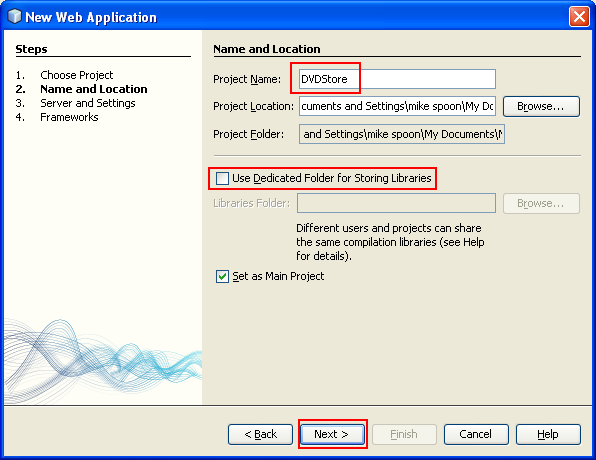
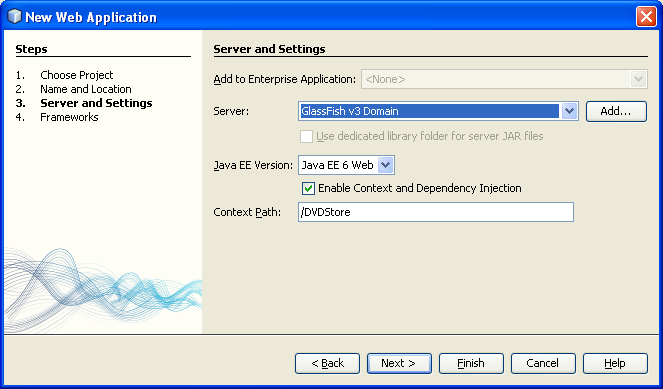
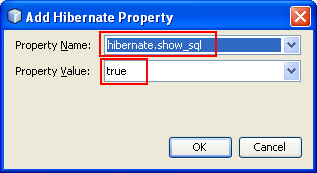
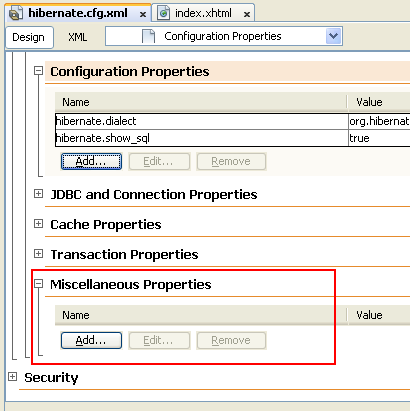
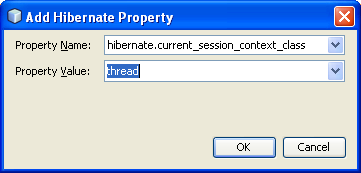
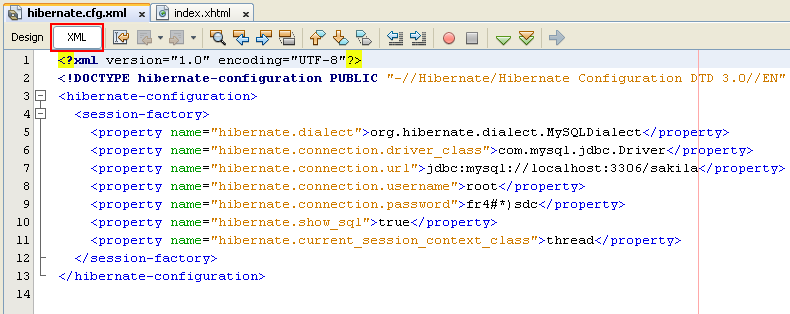
ÿþ<html> <head> <meta http-equiv="Content-Type" content="text/html; charset=unicode" /> <meta http-equiv="Content-Language" content="en-us" /> <style> <!-- p.MsoNormal, li.MsoNormal {margin-top:0mm; margin-right:0mm; margin-bottom:10.0pt; margin-left:0mm; line-height:115%; font-size:12.0pt; font-family:"Times New Roman","serif";} h1 {margin-right:0mm; margin-left:0mm; font-size:24.0pt; font-family:"Times New Roman","serif"; font-weight:bold} a:link {color:blue; text-decoration:underline;} a:visited {color:purple; text-decoration:underline;} p {margin-right:0mm; margin-left:0mm; font-size:12.0pt; font-family:"Times New Roman","serif";} p.MsoListParagraph {margin-top:0mm; margin-right:0mm; margin-bottom:10.0pt; margin-left:36.0pt; line-height:115%; font-size:12.0pt; font-family:"Times New Roman","serif";} ol {margin-bottom:0mm;} --> </style> <title>Creating the Web Application Project for Hibernate</title> <meta name="keywords" content="opensource, applications, technology, Hibernate, tutorials, example, web, hosting, computing, database, online" /> <meta name="description" content="Steps on how to create web application hibernate project in NetBeans" /> </head> <body lang="EN-US" link="#0000FF" vlink="#800080" topmargin="20" leftmargin="20" rightmargin="20" bottommargin="20"> <div class="WordSection1"> <h1 align="center" style="margin-bottom:0mm;margin-bottom:0; text-align:center;line-height:100%; margin-top:0"><b> <font size="6" face="Arial"><span style="font-weight:bold">Using Hibernate in a Web Application 2</span></font></b></h1> <h1 align="center" style="margin-bottom:0mm;margin-bottom:0; text-align:center;line-height:100%; margin-top:0"><b> <font size="5" face="Arial"> <span style="font-weight:bold; font-style:italic">(With NetBeans &amp; MySQL)</span></font></b></h1> <p class="MsoNormal" style="margin-bottom:0mm;margin-bottom:0;line-height: 100%; margin-top:0">&nbsp;</p> <p class="MsoNormal" style="margin-bottom:0mm;margin-bottom:0;line-height: 100%; margin-top:0">&nbsp;</p> <p class="MsoNormal" style="margin-bottom:0mm;margin-bottom:0;line-height: 100%; margin-top:0" align="center"><script src="http://tag.contextweb.com/TagPublish/getjs.aspx?action=VIEWAD&cwrun=200&cwadformat=728X90&cwpid=527221&cwwidth=728&cwheight=90&cwpnet=1&cwtagid=85440"></script></p> <p class="MsoNormal" style="margin-bottom:0mm;margin-bottom:0;line-height: 100%; margin-top:0">&nbsp;</p> <p class="MsoNormal" style="margin-bottom:0mm;margin-bottom:0;line-height: 100%; margin-top:0">&nbsp;</p> <p class="MsoNormal" style="margin-bottom:0mm;margin-bottom:0;line-height: 100%; margin-top:0"><b><font size="3" face="Arial"> <span style="font-size:12.0pt;font-weight:bold">Creating the Web Application Project</span></font></b></p> <p class="MsoNormal" style="margin-bottom:0mm;margin-bottom:0;line-height: 100%; margin-top:0"><font size="3" face="Arial"><span style="font-size:12.0pt">&nbsp;</span></font></p> <p class="MsoNormal" style="margin-bottom:0mm;margin-bottom:0;line-height: 100%; margin-top:0"><font size="3" face="Arial"><span style="font-size:12.0pt">In this exercise you will create a web application project and add the Hibernate libraries to the project. When you create the project, you will select Hibernate in the Frameworks panel of the New Project wizard and specify the database.</span></font></p> <p class="MsoNormal" style="margin-bottom:0mm;margin-bottom:0;line-height: 100%; margin-top:0"><font size="3" face="Arial"><span style="font-size:12.0pt">&nbsp;</span></font></p> <ol style="margin-top:0mm" start="1" type="1"> <li class="MsoNormal" style="margin-bottom:0mm;margin-bottom:.0001pt;line-height: normal"> <p style="line-height: 100%; margin-top: 0; margin-bottom: 0"> <font size="3" face="Arial"><span style="font-size:12.0pt">Choose File &gt; New Project (Ctrl-Shift-N). Select Web Application from the Java Web category and click Next.</span></font></p> </li> </ol> <p class="MsoNormal" style="margin-bottom:0mm;margin-bottom:0;line-height: 100%; margin-top:0"><font size="3" face="Arial"><span style="font-size:12.0pt">&nbsp;</span></font></p> <p class="MsoNormal" align="center" style="margin-bottom:0mm;margin-bottom:0; text-align:center;line-height:100%; margin-top:0"><font size="3" face="Arial"> <span style="font-size:12.0pt"> <img border="0" width="642" height="474" src="hibernateormnetbean_files/javahibernateormdbaseweb014.png" alt="Creating new Java web application" /></span></font></p> <p class="MsoNormal" style="margin-bottom:0mm;margin-bottom:0;line-height: 100%; margin-top:0"><font size="3" face="Arial"><span style="font-size:12.0pt">&nbsp;</span></font></p> <ol style="margin-top:0mm" start="2" type="1"> <li class="MsoNormal" style="margin-bottom:0mm;margin-bottom:.0001pt;line-height: normal"> <p style="line-height: 100%; margin-top: 0; margin-bottom: 0"> <font size="3" face="Arial"><span style="font-size:12.0pt">Type <b> <span style="font-weight:bold">DVDStore</span></b> for the project name and set the project location if needed.</span></font></p> </li> </ol> <p class="MsoNormal" style="margin-bottom:0mm;margin-bottom:0;line-height: 100%; margin-top:0"><font size="3" face="Arial"><span style="font-size:12.0pt">&nbsp;</span></font></p> <ol style="margin-top:0mm" start="3" type="1"> <li class="MsoNormal" style="margin-bottom:0mm;margin-bottom:.0001pt;line-height: normal"> <p style="line-height: 100%; margin-top: 0; margin-bottom: 0"> <font size="3" face="Arial"><span style="font-size:12.0pt">Deselect the Use Dedicated Folder option, if selected. Click Next. </span></font></p> </li> </ol> <p class="MsoNormal" style="margin-top:0;margin-right:0mm;margin-bottom:0mm; margin-left:36.0pt;margin-bottom:0;line-height:100%"> <font size="3" face="Arial"><span style="font-size:12.0pt">For this tutorial there is little reason to copy project libraries to a dedicated folder because you will not need to share libraries with other users.</span></font></p> <p class="MsoNormal" style="margin-bottom:0mm;margin-bottom:0;line-height: 100%; margin-top:0"><font size="3" face="Arial"><span style="font-size:12.0pt">&nbsp;</span></font></p> <p class="MsoNormal" align="center" style="margin-bottom:0mm;margin-bottom:0; text-align:center;line-height:100%; margin-top:0"><font size="3" face="Arial"> <span style="font-size:12.0pt"> <img border="0" width="596" height="460" src="hibernateormnetbean_files/javahibernateormdbaseweb015.png" alt="Providing the Java web application project name and location" /></span></font></p> <p class="MsoNormal" style="margin-bottom:0mm;margin-bottom:0;line-height: 100%; margin-top:0"><font size="3" face="Arial"><span style="font-size:12.0pt">&nbsp;</span></font></p> <ol style="margin-top:0mm" start="4" type="1"> <li class="MsoNormal" style="margin-bottom:0mm;margin-bottom:.0001pt;line-height: normal"> <p style="line-height: 100%; margin-top: 0; margin-bottom: 0"> <font size="3" face="Arial"><span style="font-size:12.0pt">Set the server to GlassFish v3 and set the Java EE Version to Java EE 6 Web. Click Next.</span></font></p> </li> </ol> <p class="MsoNormal" style="margin-bottom:0mm;margin-bottom:0;line-height: 100%; margin-top:0"><font size="3" face="Arial"><span style="font-size:12.0pt">&nbsp;</span></font></p> <p class="MsoNormal" align="center" style="margin-bottom:0mm;margin-bottom:0; text-align:center;line-height:100%; margin-top:0"><font size="3" face="Arial"> <span style="font-size:12.0pt"> <img border="0" width="663" height="389" src="hibernateormnetbean_files/javahibernateormdbaseweb016.png" alt="Selecting GlassFish web server for Java web application project in NetBeans" /></span></font></p> <p class="MsoNormal" style="margin-bottom:0mm;margin-bottom:0;line-height: 100%; margin-top:0"><font size="3" face="Arial"><span style="font-size:12.0pt">&nbsp;</span></font></p> <ol style="margin-top:0mm" start="5" type="1"> <li class="MsoNormal" style="margin-bottom:0mm;margin-bottom:.0001pt;line-height: normal"> <p style="line-height: 100%; margin-top: 0; margin-bottom: 0"> <font size="3" face="Arial"><span style="font-size:12.0pt">Select the JavaServer Faces checkbox and use the default JSF 2.0 libraries.</span></font></p> </li> <li class="MsoNormal" style="margin-bottom:0mm;margin-bottom:.0001pt;line-height: normal"> <p style="line-height: 100%; margin-top: 0; margin-bottom: 0"> <font size="3" face="Arial"><span style="font-size:12.0pt">Select the Hibernate 3.2.5 checkbox.</span></font></p> </li> <li class="MsoNormal" style="margin-bottom:0mm;margin-bottom:.0001pt;line-height: normal"> <p style="line-height: 100%; margin-top: 0; margin-bottom: 0"> <font size="3" face="Arial"><span style="font-size:12.0pt">Select the sakila database from the Database Connection drop down list. Click Finish.</span></font></p> </li> </ol> <p class="MsoNormal" style="margin-bottom:0mm;margin-bottom:0;line-height: 100%; margin-top:0"><font size="3" face="Arial"><span style="font-size:12.0pt">&nbsp;</span></font></p> <p class="MsoNormal" align="center" style="margin-bottom:0mm;margin-bottom:0; text-align:center;line-height:100%; margin-top:0"><font size="3" face="Arial"> <span style="font-size:12.0pt"> <img border="0" width="680" height="495" src="hibernateormnetbean_files/javahibernateormdbaseweb017.png" alt="Adding JavaServer Faces (JSF) and Hibernate frameworks into the Java web application" /></span></font></p> <p class="MsoNormal" style="margin-bottom:0mm;margin-bottom:0;line-height: 100%; margin-top:0"><font size="3" face="Arial"><span style="font-size:12.0pt">&nbsp;</span></font></p> <p class="MsoNormal" style="margin-bottom:0mm;margin-bottom:0;line-height: 100%; margin-top:0"><b><font size="3" face="Arial"> <span style="font-size:12.0pt; font-weight:bold">Note:</span></font></b><font face="Arial"> If the sakila database is not available as an option in the Frameworks panel in the wizard, check to see if the connection is listed under the Databases node in the Services window. If the connection is not there, you need to create the database connection.</font></p> <p class="MsoNormal" style="margin-bottom:0mm;margin-bottom:0;line-height: 100%; margin-top:0"><font size="3" face="Arial"><span style="font-size:12.0pt">When you click Finish, the IDE creates the web application project and opens the </span></font><font face="Courier New"> <span style="font-family:&quot;Arial&quot;">hibernate.cfg.xml</span></font><font face="Arial"> file and </font><font face="Courier New"> <span style="font-family:&quot;Arial&quot;; font-weight:700">index.xhtml</span></font><font face="Arial"> in the editor.</font></p> <p class="MsoNormal" style="margin-bottom:0mm;margin-bottom:0;line-height: 100%; margin-top:0"><font size="3" face="Arial"><span style="font-size:12.0pt">If you expand the Libraries node in the Projects window, you can see that the IDE added the Hibernate libraries to the project.</span></font></p> <p class="MsoNormal" style="margin-bottom:0mm;margin-bottom:0;line-height: 100%; margin-top:0">&nbsp;</p> <p class="MsoNormal" style="margin-bottom:0mm;margin-bottom:0;line-height: 100%; margin-top:0">&nbsp;</p> <p class="MsoNormal" style="margin-bottom:0mm;margin-bottom:0;line-height: 100%; margin-top:0">&nbsp;</p> <p class="MsoNormal" style="margin-bottom:0mm;margin-bottom:0;line-height: 100%; margin-top:0" align="center"><script type="text/javascript"><!-- google_ad_client = "pub-8089415323104206"; /* 300x250, created 5/16/08javaos */ google_ad_slot = "8146009330"; google_ad_width = 300; google_ad_height = 250; //--> </script> <script type="text/javascript" src="http://pagead2.googlesyndication.com/pagead/show_ads.js"> </script></p> <p class="MsoNormal" style="margin-bottom:0mm;margin-bottom:0;line-height: 100%; margin-top:0">&nbsp;</p> <p class="MsoNormal" style="margin-bottom:0mm;margin-bottom:0;line-height: 100%; margin-top:0">&nbsp;</p> <p class="MsoNormal" style="margin-bottom:0mm;margin-bottom:0;line-height: 100%; margin-top:0">&nbsp;</p> <p class="MsoNormal" style="margin-bottom:0mm;margin-bottom:0;line-height: 100%; margin-top:0" align="center"><font face="Arial"> ---------------------------------------------------------------------</font></p> <p class="MsoNormal" style="margin-bottom:0mm;margin-bottom:0;line-height: 100%; margin-top:0">&nbsp;</p> <p class="MsoNormal" align="center" style="margin-bottom:0mm;margin-bottom:0; text-align:center;line-height:100%; margin-top:0"><font size="3" face="Arial"> <span style="font-size:12.0pt"> <img border="0" width="348" height="610" src="hibernateormnetbean_files/javahibernateormdbaseweb018.png" alt="The Hibernate libraries for Java web application seen in NetBeans" /></span></font></p> <p class="MsoNormal" style="margin-bottom:0mm;margin-bottom:0;line-height: 100%; margin-top:0"><font size="3" face="Arial"><span style="font-size:12.0pt">&nbsp;</span></font></p> <p class="MsoNormal" style="margin-bottom:0mm;margin-bottom:0;line-height: 100%; margin-top:0"><b><font size="3" face="Arial"> <span style="font-size:12.0pt; font-weight:bold">Modifying the Hibernate Configuration File</span></font></b></p> <p class="MsoNormal" style="margin-bottom:0mm;margin-bottom:0;line-height: 100%; margin-top:0"><font size="3" face="Arial"><span style="font-size:12.0pt">&nbsp;</span></font></p> <p class="MsoNormal" style="margin-bottom:0mm;margin-bottom:0;line-height: 100%; margin-top:0"><font size="3" face="Arial"><span style="font-size:12.0pt">When you create a new project that uses the Hibernate framework, the IDE automatically creates the </span></font><font face="Courier New"> <span style="font-family:&quot;Arial&quot;">hibernate.cfg.xml</span></font><font face="Arial"> configuration file at the root of the context classpath of the application (in the Files window, </font><font face="Courier New"> <span style="font-family:&quot;Arial&quot;">src/java</span></font><font face="Arial">). The file is located in the </font><font face="Courier New"> <span style="font-family: &quot;Arial&quot;; font-weight:700">&lt;default package&gt;</span></font><font face="Arial"> under the Source Packages node in the Projects window. The configuration file contains information about the database connection, resource mappings, and other connection properties. You can edit the file using the multi-view editor, or edit the XML directly in the XML editor.</font></p> <p class="MsoNormal" style="margin-bottom:0mm;margin-bottom:0;line-height: 100%; margin-top:0"><font size="3" face="Arial"><span style="font-size:12.0pt">In this exercise you will edit the default properties specified in </span> </font><font face="Courier New"><span style="font-family:&quot;Arial&quot;"> hibernate.cfg.xml</span></font><font face="Arial"> to enable debug logging for SQL statements and to enable Hibernate&#39;s session context management.</font></p> <p class="MsoNormal" style="margin-bottom:0mm;margin-bottom:0;line-height: 100%; margin-top:0"><font size="3" face="Arial"><span style="font-size:12.0pt">&nbsp;</span></font></p> <ol style="margin-top:0mm" start="1" type="1"> <li class="MsoNormal" style="margin-bottom:0mm;margin-bottom:.0001pt;line-height: normal"> <p style="line-height: 100%; margin-top: 0; margin-bottom: 0"> <font size="3" face="Arial"><span style="font-size:12.0pt">Open </span> </font><font face="Courier New"> <span style="font-family:&quot;Arial&quot;; font-weight:700">hibernate.cfg.xml</span></font><font face="Arial"> in the Design tab. You can open the file by expanding Source Packages &gt; &lt;default package&gt; in the Projects window and double-clicking </font> <font face="Courier New"><span style="font-family:&quot;Arial&quot;">hibernate.cfg.xml</span></font><font face="Arial">.</font></p> </li> </ol> <p class="MsoNormal" style="margin-bottom:0mm;margin-bottom:0;line-height: 100%; margin-top:0"><font size="3" face="Arial"><span style="font-size:12.0pt">&nbsp;</span></font></p> <p class="MsoNormal" align="center" style="margin-bottom:0mm;margin-bottom:0; text-align:center;line-height:100%; margin-top:0"><font size="3" face="Arial"> <span style="font-size:12.0pt"> <img border="0" width="537" height="409" src="hibernateormnetbean_files/javahibernateormdbaseweb019.png" alt="The Hibernate configuration file in XML format seen in NetBeans" /></span></font></p> <p class="MsoNormal" style="margin-bottom:0mm;margin-bottom:0;line-height: 100%; margin-top:0"><font size="3" face="Arial"><span style="font-size:12.0pt">&nbsp;</span></font></p> <ol style="margin-top:0mm" start="2" type="1"> <li class="MsoNormal" style="margin-bottom:0mm;margin-bottom:.0001pt;line-height: normal"> <p style="line-height: 100%; margin-top: 0; margin-bottom: 0"> <font size="3" face="Arial"><span style="font-size:12.0pt">In the multi-view XML editor, expand the Configuration Properties node under Optional Properties.</span></font></p> </li> </ol> <p class="MsoListParagraph" style="margin:0 0mm;line-height:100%; margin-bottom:0"> <font size="3" face="Arial"><span style="font-size:12.0pt;line-height:115%">&nbsp;</span></font></p> <p class="MsoListParagraph" align="center" style="margin:0 0mm;text-align:center; line-height:100%; margin-bottom:0"> <font size="3" face="Arial"> <span style="font-size: 12.0pt;line-height:115%"> <img border="0" width="558" height="377" src="hibernateormnetbean_files/javahibernateormdbaseweb020.png" alt="Changing some of the Hibernate properties for Java web applications" /></span></font></p> <p class="MsoNormal" style="margin-bottom:0mm;margin-bottom:0;line-height: 100%; margin-top:0"><font size="3" face="Arial"><span style="font-size:12.0pt">&nbsp;</span></font></p> <ol style="margin-top:0mm" start="3" type="1"> <li class="MsoNormal" style="margin-bottom:0mm;margin-bottom:.0001pt;line-height: normal"> <p style="line-height: 100%; margin-top: 0; margin-bottom: 0"> <font size="3" face="Arial"><span style="font-size:12.0pt">Click Add to open the Add Hibernate Property dialog box.</span></font></p> </li> </ol> <p class="MsoNormal" style="margin-bottom:0mm;margin-bottom:0;line-height: 100%; margin-top:0"><font size="3" face="Arial"><span style="font-size:12.0pt">&nbsp;</span></font></p> <p class="MsoNormal" align="center" style="margin-bottom:0mm;margin-bottom:0; text-align:center;line-height:100%; margin-top:0"><font size="3" face="Arial"> <span style="font-size:12.0pt"> <img border="0" width="317" height="173" src="hibernateormnetbean_files/javahibernateormdbaseweb021.png" alt="Adding Hibernate property page - adding hibernate.show_sql" /></span></font></p> <p class="MsoNormal" style="margin-bottom:0mm;margin-bottom:0;line-height: 100%; margin-top:0"><font size="3" face="Arial"><span style="font-size:12.0pt">&nbsp;</span></font></p> <ol style="margin-top:0mm" start="4" type="1"> <li class="MsoNormal" style="margin-bottom:0mm;margin-bottom:.0001pt;line-height: normal"> <p style="line-height: 100%; margin-top: 0; margin-bottom: 0"> <font size="3" face="Arial"><span style="font-size:12.0pt">In the dialog box, select the </span></font><font face="Courier New"> <span style="font-family:&quot;Arial&quot;; font-weight:700">hibernate.show_sql</span></font><font face="Arial"> property and set the value to </font><font face="Courier New"> <span style="font-family:&quot;Arial&quot;">true</span></font><font face="Arial">. This enables the debug logging of the SQL statements.</font></p> </li> </ol> <p style="line-height: 100%; margin-top: 0; margin-bottom: 0">&nbsp;</p> <p class="MsoNormal" align="center" style="text-align:center; line-height:100%; margin-top:0; margin-bottom:0"> <font size="3" face="Arial"><span style="font-size:12.0pt;line-height:115%"> <img border="0" width="317" height="173" src="hibernateormnetbean_files/javahibernateormdbaseweb022.png" alt="Do some settings for hibernate.show_sql" /></span></font></p> <ol style="margin-top:0mm" start="5" type="1"> <li class="MsoNormal" style="margin-bottom:0mm;margin-bottom:.0001pt;line-height: normal"> <p style="line-height: 100%; margin-top: 0; margin-bottom: 0"> <font size="3" face="Arial"><span style="font-size:12.0pt">Expand the Miscellaneous Properties node and click Add.</span></font></p> </li> </ol> <p class="MsoNormal" style="margin-bottom:0mm;margin-bottom:0;line-height: 100%; margin-top:0"><font size="3" face="Arial"><span style="font-size:12.0pt">&nbsp;</span></font></p> <p class="MsoNormal" align="center" style="margin-bottom:0mm;margin-bottom:0; text-align:center;line-height:100%; margin-top:0"><font size="3" face="Arial"> <span style="font-size:12.0pt"> <img border="0" width="410" height="411" src="hibernateormnetbean_files/javahibernateormdbaseweb023.png" alt="Settings miscellaneous Hibernate properties" /></span></font></p> <p class="MsoNormal" style="margin-bottom:0mm;margin-bottom:0;line-height: 100%; margin-top:0"><font size="3" face="Arial"><span style="font-size:12.0pt">&nbsp;</span></font></p> <ol style="margin-top:0mm" start="6" type="1"> <li class="MsoNormal" style="margin-bottom:0mm;margin-bottom:.0001pt;line-height: normal"> <p style="line-height: 100%; margin-top: 0; margin-bottom: 0"> <font size="3" face="Arial"><span style="font-size:12.0pt">In the dialog box, select the </span></font><font size="3" face="Courier New"> <span style="font-family:&quot;Arial&quot;">properties <b>hibernate.current_session_context_class</b></span></font><font face="Arial"> and set the value to </font><font size="3" face="Courier New"> <span style="font-family: &quot;Arial&quot;">thread</span></font><font face="Arial"> to enable Hibernate&#39;s automatic session context management.</font></p> </li> </ol> <p class="MsoNormal" align="center" style="margin-top:0;margin-right:0mm; margin-bottom:0mm;margin-left:18.0pt;margin-bottom:0;text-align:center; line-height:100%"><font size="3" face="Arial"><span style="font-size: 12.0pt"><br /> <img border="0" width="361" height="173" src="hibernateormnetbean_files/javahibernateormdbaseweb024.png" alt="Adding another hibernate properties - hibernate.current_session_context_class" /></span></font></p> <p class="MsoNormal" style="margin-top:0;margin-right:0mm;margin-bottom:0mm; margin-left:18.0pt;margin-bottom:0;line-height:100%"> <font size="3" face="Arial"><span style="font-size:12.0pt">&nbsp;</span></font></p> <p class="MsoNormal" style="margin-top:0;margin-right:0mm;margin-bottom:0mm; margin-left:36.0pt;margin-bottom:0;line-height:100%"> <font size="3" face="Arial"><span style="font-size:12.0pt">If you click the XML tab in the editor you can see the file in XML view. Your file should look like the following:</span></font></p> <p class="MsoNormal" style="margin-top:0;margin-right:0mm;margin-bottom:0mm; margin-left:36.0pt;margin-bottom:0;line-height:100%"> <font size="3" face="Arial"><span style="font-size:12.0pt">&nbsp;</span></font></p> <p class="MsoNormal" style="margin-top:0;margin-right:0mm;margin-bottom:0mm; margin-left:36.0pt;margin-bottom:0;line-height:100%"> <font size="3" face="Courier New"> <span style="font-size:12.0pt;font-family:&quot;Arial&quot;; font-weight:700"> &lt;hibernate-configuration&gt;</span></font></p> <p class="MsoNormal" style="margin-top:0;margin-right:0mm;margin-bottom:0mm; margin-left:36.0pt;margin-bottom:0;line-height:100%"> <font size="3" face="Courier New"> <span style="font-size:12.0pt;font-family:&quot;Arial&quot;; font-weight:700">&nbsp;&nbsp;&nbsp; &lt;session-factory name=&quot;session1&quot;&gt;</span></font></p> <p class="MsoNormal" style="margin-top:0;margin-right:0mm;margin-bottom:0mm; margin-left:36.0pt;margin-bottom:0;line-height:100%"> <font size="3" face="Courier New"> <span style="font-size:12.0pt;font-family:&quot;Arial&quot;; font-weight:700">&nbsp;&nbsp;&nbsp;&nbsp;&nbsp;&nbsp;&nbsp; &lt;property name=&quot;hibernate.dialect&quot;&gt;org.hibernate.dialect.MySQLDialect&lt;/property&gt;</span></font></p> <p class="MsoNormal" style="margin-top:0;margin-right:0mm;margin-bottom:0mm; margin-left:36.0pt;margin-bottom:0;line-height:100%"> <font size="3" face="Courier New"> <span style="font-size:12.0pt;font-family:&quot;Arial&quot;; font-weight:700">&nbsp;&nbsp;&nbsp;&nbsp;&nbsp;&nbsp;&nbsp; &lt;property name=&quot;hibernate.connection.driver_class&quot;&gt;com.mysql.jdbc.Driver&lt;/property&gt;</span></font></p> <p class="MsoNormal" style="margin-top:0;margin-right:0mm;margin-bottom:0mm; margin-left:36.0pt;margin-bottom:0;line-height:100%"> <font size="3" face="Courier New"> <span style="font-size:12.0pt;font-family:&quot;Arial&quot;; font-weight:700">&nbsp;&nbsp;&nbsp;&nbsp;&nbsp;&nbsp;&nbsp; &lt;property name=&quot;hibernate.connection.url&quot;&gt;jdbc:mysql://localhost:3306/sakila&lt;/property&gt;</span></font></p> <p class="MsoNormal" style="margin-top:0;margin-right:0mm;margin-bottom:0mm; margin-left:36.0pt;margin-bottom:0;line-height:100%"> <font size="3" face="Courier New"> <span style="font-size:12.0pt;font-family:&quot;Arial&quot;; font-weight:700">&nbsp;&nbsp;&nbsp;&nbsp;&nbsp;&nbsp;&nbsp; &lt;property name=&quot;hibernate.connection.username&quot;&gt;root&lt;/property&gt;</span></font></p> <p class="MsoNormal" style="margin-top:0;margin-right:0mm;margin-bottom:0mm; margin-left:36.0pt;margin-bottom:0;line-height:100%"> <font size="3" face="Courier New"> <span style="font-size:12.0pt;font-family:&quot;Arial&quot;; font-weight:700">&nbsp;&nbsp;&nbsp;&nbsp;&nbsp;&nbsp;&nbsp; &lt;property name=&quot;hibernate.connection.password&quot;&gt;######&lt;/property&gt;</span></font></p> <p class="MsoNormal" style="margin-top:0;margin-right:0mm;margin-bottom:0mm; margin-left:36.0pt;margin-bottom:0;line-height:100%"> <font size="3" face="Courier New"> <span style="font-size:12.0pt;font-family:&quot;Arial&quot;; font-weight:700">&nbsp;&nbsp;&nbsp;&nbsp;&nbsp;&nbsp;&nbsp; &lt;property name=&quot;hibernate.show_sql&quot;&gt;true&lt;/property&gt;</span></font></p> <p class="MsoNormal" style="margin-top:0;margin-right:0mm;margin-bottom:0mm; margin-left:36.0pt;margin-bottom:0;line-height:100%"> <font size="3" face="Courier New"> <span style="font-size:12.0pt;font-family:&quot;Arial&quot;; font-weight:700">&nbsp;&nbsp;&nbsp;&nbsp;&nbsp;&nbsp;&nbsp; &lt;property name=&quot;hibernate.current_session_context_class&quot;&gt;thread&lt;/property&gt;</span></font></p> <p class="MsoNormal" style="margin-top:0;margin-right:0mm;margin-bottom:0mm; margin-left:36.0pt;margin-bottom:0;line-height:100%"> <font size="3" face="Courier New"> <span style="font-size:12.0pt;font-family:&quot;Arial&quot;; font-weight:700">&nbsp;&nbsp;&nbsp; &lt;/session-factory&gt;</span></font></p> <p class="MsoNormal" style="margin-top:0;margin-right:0mm;margin-bottom:0mm; margin-left:36.0pt;margin-bottom:0;line-height:100%"> <font size="3" face="Courier New"> <span style="font-size:12.0pt;font-family:&quot;Arial&quot;; font-weight:700"> &lt;/hibernate-configuration&gt;</span></font></p> <p class="MsoNormal" style="margin-bottom:0mm;margin-bottom:0;line-height: 100%; margin-top:0"><font size="3" face="Arial"><span style="font-size:12.0pt">&nbsp;</span></font></p> <p class="MsoNormal" align="center" style="margin-bottom:0mm;margin-bottom:0; text-align:center;line-height:100%; margin-top:0"><font size="3" face="Arial"> <span style="font-size:12.0pt"> <img border="0" width="790" height="314" src="hibernateormnetbean_files/javahibernateormdbaseweb025.png" alt="The hibernate config file seen in XML format" /></span></font></p> <p class="MsoNormal" style="margin-bottom:0mm;margin-bottom:0;line-height: 100%; margin-top:0"><font size="3" face="Arial"><span style="font-size:12.0pt">&nbsp;</span></font></p> <ol style="margin-top:0mm" start="7" type="1"> <li class="MsoNormal" style="margin-bottom:0mm;margin-bottom:.0001pt;line-height: normal"> <p style="line-height: 100%; margin-top: 0; margin-bottom: 0"> <font size="3" face="Arial"><span style="font-size:12.0pt">Save your changes to the file.</span></font></p> </li> </ol> <p class="MsoNormal" style="margin-bottom:0mm;margin-bottom:0;line-height: 100%; margin-top:0"><font size="3" face="Arial"><span style="font-size:12.0pt">&nbsp;</span></font></p> <p class="MsoNormal" style="margin-bottom:0mm;margin-bottom:0;line-height: 100%; margin-top:0"><font size="3" face="Arial"><span style="font-size:12.0pt">You can close the file because you do not need to edit the file again.</span></font></p> <p class="MsoNormal" style="margin-bottom:0mm;margin-bottom:0;line-height: 100%; margin-top:0">&nbsp;</p> <p class="MsoNormal" style="margin-bottom:0mm;margin-bottom:0;line-height: 100%; margin-top:0">&nbsp;</p> <hr color="#FF0000" /> <p class="MsoNormal" style="margin-bottom:0mm;margin-bottom:0; line-height:100%; margin-top:0" align="center"> <font face="Arial" size="5"> <a title="Java, ORM &amp; Hibernate tutorial 1" target="_top" href="http://www.visualcplusdotnet.com/javaopensource/hibernateormnetbean.html"> Java, ORM &amp; Hibernate 1</a> | <a title="The Java and open source applications" target="_top" href="http://www.javaguicodexample.com/"> Back to Main</a> | <a title="Creating the HibernateUtil.java Helper File" target="_top" href="http://www.visualcplusdotnet.com/javaopensource/hibernateormnetbean2.html"> Java, ORM &amp; Hibernate 3</a></font></p> <p class="MsoNormal" style="margin-bottom:0mm;margin-bottom:0; line-height:100%; margin-top:0" align="left"> &nbsp;</p> <p class="MsoNormal" style="margin-bottom:0mm;margin-bottom:0; line-height:100%; margin-top:0" align="center"> <script type="text/javascript"><!-- google_ad_client = "pub-8089415323104206"; /* 728x90, created 5/16/08 javaos */ google_ad_slot = "1917524460"; google_ad_width = 728; google_ad_height = 90; //--> </script> <script type="text/javascript" src="http://pagead2.googlesyndication.com/pagead/show_ads.js"> </script></p> </div> </body> </html>