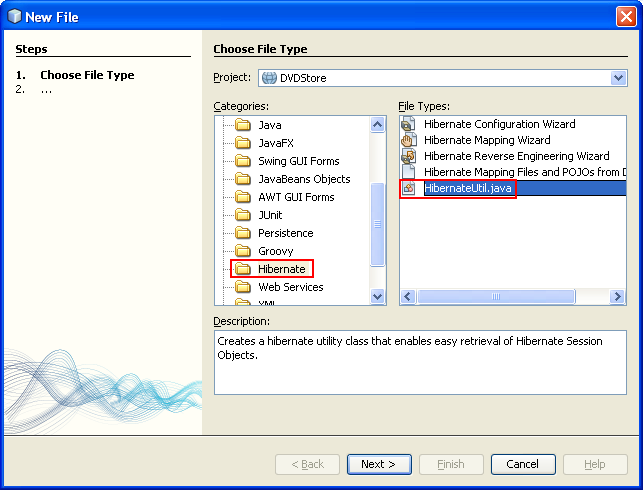
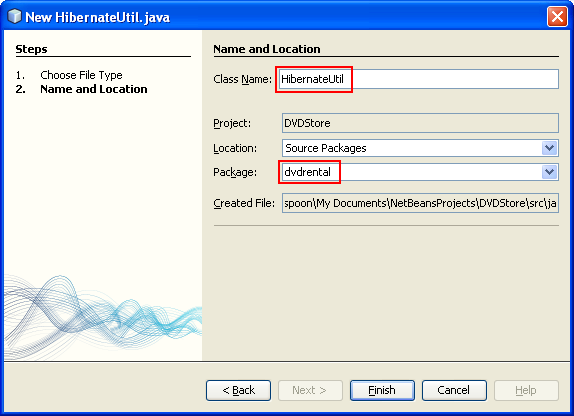
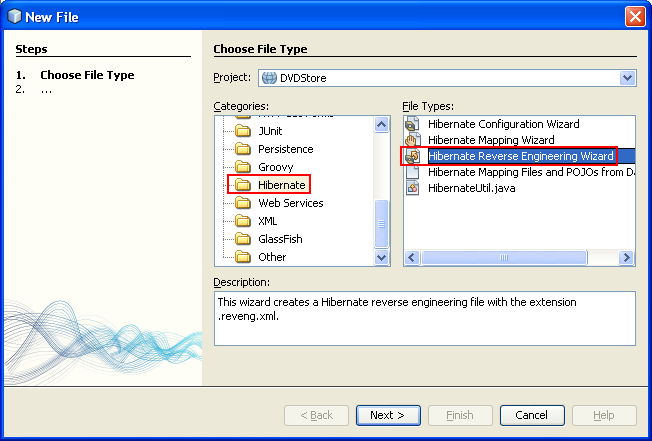
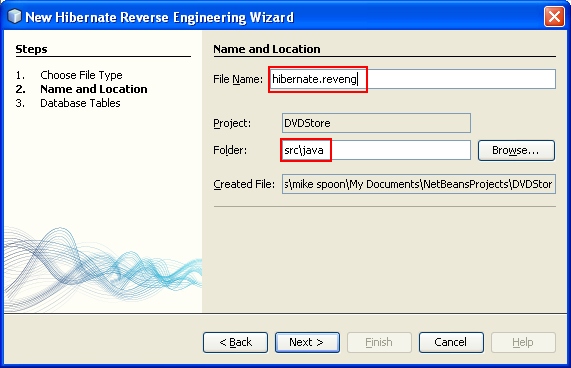
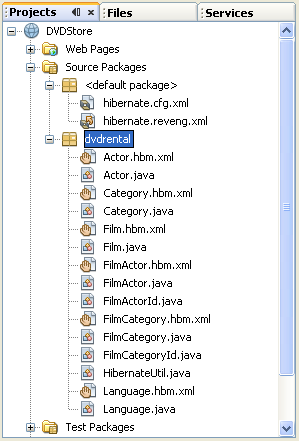
ÿþ<html> <head> <meta http-equiv="Content-Type" content="text/html; charset=unicode" /> <meta http-equiv="Content-Language" content="en-us" /> <style> <!-- p.MsoNormal, li.MsoNormal {margin-top:0mm; margin-right:0mm; margin-bottom:10.0pt; margin-left:0mm; line-height:115%; font-size:12.0pt; font-family:"Times New Roman","serif";} h1 {margin-right:0mm; margin-left:0mm; font-size:24.0pt; font-family:"Times New Roman","serif"; font-weight:bold} a:link {color:blue; text-decoration:underline;} a:visited {color:purple; text-decoration:underline;} p {margin-right:0mm; margin-left:0mm; font-size:12.0pt; font-family:"Times New Roman","serif";} p.MsoListParagraph {margin-top:0mm; margin-right:0mm; margin-bottom:10.0pt; margin-left:36.0pt; line-height:115%; font-size:12.0pt; font-family:"Times New Roman","serif";} ol {margin-bottom:0mm;} --> </style> <title>Creating the HibernateUtil.java Helper File for Java Hibernate web application</title> <meta name="keywords" content="Java, opensource, examples, samples, program, technology, applications, database, system, online, data" /> <meta name="description" content="Steps on how to create the HibernateUtil.java Helper File" /> </head> <body lang="EN-US" link="#0000FF" vlink="#800080" topmargin="20" leftmargin="20" rightmargin="20" bottommargin="20"> <div class="WordSection1"> <h1 align="center" style="margin-bottom:0mm;margin-bottom:0; text-align:center;line-height:100%; margin-top:0"><b> <font size="6" face="Arial"><span style="font-weight:bold">Using Hibernate in a Web Application 3</span></font></b></h1> <h1 align="center" style="margin-bottom:0mm;margin-bottom:0; text-align:center;line-height:100%; margin-top:0"><b> <font size="5" face="Arial"> <span style="font-weight:bold; font-style:italic">(With NetBeans &amp; MySQL)</span></font></b></h1> <p class="MsoNormal" style="margin-bottom:0mm;margin-bottom:0;line-height: 100%; margin-top:0">&nbsp;</p> <p class="MsoNormal" style="margin-bottom:0mm;margin-bottom:0;line-height: 100%; margin-top:0">&nbsp;</p> <p class="MsoNormal" style="margin-bottom:0mm;margin-bottom:0;line-height: 100%; margin-top:0">&nbsp;</p> <p class="MsoNormal" style="margin-bottom:0mm;margin-bottom:0;line-height: 100%; margin-top:0" align="center"><script src="http://tag.contextweb.com/TagPublish/getjs.aspx?action=VIEWAD&cwrun=200&cwadformat=728X90&cwpid=527221&cwwidth=728&cwheight=90&cwpnet=1&cwtagid=85440"></script></p> <p class="MsoNormal" style="margin-bottom:0mm;margin-bottom:0;line-height: 100%; margin-top:0">&nbsp;</p> <p class="MsoNormal" style="margin-bottom:0mm;margin-bottom:0;line-height: 100%; margin-top:0">&nbsp;</p> <p class="MsoNormal" style="margin-bottom:0mm;margin-bottom:0;line-height: 100%; margin-top:0"><b><font size="3" face="Arial"> <span style="font-size:12.0pt;font-weight:bold">Creating the </span></font> <font face="Courier New"> <span style="font-family:&quot;Arial&quot;;font-weight:bold">HibernateUtil.java</span></font></b><font face="Arial"><b><span style="font-weight:bold"> Helper File</span></b></font></p> <p class="MsoNormal" style="margin-bottom:0mm;margin-bottom:0;line-height: 100%; margin-top:0">&nbsp;</p> <p class="MsoNormal" style="margin-bottom:0mm;margin-bottom:0;line-height: 100%; margin-top:0"><font size="3" face="Arial"><span style="font-size:12.0pt">To use Hibernate you need to create a helper class that handles startup and that accesses Hibernate's </span></font><font face="Courier New"> <span style="font-family:&quot;Arial&quot;">SessionFactory</span></font><font face="Arial"> to obtain a Session object. The class calls </font><font face="Courier New"> <span style="font-family:&quot;Arial&quot;">configure()</span></font><font face="Arial"> and loads the </font><font face="Courier New"> <span style="font-family:&quot;Arial&quot;">hibernate.cfg.xml</span></font><font face="Arial"> configuration file and then builds the </font><font face="Courier New"> <span style="font-family:&quot;Arial&quot;">SessionFactory</span></font><font face="Arial"> to obtain the Session object. In this section you use the New File wizard to create the helper class </font><font face="Courier New"> <span style="font-family:&quot;Arial&quot;">HibernateUtil.java</span></font><font face="Arial">.</font></p> <p class="MsoNormal" style="margin-bottom:0mm;margin-bottom:0;line-height: 100%; margin-top:0"><font size="3" face="Arial"><span style="font-size:12.0pt">&nbsp;</span></font></p> <ol style="margin-top:0mm" start="1" type="1"> <li class="MsoNormal" style="margin-bottom:0mm;margin-bottom:.0001pt;line-height: normal"> <p style="line-height: 100%; margin-top: 0; margin-bottom: 0"> <font size="3" face="Arial"><span style="font-size:12.0pt">Right-click the Source Packages node and select New &gt; Other to open the New File wizard.</span></font></p> </li> </ol> <p class="MsoNormal" style="margin-bottom:0mm;margin-bottom:0;text-align: justify;line-height:100%; margin-top:0"><font size="3" face="Arial"> <span style="font-size:12.0pt">&nbsp;</span></font></p> <p class="MsoNormal" align="center" style="margin-bottom:0mm;margin-bottom:0; text-align:center;line-height:100%; margin-top:0"><font size="3" face="Arial"> <span style="font-size:12.0pt"> <img border="0" width="480" height="367" src="hibernateormnetbean_files/javahibernateormdbaseweb026.png" alt="Adding Java package into Hibernate web application project" /></span></font></p> <p class="MsoNormal" style="margin-bottom:0mm;margin-bottom:0;line-height: 100%; margin-top:0"><font size="3" face="Arial"><span style="font-size:12.0pt">&nbsp;</span></font></p> <ol style="margin-top:0mm" start="2" type="1"> <li class="MsoNormal" style="margin-bottom:0mm;margin-bottom:.0001pt;line-height: normal"> <p style="line-height: 100%; margin-top: 0; margin-bottom: 0"> <font size="3" face="Arial"><span style="font-size:12.0pt">Select Hibernate from the Categories list and HibernateUtil.java from the File Types list. Click Next.</span></font></p> </li> </ol> <p class="MsoNormal" style="margin-bottom:0mm;margin-bottom:0;line-height: 100%; margin-top:0"><font size="3" face="Arial"><span style="font-size:12.0pt">&nbsp;</span></font></p> <p class="MsoNormal" align="center" style="margin-bottom:0mm;margin-bottom:0; text-align:center;line-height:100%; margin-top:0"><font size="3" face="Arial"> <span style="font-size:12.0pt"> <img border="0" width="643" height="490" src="hibernateormnetbean_files/javahibernateormdbaseweb027.png" alt="Adding the hibernateUtil.java file into the Hibernate Java web application project" /></span></font></p> <p class="MsoNormal" style="margin-bottom:0mm;margin-bottom:0;line-height: 100%; margin-top:0"><font size="3" face="Arial"><span style="font-size:12.0pt">&nbsp;</span></font></p> <ol style="margin-top:0mm" start="3" type="1"> <li class="MsoNormal" style="margin-bottom:0mm;margin-bottom:.0001pt;line-height: normal"> <p style="line-height: 100%; margin-top: 0; margin-bottom: 0"> <font size="3" face="Arial"><span style="font-size:12.0pt">Type <b> <span style="font-weight:bold">HibernateUtil</span></b> for the class name and <b><span style="font-weight:bold">dvdrental</span></b> for the package. Click Finish.</span></font></p> </li> </ol> <p class="MsoNormal" style="margin-top:0;margin-right:0mm;margin-bottom:0mm; margin-left:18.0pt;margin-bottom:0;line-height:100%"> <font size="3" face="Arial"><span style="font-size:12.0pt">&nbsp;</span></font></p> <p class="MsoNormal" align="center" style="margin-bottom:0mm;margin-bottom:0; text-align:center;line-height:100%; margin-top:0"><font size="3" face="Arial"> <span style="font-size:12.0pt"> <img border="0" width="574" height="416" src="hibernateormnetbean_files/javahibernateormdbaseweb028.png" alt="Do some settings on the HibernateUtil.java" /></span></font></p> <p class="MsoNormal" style="margin-bottom:0mm;margin-bottom:0;line-height: 100%; margin-top:0"><font size="3" face="Arial"><span style="font-size:12.0pt">&nbsp;</span></font></p> <p class="MsoNormal" style="margin-bottom:0mm;margin-bottom:0;line-height: 100%; margin-top:0"><font size="3" face="Arial"><span style="font-size:12.0pt">When you click Finish, </span></font><font face="Courier New"> <span style="font-family:&quot;Arial&quot;">HibernateUtil.java</span></font><font face="Arial"> opens in the editor. You can close the file because you do not need to edit the file.</font></p> <p class="MsoNormal" style="margin-bottom:0mm;margin-bottom:0;line-height: 100%; margin-top:0"><font size="3" face="Arial"><span style="font-size:12.0pt">&nbsp;</span></font></p> <p class="MsoNormal" style="margin-bottom:0mm;margin-bottom:0;line-height: 100%; margin-top:0"><b><font size="3" face="Arial"> <span style="font-size:12.0pt;font-weight:bold">Generating Hibernate Mapping Files and Java Classes</span></font></b></p> <p class="MsoNormal" style="margin-bottom:0mm;margin-bottom:0;line-height: 100%; margin-top:0"><font size="3" face="Arial"><span style="font-size:12.0pt">&nbsp;</span></font></p> <p class="MsoNormal" style="margin-bottom:0mm;margin-bottom:0;line-height: 100%; margin-top:0"><font size="3" face="Arial"><span style="font-size:12.0pt">In this tutorial you use a POJO (plain old Java object) to represent the data in each of the tables in the database that you will use. The Java class specifies the fields for the columns in the tables and uses simple setters and getters to retrieve and write the data. To map the POJOs to the tables you can use a Hibernate mapping file or use annotations in the class.</span></font></p> <p class="MsoNormal" style="margin-bottom:0mm;margin-bottom:0;line-height: 100%; margin-top:0"><font size="3" face="Arial"><span style="font-size:12.0pt">You can use the Hibernate Mapping Files and POJOs from a Database wizard to create multiple POJOs and mapping files based on database tables. When you use the wizard you select all the tables for which you want POJOs and mapping files and the IDE then generates the files for you based on the database tables and adds the mapping entries to </span></font><font size="3" face="Courier New"> <span style="font-family:&quot;Arial&quot;">hibernate.cfg.xml</span></font><font face="Arial">. When you use the wizard you can choose the files that you want the IDE to generate (only the POJOs, for example) and select code generation options (generate code that uses EJB 3 annotations, for example).</font></p> <p class="MsoNormal" style="margin-bottom:0mm;margin-bottom:0;line-height: 100%; margin-top:0"><b><font size="3" face="Arial"> <span style="font-size:12.0pt; font-weight:bold">Note.</span></font></b><font face="Arial"> The IDE also has wizards to help you create individual POJOs and mapping files from scratch.</font></p> <p class="MsoNormal" style="margin-bottom:0mm;margin-bottom:0;line-height: 100%; margin-top:0"><font size="3" face="Arial"><span style="font-size:12.0pt">&nbsp;</span></font></p> <p class="MsoNormal" style="margin-bottom:0mm;margin-bottom:0;line-height: 100%; margin-top:0"><b><font size="3" face="Arial"> <span style="font-size:12.0pt;font-weight:bold">Creating the Hibernate Reverse Engineering File</span></font></b></p> <p class="MsoNormal" style="margin-bottom:0mm;margin-bottom:0;line-height: 100%; margin-top:0"><font size="3" face="Arial"><span style="font-size:12.0pt">&nbsp;</span></font></p> <p class="MsoNormal" style="margin-bottom:0mm;margin-bottom:0;line-height: 100%; margin-top:0"><font size="3" face="Arial"><span style="font-size:12.0pt">If you want to use the Hibernate Mapping Files and POJOs from a Database wizard, you first need to create a </span></font><font face="Courier New"> <span style="font-family:&quot;Arial&quot;; font-weight:700">hibernate.reveng.xml</span></font><font face="Arial"> reverse engineering file. The Hibernate Mapping Files and POJOs from a Database wizard requires </font><font face="Courier New"> <span style="font-family:&quot;Arial&quot;">hibernate.reveng.xml</span></font><font face="Arial"> and </font><font face="Courier New"> <span style="font-family:&quot;Arial&quot;">hibernate.cfg.xml</span></font><font face="Arial">.</font></p> <p class="MsoNormal" style="margin-bottom:0mm;margin-bottom:0;line-height: 100%; margin-top:0"><font size="3" face="Arial"><span style="font-size:12.0pt">The reverse engineering file enables you to have greater control over how database mapping strategy. The Hibernate Reverse Engineering Wizard creates a reverse engineering file with a default configuration that you can edit in the XML editor.</span></font></p> <p class="MsoNormal" style="margin-bottom:0mm;margin-bottom:0;line-height: 100%; margin-top:0"><font size="3" face="Arial"><span style="font-size:12.0pt">To create the Hibernate reverse engineering file, perform the following steps.</span></font></p> <p class="MsoNormal" style="margin-bottom:0mm;margin-bottom:0;line-height: 100%; margin-top:0"><font size="3" face="Arial"><span style="font-size:12.0pt">&nbsp;</span></font></p> <ol style="margin-top:0mm" start="1" type="1"> <li class="MsoNormal" style="margin-bottom:0mm;margin-bottom:.0001pt;line-height: normal"> <p style="line-height: 100%; margin-top: 0; margin-bottom: 0"> <font size="3" face="Arial"><span style="font-size:12.0pt">Right-click the Source Packages node in the Projects window and choose New &gt; Other to open the New File wizard.</span></font></p> </li> </ol> <p class="MsoNormal" style="margin-bottom:0mm;margin-bottom:0;line-height: 100%; margin-top:0"><font size="3" face="Arial"><span style="font-size:12.0pt">&nbsp;</span></font></p> <ol style="margin-top:0mm" start="2" type="1"> <li class="MsoNormal" style="margin-bottom:0mm;margin-bottom:.0001pt;line-height: normal"> <p style="line-height: 100%; margin-top: 0; margin-bottom: 0"> <font size="3" face="Arial"><span style="font-size:12.0pt">Select Hibernate Reverse Engineering Wizard in the Hibernate category. Click Next.</span></font></p> </li> </ol> <p class="MsoListParagraph" style="margin:0 0mm;line-height:100%; margin-bottom:0"> <font size="3" face="Arial"><span style="font-size:12.0pt;line-height:115%">&nbsp;</span></font></p> <p class="MsoListParagraph" align="center" style="margin:0 0mm;text-align:center; line-height:100%; margin-bottom:0"> <font size="3" face="Arial"> <span style="font-size: 12.0pt;line-height:115%"> <img border="0" width="652" height="442" src="hibernateormnetbean_files/javahibernateormdbaseweb029.png" alt="Adding another file - Hibernate Reverse Engineering Wizard" /></span></font></p> <p class="MsoNormal" style="margin-bottom:0mm;margin-bottom:0;line-height: 100%; margin-top:0"><font size="3" face="Arial"><span style="font-size:12.0pt">&nbsp;</span></font></p> <ol style="margin-top:0mm" start="3" type="1"> <li class="MsoNormal" style="margin-bottom:0mm;margin-bottom:.0001pt;line-height: normal"> <p style="line-height: 100%; margin-top: 0; margin-bottom: 0"> <font size="3" face="Arial"><span style="font-size:12.0pt">Specify </span></font><font face="Courier New"> <span style="font-family:&quot;Arial&quot;; font-weight:700">hibernate.reveng</span></font><font face="Arial"> as the File Name and </font><font face="Courier New"> <span style="font-family: &quot;Arial&quot;; font-weight:700">src\java</span></font><font face="Arial"> for the Folder (both are default). Click Next.</font></p> </li> </ol> <p class="MsoNormal" style="margin-bottom:0mm;margin-bottom:0;line-height: 100%; margin-top:0"><font size="3" face="Arial"><span style="font-size:12.0pt">&nbsp;</span></font></p> <p class="MsoNormal" align="center" style="margin-bottom:0mm;margin-bottom:0; text-align:center;line-height:100%; margin-top:0"><font size="3" face="Arial"> <span style="font-size:12.0pt"> <img border="0" width="571" height="368" src="hibernateormnetbean_files/javahibernateormdbaseweb030.png" alt="Setting the name and location for the Hibernate Reverse Engineering Wizard" /></span></font></p> <p class="MsoNormal" style="margin-bottom:0mm;margin-bottom:0;line-height: 100%; margin-top:0"><font size="3" face="Arial"><span style="font-size:12.0pt">&nbsp;</span></font></p> <ol style="margin-top:0mm" start="4" type="1"> <li class="MsoNormal" style="margin-bottom:0mm;margin-bottom:.0001pt;line-height: normal"> <p style="line-height: 100%; margin-top: 0; margin-bottom: 0"> <font size="3" face="Arial"><span style="font-size:12.0pt">Select </span> </font><font face="Courier New"> <span style="font-family:&quot;Arial&quot;; font-weight:700">hibernate.cfg.xml</span></font><font face="Arial"> from the Configuration File drop down list, if not selected.</font></p> </li> <li class="MsoNormal" style="margin-bottom:0mm;margin-bottom:.0001pt;line-height: normal"> <p style="line-height: 100%; margin-top: 0; margin-bottom: 0"> <font size="3" face="Arial"><span style="font-size:12.0pt">Select the following tables from Available Tables and click Add to add the tables to Selected Tables.</span></font></p> </li> </ol> <ol type="a"> <li> <p class="MsoNormal" style="margin-top:0;margin-right:0mm;margin-bottom:0mm; margin-left:90.0pt;margin-bottom:0;text-indent:-18.0pt;line-height:100%"> <font face="Arial">actor</font></p> </li> <li> <p class="MsoNormal" style="margin-top:0;margin-right:0mm;margin-bottom:0mm; margin-left:90.0pt;margin-bottom:0;text-indent:-18.0pt;line-height:100%"> <font face="Arial">category</font></p> </li> <li> <p class="MsoNormal" style="margin-top:0;margin-right:0mm;margin-bottom:0mm; margin-left:90.0pt;margin-bottom:0;text-indent:-18.0pt;line-height:100%"> <font face="Arial">film</font></p> </li> <li> <p class="MsoNormal" style="margin-top:0;margin-right:0mm;margin-bottom:0mm; margin-left:90.0pt;margin-bottom:0;text-indent:-18.0pt;line-height:100%"> <font face="Arial">film_actor</font></p> </li> <li> <p class="MsoNormal" style="margin-top:0;margin-right:0mm;margin-bottom:0mm; margin-left:90.0pt;margin-bottom:0;text-indent:-18.0pt;line-height:100%"> <font face="Arial">film_category</font></p> </li> <li> <p class="MsoNormal" style="margin-top:0;margin-right:0mm;margin-bottom:0mm; margin-left:90.0pt;margin-bottom:0;text-indent:-18.0pt;line-height:100%"> <font face="Arial">language</font></p> </li> </ol> <p class="MsoNormal" style="margin-bottom:0mm;margin-bottom:0;line-height: 100%; margin-top:0">&nbsp;</p> <p class="MsoNormal" style="margin-bottom:0mm;margin-bottom:0;line-height: 100%; margin-top:0">&nbsp;</p> <p class="MsoNormal" style="margin-bottom:0mm;margin-bottom:0;line-height: 100%; margin-top:0">&nbsp;</p> <p class="MsoNormal" style="margin-bottom:0mm;margin-bottom:0;line-height: 100%; margin-top:0" align="center"><script type="text/javascript"><!-- google_ad_client = "pub-8089415323104206"; /* 300x250, created 5/16/08javaos */ google_ad_slot = "8146009330"; google_ad_width = 300; google_ad_height = 250; //--> </script> <script type="text/javascript" src="http://pagead2.googlesyndication.com/pagead/show_ads.js"> </script></p> <p class="MsoNormal" style="margin-bottom:0mm;margin-bottom:0;line-height: 100%; margin-top:0">&nbsp;</p> <p class="MsoNormal" style="margin-bottom:0mm;margin-bottom:0;line-height: 100%; margin-top:0">&nbsp;</p> <p class="MsoNormal" style="margin-bottom:0mm;margin-bottom:0;line-height: 100%; margin-top:0">&nbsp;</p> <p class="MsoNormal" style="margin-bottom:0mm;margin-bottom:0;line-height: 100%; margin-top:0" align="center"><font face="Arial"> ------------------------------------------------------------------</font></p> <p class="MsoNormal" style="margin-bottom:0mm;margin-bottom:0;line-height: 100%; margin-top:0">&nbsp;</p> <p class="MsoNormal" align="center" style="margin-bottom:0mm;margin-bottom:0; text-align:center;line-height:100%; margin-top:0"><font size="3" face="Arial"> <span style="font-size:12.0pt"> <img border="0" width="623" height="441" src="hibernateormnetbean_files/javahibernateormdbaseweb031.png" alt="Selecting the database tables into the Hibernate Reverse Engineering Wizard" /></span></font></p> <p class="MsoNormal" style="margin-bottom:0mm;margin-bottom:0;line-height: 100%; margin-top:0"><font size="3" face="Arial"><span style="font-size:12.0pt">&nbsp;</span></font></p> <p class="MsoNormal" style="margin-top:0;margin-right:0mm;margin-bottom:0mm; margin-left:36.0pt;margin-bottom:0;line-height:100%"> <font size="3" face="Arial"><span style="font-size:12.0pt">Click Finish.</span></font></p> <p class="MsoNormal" style="margin-top:0;margin-right:0mm;margin-bottom:0mm; margin-left:36.0pt;margin-bottom:0;line-height:100%"> <font size="3" face="Arial"><span style="font-size:12.0pt">&nbsp;</span></font></p> <p class="MsoNormal" style="margin-bottom:0mm;margin-bottom:0;line-height: 100%; margin-top:0"><font size="3" face="Arial"><span style="font-size:12.0pt">The wizard generates a </span></font><font face="Courier New"> <span style="font-family:&quot;Arial&quot;">hibernate.reveng.xml</span></font><font face="Arial"> reverse engineering file and opens the file in the editor. You can close the reverse engineering file because you will not need to edit the file.</font></p> <p class="MsoNormal" style="margin-bottom:0mm;margin-bottom:0;line-height: 100%; margin-top:0"><font size="3" face="Arial"><span style="font-size:12.0pt">&nbsp;</span></font></p> <p class="MsoNormal" style="margin-bottom:0mm;margin-bottom:0;line-height: 100%; margin-top:0"><b><font size="3" face="Arial"> <span style="font-size:12.0pt; font-weight:bold">Creating the Hibernate Mapping Files and POJOs</span></font></b></p> <p class="MsoNormal" style="margin-bottom:0mm;margin-bottom:0;line-height: 100%; margin-top:0"><font size="3" face="Arial"><span style="font-size:12.0pt">&nbsp;</span></font></p> <p class="MsoNormal" style="margin-bottom:0mm;margin-bottom:0;line-height: 100%; margin-top:0"><font size="3" face="Arial"><span style="font-size:12.0pt">You can use the Hibernate Mapping Files and POJOs from a Database wizard to generate files for you. The wizard can generate a POJO and a corresponding mapping file for each table that you select in the wizard. The mapping files are XML files that contain data about how the columns in the tables are mapped to the fields in the POJOs. You need to have the </span></font><font face="Courier New"> <span style="font-family:&quot;Arial&quot;">hibernate.reveng.xml</span></font><font face="Arial"> and </font><font face="Courier New"> <span style="font-family:&quot;Arial&quot;">hibernate.cfg.xml</span></font><font face="Arial"> files to use the wizard.</font></p> <p class="MsoNormal" style="margin-bottom:0mm;margin-bottom:0;line-height: 100%; margin-top:0"><font size="3" face="Arial"><span style="font-size:12.0pt">To create the POJOS and mapping files using a wizard, perform the following steps.</span></font></p> <p class="MsoNormal" style="margin-bottom:0mm;margin-bottom:0;line-height: 100%; margin-top:0"><font size="3" face="Arial"><span style="font-size:12.0pt">&nbsp;</span></font></p> <ol style="margin-top:0mm" start="1" type="1"> <li class="MsoNormal" style="margin-bottom:0mm;margin-bottom:.0001pt;line-height: normal"> <p style="line-height: 100%; margin-top: 0; margin-bottom: 0"> <font size="3" face="Arial"><span style="font-size:12.0pt">Right-click the Source Packages node in the Projects window and choose New &gt; Other to open the New File wizard.</span></font></p> </li> <li class="MsoNormal" style="margin-bottom:0mm;margin-bottom:.0001pt;line-height: normal"> <p style="line-height: 100%; margin-top: 0; margin-bottom: 0"> <font size="3" face="Arial"><span style="font-size:12.0pt">Select Hibernate Mapping Files and POJOs from a Database in the Hibernate category. Click Next.</span></font></p> </li> </ol> <p class="MsoNormal" style="margin-bottom:0mm;margin-bottom:0;line-height: 100%; margin-top:0"><font size="3" face="Arial"><span style="font-size:12.0pt">&nbsp;</span></font></p> <p class="MsoNormal" align="center" style="margin-bottom:0mm;margin-bottom:0; text-align:center;line-height:100%; margin-top:0"><font size="3" face="Arial"> <span style="font-size:12.0pt"> <img border="0" width="719" height="503" src="hibernateormnetbean_files/javahibernateormdbaseweb032.png" alt="Adding more Hibernate files - Hibernate Mapping Files and POJOs from Database" /></span></font></p> <p class="MsoNormal" style="margin-bottom:0mm;margin-bottom:0;line-height: 100%; margin-top:0"><font size="3" face="Arial"><span style="font-size:12.0pt">&nbsp;</span></font></p> <ol style="margin-top:0mm" start="3" type="1"> <li class="MsoNormal" style="margin-bottom:0mm;margin-bottom:.0001pt;line-height: normal"> <p style="line-height: 100%; margin-top: 0; margin-bottom: 0"> <font size="3" face="Arial"><span style="font-size:12.0pt">Ensure that the </span></font><font face="Courier New"> <span style="font-family: &quot;Arial&quot;">hibernate.cfg.xml</span></font><font face="Arial"> and </font><font face="Courier New"> <span style="font-family:&quot;Arial&quot;">hibernate.reveng.xml</span></font><font face="Arial"> files are selected in the drop down lists.</font></p> </li> <li class="MsoNormal" style="margin-bottom:0mm;margin-bottom:.0001pt;line-height: normal"> <p style="line-height: 100%; margin-top: 0; margin-bottom: 0"> <font size="3" face="Arial"><span style="font-size:12.0pt">Select <b> <span style="font-weight:bold">JDK 5 Language Features</span></b> under the General Settings options.</span></font></p> </li> <li class="MsoNormal" style="margin-bottom:0mm;margin-bottom:.0001pt;line-height: normal"> <p style="line-height: 100%; margin-top: 0; margin-bottom: 0"> <font size="3" face="Arial"><span style="font-size:12.0pt">Ensure that the <b><span style="font-weight:bold">Domain Code</span></b> and <b> <span style="font-weight:bold">Hibernate XML Mappings</span></b> options are selected.</span></font></p> </li> <li class="MsoNormal" style="margin-bottom:0mm;margin-bottom:.0001pt;line-height: normal"> <p style="line-height: 100%; margin-top: 0; margin-bottom: 0"> <font size="3" face="Arial"><span style="font-size:12.0pt">Select <b> <span style="font-weight:bold">dvdrental</span></b> for the Package name. Click Finish.</span></font></p> </li> </ol> <p class="MsoNormal" align="center" style="margin-top:0;margin-right:0mm; margin-bottom:0mm;margin-left:18.0pt;margin-bottom:0;text-align:center; line-height:100%"><font size="3" face="Arial"><span style="font-size: 12.0pt"><br /> <img border="0" width="605" height="463" src="hibernateormnetbean_files/javahibernateormdbaseweb033.png" alt="Doing some settings on the Hibernate Mapping Files and POJOs from Database" /></span></font></p> <p class="MsoNormal" style="margin-bottom:0mm;margin-bottom:0;line-height: 100%; margin-top:0"><font size="3" face="Arial"><span style="font-size:12.0pt">&nbsp;</span></font></p> <p class="MsoNormal" style="margin-bottom:0mm;margin-bottom:0;line-height: 100%; margin-top:0"><font size="3" face="Arial"><span style="font-size:12.0pt">When you click Finish the IDE generates POJOs and Hibernate mapping files with the fields mapped to the columns specified in </span></font> <font face="Courier New"><span style="font-family:&quot;Arial&quot;">hibernate.reveng.xml</span></font><font face="Arial">. The IDE also adds mapping entries to </font><font face="Courier New"> <span style="font-family: &quot;Arial&quot;">hibernate.cfg.xml</span></font><font face="Arial">. You can expand the </font><font face="Courier New"> <span style="font-family:&quot;Arial&quot;">dvdrental</span></font><font face="Arial"> package to see the files generated by the wizard.</font></p> <p class="MsoNormal" style="margin-bottom:0mm;margin-bottom:0;line-height: 100%; margin-top:0"><font size="3" face="Arial"><span style="font-size:12.0pt">&nbsp;</span></font></p> <p class="MsoNormal" align="center" style="margin-bottom:0mm;margin-bottom:0; text-align:center;line-height:100%; margin-top:0"><font size="3" face="Arial"> <span style="font-size:12.0pt"> <img border="0" width="299" height="441" src="hibernateormnetbean_files/javahibernateormdbaseweb034.png" alt="The dvdrental package with the files generated by the wizard" /></span></font></p> <p class="MsoNormal" style="margin-bottom:0mm;margin-bottom:0;line-height: 100%; margin-top:0"><font size="3" face="Arial"><span style="font-size:12.0pt">&nbsp;</span></font></p> <p class="MsoNormal" style="margin-bottom:0mm;margin-bottom:0;line-height: 100%; margin-top:0"><font size="3" face="Arial"><span style="font-size:12.0pt">You can use the Hibernate Mapping wizard if you want to create a Hibernate mapping file that maps a specific table to a specific class.</span></font></p> <p class="MsoNormal" style="margin-bottom:0mm;margin-bottom:0;line-height: 100%; margin-top:0"><font size="3" face="Arial"><span style="font-size:12.0pt">&nbsp;</span></font></p> <p class="MsoNormal" style="margin-bottom:0mm;margin-bottom:0; line-height:100%; margin-top:0"> <font size="3" face="Arial"><span style="font-size:12.0pt;line-height:115%">&nbsp;</span></font></p> <p class="MsoNormal" style="margin-bottom:0mm;margin-bottom:0; line-height:100%; margin-top:0"> <font size="3" face="Arial"><span style="font-size:12.0pt;line-height:115%">&nbsp;</span></font></p> <hr color="#FF0000" /> <p class="MsoNormal" style="margin-bottom:0mm;margin-bottom:0; line-height:100%; margin-top:0" align="center"> <font face="Arial" size="5"> <a title="Creating the Java Web Application Project" target="_top" href="http://www.visualcplusdotnet.com/javaopensource/hibernateormnetbean1.html"> Java, ORM &amp; Hibernate 2</a> | <a title="The Java and open source applications" target="_top" href="http://www.javaguicodexample.com/"> Back to Main</a> | <a title="Creating the HibernateUtil.java Helper File" target="_top" href="http://www.visualcplusdotnet.com/javaopensource/hibernateormnetbean3.html"> Java, ORM &amp; Hibernate 4</a></font></p> <p class="MsoNormal" style="line-height: 100%; margin-top: 0; margin-bottom: 0">&nbsp;</p> <p class="MsoNormal" style="line-height: 100%; margin-top: 0; margin-bottom: 0" align="center"><script type="text/javascript"><!-- google_ad_client = "pub-8089415323104206"; /* 728x90, created 5/16/08 javaos */ google_ad_slot = "1917524460"; google_ad_width = 728; google_ad_height = 90; //--> </script> <script type="text/javascript" src="http://pagead2.googlesyndication.com/pagead/show_ads.js"> </script></p> </div> </body> </html>