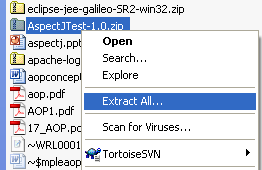
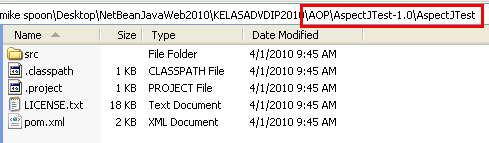
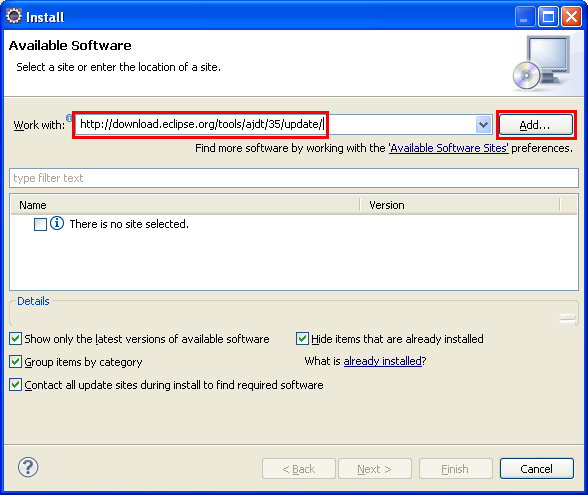
ÿþ<html> <head> <meta http-equiv="Content-Type" content="text/html; charset=unicode" /> <meta http-equiv="Content-Language" content="en-us" /> <style> <!-- p.MsoNormal {margin-top:0mm; margin-right:0mm; margin-bottom:10.0pt; margin-left:0mm; line-height:115%; font-size:12.0pt; font-family:"Times New Roman","serif";} a:link {color:blue; text-decoration:underline;} a:visited {color:purple; text-decoration:underline;} p {margin-right:0mm; margin-left:0mm; font-size:12.0pt; font-family:"Times New Roman","serif";} ol {margin-bottom:0mm;} --> </style> <title>A tutorial on Java aspect oriented programming (AOP) with Eclipse</title> <meta name="keywords" content="Java, AOP, opensource, technology, web server, web application, spring, samples, examples, applications, hosting, tools" /> <meta name="description" content="A brief tutorial on the Java Aspect Oriented Programming through program sample using Eclipse IDE" /> </head> <body lang="EN-US" link="#0000FF" vlink="#800080" topmargin="20" leftmargin="20" rightmargin="20" bottommargin="20"> <div class="WordSection1"> <p class="MsoNormal" style="margin-bottom:0mm;margin-bottom:0; line-height:100%; margin-top:0">&nbsp;</p> <h1 align="center" style="margin-bottom:0mm;margin-bottom:0; text-align:center; line-height:100%; margin-top:0"><b> <font face="Arial"> <span style="line-height:115%;font-weight:400">Java, Aspect Oriented Programming, Aspectj and Eclipse</span></font></b></h1> <p class="MsoNormal" style="margin-bottom:0mm;margin-bottom:0; line-height:100%; margin-top:0">&nbsp;</p> <p class="MsoNormal" style="margin-bottom:0mm;margin-bottom:0; line-height:100%; margin-top:0">&nbsp;</p> <p class="MsoNormal" style="margin-bottom:0mm;margin-bottom:0; line-height:100%; margin-top:0">&nbsp;</p> <p class="MsoNormal" style="margin-bottom:0mm;margin-bottom:0; line-height:100%; margin-top:0" align="center"><script type="text/javascript"><!-- google_ad_client = "pub-8089415323104206"; /* 728x90, created 5/16/08 javaos */ google_ad_slot = "1917524460"; google_ad_width = 728; google_ad_height = 90; //--> </script> <script type="text/javascript" src="http://pagead2.googlesyndication.com/pagead/show_ads.js"> </script></p> <p class="MsoNormal" style="margin-bottom:0mm;margin-bottom:0; line-height:100%; margin-top:0">&nbsp;</p> <p class="MsoNormal" style="margin-bottom:0mm;margin-bottom:0; line-height:100%; margin-top:0">&nbsp;</p> <p class="MsoNormal" style="margin-bottom:0mm;margin-bottom:0; line-height:100%; margin-top:0">&nbsp;</p> <p class="MsoNormal" style="margin-bottom:0mm;margin-bottom:0; line-height:100%; margin-top:0"> <font size="3" face="Arial"><span style="font-size:12.0pt;line-height:115%"> What do we have in this session?</span></font></p> <p class="MsoNormal" style="margin-bottom:0mm;margin-bottom:0; line-height:100%; margin-top:0"> <font size="3" face="Arial"><span style="font-size:12.0pt;line-height:115%">&nbsp;</span></font></p> <ol> <li> <h1 style="margin-top: 0; margin-bottom: 0"> <span style="font-weight: 400"><font size="3" face="Arial">Download and Run Eclipse IDE</font></span></h1> </li> <li> <h1 style="margin-top: 0; margin-bottom: 0"> <span style="font-weight: 400"><font size="3" face="Arial">Running Eclipse</font></span></h1> </li> <li> <h1 style="margin-top: 0; margin-bottom: 0"> <span style="font-weight: 400"><font size="3" face="Arial">Trying a Sample AOP Example</font></span></h1> </li> <li> <h1 style="margin-top: 0; margin-bottom: 0"> <span style="font-weight: 400"><font size="3" face="Arial">Importing Sample AOP Project into Eclipse</font></span></h1> </li> <li> <h1 style="margin-top: 0; margin-bottom: 0"> <span style="font-weight: 400"><font size="3" face="Arial">Download and Update AspectJ Development Tools (ADJT)</font></span></h1> </li> <li> <h1 style="margin-top: 0; margin-bottom: 0"> <span style="font-weight: 400"><font size="3" face="Arial">Build and Run the Sample AOP Project</font></span></h1> </li> <li> <h1 style="margin-top: 0; margin-bottom: 0"> <span style="font-weight: 400"><font size="3" face="Arial">Resolving the Java Package Error</font></span></h1> </li> <li> <h1 style="margin-top: 0; margin-bottom: 0"> <span style="font-weight: 400"><font size="3" face="Arial">Further Reading and Investigation: AOP with Spring</font></span></h1> </li> </ol> <p class="MsoNormal" style="margin-bottom:0mm;margin-bottom:0; line-height:100%; margin-top:0"> <font size="3" face="Arial"><span style="font-size:12.0pt;line-height:115%">&nbsp;</span></font></p> <p class="MsoNormal" style="margin-bottom:0mm;margin-bottom:0; line-height:100%; margin-top:0"> <font size="3" face="Arial"><span style="font-size:12.0pt;line-height:115%">&nbsp;</span></font></p> <p class="MsoNormal" style="margin-bottom:0mm;margin-bottom:0; line-height:100%; margin-top:0"> <font size="3" face="Arial"><span style="font-size:12.0pt;line-height:115%"> In this very short tutorial we are going to try a very simple example on Aspect oriented Programming (AOP). We will use Eclipse IDE to build a very simple Java program example that demonstrates AOP. First and foremost, please read and try to understand a simple AOP tutorial at <a href="http://www.christianschenk.org/blog/aop-with-aspectj/" target="_blank" title="AOP with Aspectj short tutorial with sample Java program example"> AOP with Aspectj</a>.</span></font><font face="Arial"> </font></p> <p class="MsoNormal" style="margin-bottom:0mm;margin-bottom:0; line-height:100%; margin-top:0">&nbsp;</p> <p class="MsoNormal" style="margin-bottom:0mm;margin-bottom:0; line-height:100%; margin-top:0"> <font face="Arial"><b><span style="font-weight:bold">Download and Run Eclipse IDE</span></b></font></p> <p class="MsoNormal" style="margin-bottom:0mm;margin-bottom:0; line-height:100%; margin-top:0">&nbsp;</p> <p class="MsoNormal" style="margin-bottom:0mm;margin-bottom:0; line-height:100%; margin-top:0"> <font face="Arial">Then, download Eclipse from <a href="http://www.eclipse.org/" target="_blank" title="Eclipse IDE - an open source Java, C, C++, Ruby and other programming languages"> www.eclipse.org</a> and choose <b><span style="font-weight:bold">Eclipse IDE for Java EE Developers (190 MB)</span></b> package. Please read the &#39;installation&#39; procedure document/manual as needed.</font></p> <p class="MsoNormal" style="margin-bottom:0mm;margin-bottom:0; line-height:100%; margin-top:0">&nbsp;</p> <p class="MsoNormal" align="center" style="margin-bottom:0mm;margin-bottom:0; text-align:center; line-height:100%; margin-top:0"><font face="Arial"> <img border="0" width="731" height="292" src="javaopaspectjeclipse_files/javaopaspectjeclipse001.png" alt="Java, Aspect Oriented Programming, Aspectj and Eclipse - download Eclipse IDE" /></font></p> <p class="MsoNormal" style="margin-bottom:0mm;margin-bottom:0; line-height:100%; margin-top:0">&nbsp;</p> <p class="MsoNormal" style="margin-bottom:0mm;margin-bottom:0; line-height:100%; margin-top:0"> <font face="Arial">After downloading the eclipse-jee-galileo-SR2-win32.zip file, use <a href="http://www.7-zip.org/" target="_blank" title="7 zip utility for unzipping and zipping files/folders"> 7 zip to unzip the compressed</a> file (using Windows zip will generate error!).</font></p> <p class="MsoNormal" style="margin-bottom:0mm;margin-bottom:0; line-height:100%; margin-top:0">&nbsp;</p> <p class="MsoNormal" align="center" style="margin-bottom:0mm;margin-bottom:0; text-align:center; line-height:100%; margin-top:0"><font face="Arial"> <img border="0" width="590" height="246" src="javaopaspectjeclipse_files/javaopaspectjeclipse002.png" alt="Java, Aspect Oriented Programming, Aspectj and Eclipse - uncompress the Eclipse ZIP file" /></font></p> <p class="MsoNormal" style="margin-bottom:0mm;margin-bottom:0; line-height:100%; margin-top:0">&nbsp;</p> <p class="MsoNormal" style="margin-bottom:0mm;margin-bottom:0; line-height:100%; margin-top:0"> <font face="Arial"><b><span style="font-weight:bold">Running Eclipse</span></b></font></p> <p class="MsoNormal" style="margin-bottom:0mm;margin-bottom:0; line-height:100%; margin-top:0">&nbsp;</p> <p class="MsoNormal" style="margin-bottom:0mm;margin-bottom:0; line-height:100%; margin-top:0"> <font face="Arial">Then run the eclipse executable.</font></p> <p class="MsoNormal" style="margin-bottom:0mm;margin-bottom:0; line-height:100%; margin-top:0">&nbsp;</p> <p class="MsoNormal" align="center" style="margin-bottom:0mm;margin-bottom:0; text-align:center; line-height:100%; margin-top:0"><font face="Arial"> <img border="0" width="397" height="231" src="javaopaspectjeclipse_files/javaopaspectjeclipse003.png" alt="Java, Aspect Oriented Programming, Aspectj and Eclipse - the Eclipse executable file (and other files and folders)" /></font></p> <p class="MsoNormal" style="margin-bottom:0mm;margin-bottom:0; line-height:100%; margin-top:0">&nbsp;</p> <p class="MsoNormal" style="margin-bottom:0mm;margin-bottom:0; line-height:100%; margin-top:0"> <font face="Arial">If there is a workspace path prompt displayed, accept the default given or you can change it to your desired path.</font></p> <p class="MsoNormal" style="margin-bottom:0mm;margin-bottom:0; line-height:100%; margin-top:0">&nbsp;</p> <p class="MsoNormal" align="center" style="margin-bottom:0mm;margin-bottom:0; text-align:center; line-height:100%; margin-top:0"><font face="Arial"> <img border="0" width="791" height="531" src="javaopaspectjeclipse_files/javaopaspectjeclipse004.png" alt="Java, Aspect Oriented Programming, Aspectj and Eclipse - the Eclipse IDE" /></font></p> <p class="MsoNormal" style="margin-bottom:0mm;margin-bottom:0; line-height:100%; margin-top:0">&nbsp;</p> <p class="MsoNormal" style="margin-bottom:0mm;margin-bottom:0; line-height:100%; margin-top:0"> <font face="Arial">Net, let try building and running the sample AOP using AspectJ. The example is a very simple Hello World application with two aspects: AspectJAspect and AspectJAnnotation. While AspectJ at first introduced a Java-like language to write aspects, with AspectJ version 5 it s possible to write aspects as classes with special annotations and the two aspect examples demonstrate both approaches. You can download the Eclipse sample project as <a href="http://data.christianschenk.org/aop-with-aspectj/AspectJTest-1.0.tar.gz" target="_blank" title="AOP and AspectJ java program example in tar.gz"> tar.gz</a> or <a href="http://data.christianschenk.org/aop-with-aspectj/AspectJTest-1.0.zip" target="_blank" title="AOP and AspectJ java program example in zip format"> zip</a> and thanks to the author; all copyright must goes to him.</font></p> <p class="MsoNormal" style="margin-bottom:0mm;margin-bottom:0; line-height:100%; margin-top:0">&nbsp;</p> <p class="MsoNormal" style="margin-bottom:0mm;margin-bottom:0; line-height:100%; margin-top:0"> <font face="Arial"><b><span style="font-weight:bold">Trying a Sample AOP Example</span></b></font></p> <p class="MsoNormal" style="margin-bottom:0mm;margin-bottom:0; line-height:100%; margin-top:0">&nbsp;</p> <p class="MsoNormal" style="margin-bottom:0mm;margin-bottom:0; line-height:100%; margin-top:0"> <font face="Arial">Next, we unzip the sample code.</font></p> <p class="MsoNormal" style="margin-bottom:0mm;margin-bottom:0; line-height:100%; margin-top:0">&nbsp;</p> <p class="MsoNormal" align="center" style="margin-bottom:0mm;margin-bottom:0; text-align:center; line-height:100%; margin-top:0"><font face="Arial"> <img border="0" width="262" height="170" src="javaopaspectjeclipse_files/javaopaspectjeclipse005.png" alt="Java, Aspect Oriented Programming, Aspectj and Eclipse - unzipping the AOP with AspectJ zip file" /></font></p> <p class="MsoNormal" style="margin-bottom:0mm;margin-bottom:0; line-height:100%; margin-top:0">&nbsp;</p> <p class="MsoNormal" style="margin-bottom:0mm;margin-bottom:0; line-height:100%; margin-top:0"> <font face="Arial">The following are the source files and folders.</font></p> <p class="MsoNormal" style="margin-bottom:0mm;margin-bottom:0; line-height:100%; margin-top:0">&nbsp;</p> <p class="MsoNormal" align="center" style="margin-bottom:0mm;margin-bottom:0; text-align:center; line-height:100%; margin-top:0"><font face="Arial"> <img border="0" width="489" height="143" src="javaopaspectjeclipse_files/javaopaspectjeclipse006.png" alt="Java, Aspect Oriented Programming, Aspectj and Eclipse - the unzipped files and folders" /></font></p> <p class="MsoNormal" style="margin-bottom:0mm;margin-bottom:0; line-height:100%; margin-top:0">&nbsp;</p> <p class="MsoNormal" style="margin-bottom:0mm;margin-bottom:0; line-height:100%; margin-top:0"> <font face="Arial">Then, we copy the sample code&#39;s project folder to the Eclipse&#39;s workspace folder. However, this can be done later, automatically.</font></p> <p class="MsoNormal" style="margin-bottom:0mm;margin-bottom:0; line-height:100%; margin-top:0">&nbsp;</p> <p class="MsoNormal" align="center" style="margin-bottom:0mm;margin-bottom:0; text-align:center; line-height:100%; margin-top:0"><font face="Arial"> <img border="0" width="370" height="96" src="javaopaspectjeclipse_files/javaopaspectjeclipse007.png" /></font></p> <p class="MsoNormal" style="margin-bottom:0mm;margin-bottom:0; line-height:100%; margin-top:0">&nbsp;</p> <p class="MsoNormal" style="margin-bottom:0mm;margin-bottom:0; line-height:100%; margin-top:0"> <font face="Arial"><b><span style="font-weight:bold">Importing Sample AOP Project into Eclipse</span></b></font></p> <p class="MsoNormal" style="margin-bottom:0mm;margin-bottom:0; line-height:100%; margin-top:0">&nbsp;</p> <p class="MsoNormal" style="margin-bottom:0mm;margin-bottom:0; line-height:100%; margin-top:0"> <font face="Arial">Then, import the sample project to the current Eclipse workspace.</font></p> <p class="MsoNormal" style="margin-bottom:0mm;margin-bottom:0; line-height:100%; margin-top:0">&nbsp;</p> <p class="MsoNormal" align="center" style="margin-bottom:0mm;margin-bottom:0; text-align:center; line-height:100%; margin-top:0"><font face="Arial"> <img border="0" width="314" height="429" src="javaopaspectjeclipse_files/javaopaspectjeclipse008.png" alt="Java, Aspect Oriented Programming, Aspectj and Eclipse - importing the existing Java project into Eclipse" /></font></p> <p class="MsoNormal" style="margin-bottom:0mm;margin-bottom:0; line-height:100%; margin-top:0"> <font face="Arial">Expand the General folder &gt; select Existing Projects into Workspace &gt; click Next button.</font></p> <p class="MsoNormal" style="margin-bottom:0mm;margin-bottom:0; line-height:100%; margin-top:0">&nbsp;</p> <p class="MsoNormal" align="center" style="margin-bottom:0mm;margin-bottom:0; text-align:center; line-height:100%; margin-top:0"><font face="Arial"> <img border="0" width="470" height="550" src="javaopaspectjeclipse_files/javaopaspectjeclipse009.png" alt="Java, Aspect Oriented Programming, Aspectj and Eclipse - selecting the existing project type" /></font></p> <p class="MsoNormal" style="margin-bottom:0mm;margin-bottom:0; line-height:100%; margin-top:0">&nbsp;</p> <p class="MsoNormal" style="margin-bottom:0mm;margin-bottom:0; line-height:100%; margin-top:0"> <font face="Arial">Click Browse to select the sample project root directory.</font></p> <p class="MsoNormal" style="margin-bottom:0mm;margin-bottom:0; line-height:100%; margin-top:0">&nbsp;</p> <p class="MsoNormal" align="center" style="margin-bottom:0mm;margin-bottom:0; text-align:center; line-height:100%; margin-top:0"><font face="Arial"> <img border="0" width="452" height="522" src="javaopaspectjeclipse_files/javaopaspectjeclipse010.png" alt="Java, Aspect Oriented Programming, Aspectj and Eclipse - selecting the existing project's root directory" /></font></p> <p class="MsoNormal" style="margin-bottom:0mm;margin-bottom:0; line-height:100%; margin-top:0">&nbsp;</p> <p class="MsoNormal" align="center" style="margin-bottom:0mm;margin-bottom:0; text-align:center; line-height:100%; margin-top:0"><font face="Arial"> <img border="0" width="326" height="322" src="javaopaspectjeclipse_files/javaopaspectjeclipse011.png" /></font></p> <p class="MsoNormal" style="margin-bottom:0mm;margin-bottom:0; line-height:100%; margin-top:0">&nbsp;</p> <p class="MsoNormal" style="margin-bottom:0mm;margin-bottom:0; line-height:100%; margin-top:0"> <font face="Arial">If we skip the step on copying the sample project folder (copy projects into workspace check box) into the workspace as previously done, we can still copy the project into the workspace at this stage. Click Finish button.</font></p> <p class="MsoNormal" style="margin-bottom:0mm;margin-bottom:0; line-height:100%; margin-top:0">&nbsp;</p> <p class="MsoNormal" align="center" style="margin-bottom:0mm;margin-bottom:0; text-align:center; line-height:100%; margin-top:0"><font face="Arial"> <img border="0" width="452" height="522" src="javaopaspectjeclipse_files/javaopaspectjeclipse012.png" alt="Java, Aspect Oriented Programming, Aspectj and Eclipse - an option to copy the whole existing project into the Eclipse workspace" /></font></p> <p class="MsoNormal" style="margin-bottom:0mm;margin-bottom:0; line-height:100%; margin-top:0">&nbsp;</p> <p class="MsoNormal" style="margin-bottom:0mm;margin-bottom:0; line-height:100%; margin-top:0"> <font face="Arial"><b><span style="font-weight:bold">Download and Update AspectJ Development Tools (ADJT)</span></b></font></p> <p class="MsoNormal" style="margin-bottom:0mm;margin-bottom:0; line-height:100%; margin-top:0">&nbsp;</p> <p class="MsoNormal" style="margin-bottom:0mm;margin-bottom:0; line-height:100%; margin-top:0"> <font face="Arial">If your Eclipse doesn t have the AJDT, you need to download the &#39;plug-in&#39; manually or through the Eclipse update. For Eclipse update, use the following steps.</font></p> <p class="MsoNormal" style="margin-bottom:0mm;margin-bottom:0; line-height:100%; margin-top:0">&nbsp;</p> <p class="MsoNormal" style="margin-bottom:0mm;margin-bottom:0; line-height:100%; margin-top:0"> <font face="Arial">Get the stable/release update link (in this case it is: http://www.eclipse.org/ajdt/downloads/) for the correct Eclipse version and in this case: <a href="http://download.eclipse.org/tools/ajdt/35/update/">http://download.eclipse.org/tools/ajdt/35/update/</a>. Click Help menu &gt; select Install New Software.</font></p> <p class="MsoNormal" style="margin-bottom:0mm;margin-bottom:0; line-height:100%; margin-top:0">&nbsp;</p> <p class="MsoNormal" style="margin-bottom:0mm;margin-bottom:0; line-height:100%; margin-top:0"> <font face="Arial"> </font></p> <p class="MsoNormal" style="margin-bottom:0mm;margin-bottom:0; line-height:100%; margin-top:0">&nbsp;</p> <p class="MsoNormal" align="center" style="margin-bottom:0mm;margin-bottom:0; text-align:center; line-height:100%; margin-top:0"><font face="Arial"> <img border="0" width="325" height="273" src="javaopaspectjeclipse_files/javaopaspectjeclipse013.png" alt="Java, Aspect Oriented Programming, Aspectj and Eclipse - download and install new software or modules or plug-ins to the Eclipse" /></font></p> <p class="MsoNormal" style="margin-bottom:0mm;margin-bottom:0; line-height:100%; margin-top:0">&nbsp;</p> <p class="MsoNormal" style="margin-bottom:0mm;margin-bottom:0; line-height:100%; margin-top:0"> <font face="Arial">Paste the update link, click the Add button and wait.</font></p> <p class="MsoNormal" style="margin-bottom:0mm;margin-bottom:0; line-height:100%; margin-top:0">&nbsp;</p> <p class="MsoNormal" align="center" style="margin-bottom:0mm;margin-bottom:0; text-align:center; line-height:100%; margin-top:0"><font face="Arial"> <img border="0" width="588" height="495" src="javaopaspectjeclipse_files/javaopaspectjeclipse014.png" alt="Java, Aspect Oriented Programming, Aspectj and Eclipse - selecting the update URL for AspectJ Development Tool" /></font></p> <p class="MsoNormal" style="margin-bottom:0mm;margin-bottom:0; line-height:100%; margin-top:0">&nbsp;</p> <p class="MsoNormal" style="margin-bottom:0mm;margin-bottom:0; line-height:100%; margin-top:0"> <font face="Arial">Then, select all the required and optional plug-ins. Click Next/Finish and wait until all the modules are downloaded and installed.</font></p> <p class="MsoNormal" style="margin-bottom:0mm;margin-bottom:0; line-height:100%; margin-top:0">&nbsp;</p> <p class="MsoNormal" align="center" style="margin-bottom:0mm;margin-bottom:0; text-align:center; line-height:100%; margin-top:0"><font face="Arial"> <img border="0" width="588" height="495" src="javaopaspectjeclipse_files/javaopaspectjeclipse015.png" alt="Java, Aspect Oriented Programming, Aspectj and Eclipse - AspectJ Development Tools (AJDT) components to be downloaded" /></font></p> <p class="MsoNormal" style="margin-bottom:0mm;margin-bottom:0; line-height:100%; margin-top:0">&nbsp;</p> <p class="MsoNormal" style="margin-bottom:0mm;margin-bottom:0; line-height:100%; margin-top:0"> <font face="Arial"><b><span style="font-weight:bold">Build and Run the Sample AOP Project</span></b></font></p> <p class="MsoNormal" style="margin-bottom:0mm;margin-bottom:0; line-height:100%; margin-top:0">&nbsp;</p> <p class="MsoNormal" style="margin-bottom:0mm;margin-bottom:0; line-height:100%; margin-top:0"> <font face="Arial">Next, we are ready to build and run the simple program example. In Project Explorer, select <b>AspectJTest</b> project folder &gt; right-click mouse &gt; select Run As sub menu &gt; select Java Application.</font></p> <p class="MsoNormal" style="margin-bottom:0mm;margin-bottom:0; line-height:100%; margin-top:0">&nbsp;</p> <p class="MsoNormal" align="center" style="margin-bottom:0mm;margin-bottom:0; text-align:center; line-height:100%; margin-top:0"><font face="Arial"> <img border="0" width="578" height="521" src="javaopaspectjeclipse_files/javaopaspectjeclipse016.png" alt="Java, Aspect Oriented Programming, Aspectj and Eclipse - running the project opened in Eclipse as java Application" /></font></p> <p class="MsoNormal" style="margin-bottom:0mm;margin-bottom:0; line-height:100%; margin-top:0">&nbsp;</p> <p class="MsoNormal" style="margin-bottom:0mm;margin-bottom:0; line-height:100%; margin-top:0"> <font face="Arial">Select the Main (main project entry point). Click OK.</font></p> <p class="MsoNormal" style="margin-bottom:0mm;margin-bottom:0; line-height:100%; margin-top:0">&nbsp;</p> <table border="0" width="100%"> <tr> <td> <p align="center"><font face="Arial"> <img border="0" width="456" height="429" src="javaopaspectjeclipse_files/javaopaspectjeclipse017.png" alt="Java, Aspect Oriented Programming, Aspectj and Eclipse - selecting the Main project entry point" /></font></td> <td style="border-left-style: solid; border-left-width: 2px"> <p align="center"><script type="text/javascript"><!-- google_ad_client = "pub-8089415323104206"; /* 300x250, created 5/16/08javaos */ google_ad_slot = "8146009330"; google_ad_width = 300; google_ad_height = 250; //--> </script> <script type="text/javascript" src="http://pagead2.googlesyndication.com/pagead/show_ads.js"> </script></td> </tr> </table> <p class="MsoNormal" align="center" style="margin-bottom:0mm;margin-bottom:0; text-align:left; line-height:100%; margin-top:0">&nbsp;</p> <p class="MsoNormal" style="margin-bottom:0mm;margin-bottom:0; line-height:100%; margin-top:0">&nbsp;</p> <p class="MsoNormal" style="margin-bottom:0mm;margin-bottom:0; line-height:100%; margin-top:0"> <font face="Arial">Then, let view as fast view. Click the small icon on the bottom-leftmost Eclipse IDE.</font></p> <p class="MsoNormal" style="margin-bottom:0mm;margin-bottom:0; line-height:100%; margin-top:0">&nbsp;</p> <p class="MsoNormal" align="center" style="margin-bottom:0mm;margin-bottom:0; text-align:center; line-height:100%; margin-top:0"><font face="Arial"> <img border="0" width="257" height="97" src="javaopaspectjeclipse_files/javaopaspectjeclipse018.png" alt="Java, Aspect Oriented Programming, Aspectj and Eclipse - invoking more Eclipse features" /></font></p> <p class="MsoNormal" style="margin-bottom:0mm;margin-bottom:0; line-height:100%; margin-top:0">&nbsp;</p> <p class="MsoNormal" style="margin-bottom:0mm;margin-bottom:0; line-height:100%; margin-top:0"> <font face="Arial">Select Navigator menu.</font></p> <p class="MsoNormal" style="margin-bottom:0mm;margin-bottom:0; line-height:100%; margin-top:0">&nbsp;</p> <p class="MsoNormal" align="center" style="margin-bottom:0mm;margin-bottom:0; text-align:center; line-height:100%; margin-top:0"><font face="Arial"> <img border="0" width="264" height="287" src="javaopaspectjeclipse_files/javaopaspectjeclipse019.png" alt="Java, Aspect Oriented Programming, Aspectj and Eclipse - invoking the Navigator page" /></font></p> <p class="MsoNormal" style="margin-bottom:0mm;margin-bottom:0; line-height:100%; margin-top:0">&nbsp;</p> <p class="MsoNormal" style="margin-bottom:0mm;margin-bottom:0; line-height:100%; margin-top:0"> <font face="Arial">In Navigator window, double click <b>AspectJAnnotation.java</b> file.</font></p> <p class="MsoNormal" style="margin-bottom:0mm;margin-bottom:0; line-height:100%; margin-top:0">&nbsp;</p> <p class="MsoNormal" align="center" style="margin-bottom:0mm;margin-bottom:0; text-align:center; line-height:100%; margin-top:0"><font face="Arial"> <img border="0" width="350" height="507" src="javaopaspectjeclipse_files/javaopaspectjeclipse020.png" alt="Java, Aspect Oriented Programming, Aspectj and Eclipse - invoking the java source file" /></font></p> <p class="MsoNormal" style="margin-bottom:0mm;margin-bottom:0; line-height:100%; margin-top:0">&nbsp;</p> <p class="MsoNormal" style="margin-bottom:0mm;margin-bottom:0; line-height:100%; margin-top:0"> <font face="Arial">The file content should be displayed in the right windows. Now, we have some error regarding the org.apache.log4j.Logger package. The package cannot be found so let tell Eclipse how to find the package.</font></p> <p class="MsoNormal" style="margin-bottom:0mm;margin-bottom:0; line-height:100%; margin-top:0">&nbsp;</p> <p class="MsoNormal" align="center" style="margin-bottom:0mm;margin-bottom:0; text-align:center; line-height:100%; margin-top:0"><font face="Arial"> <img border="0" width="687" height="523" src="javaopaspectjeclipse_files/javaopaspectjeclipse021.png" alt="Java, Aspect Oriented Programming, Aspectj and Eclipse - errors in the Java source file for the missing log4j import" /></font></p> <p class="MsoNormal" style="margin-bottom:0mm;margin-bottom:0; line-height:100%; margin-top:0">&nbsp;</p> <p class="MsoNormal" style="margin-bottom:0mm;margin-bottom:0; line-height:100%; margin-top:0"> <font face="Arial"><b><span style="font-weight:bold">Resolving the Java Package Error</span></b></font></p> <p class="MsoNormal" style="margin-bottom:0mm;margin-bottom:0; line-height:100%; margin-top:0">&nbsp;</p> <p class="MsoNormal" style="margin-bottom:0mm;margin-bottom:0; line-height:100%; margin-top:0"> <font face="Arial">Open the project property. Select the project folder &gt; right-click mouse &gt; select Properties menu.</font></p> <p class="MsoNormal" style="margin-bottom:0mm;margin-bottom:0; line-height:100%; margin-top:0">&nbsp;</p> <p class="MsoNormal" align="center" style="margin-bottom:0mm;margin-bottom:0; text-align:center; line-height:100%; margin-top:0"><font face="Arial"> <img border="0" width="354" height="605" src="javaopaspectjeclipse_files/javaopaspectjeclipse022.png" alt="Java, Aspect Oriented Programming, Aspectj and Eclipse - invoking the project properties page in Eclipse" /></font></p> <p class="MsoNormal" style="margin-bottom:0mm;margin-bottom:0; line-height:100%; margin-top:0">&nbsp;</p> <p class="MsoNormal" style="margin-bottom:0mm;margin-bottom:0; line-height:100%; margin-top:0"> <font face="Arial">Select Java Build Path link on the left &gt; select Library page on the right window &gt; click Add External JARs button.</font></p> <p class="MsoNormal" style="margin-bottom:0mm;margin-bottom:0; line-height:100%; margin-top:0">&nbsp;</p> <p class="MsoNormal" align="center" style="margin-bottom:0mm;margin-bottom:0; text-align:center; line-height:100%; margin-top:0"><font face="Arial"> <img border="0" width="668" height="544" src="javaopaspectjeclipse_files/javaopaspectjeclipse023.png" alt="Java, Aspect Oriented Programming, Aspectj and Eclipse - adding the external JARs file into the Eclipse existing project" /></font></p> <p class="MsoNormal" style="margin-bottom:0mm;margin-bottom:0; line-height:100%; margin-top:0">&nbsp;</p> <p class="MsoNormal" style="margin-bottom:0mm;margin-bottom:0; line-height:100%; margin-top:0"> <font face="Arial">Find %eclipse-jee-galileo-SR2-win32\eclipse\plugins path/folder &gt; find and select org.apache.log4j.Logger_xxxversionxxx.jar file &gt; click Open button. If you cannot find the package, you need to download it, for example, from: <a href="http://logging.apache.org/log4j/1.2/download.html" target="_blank" title="Apache log4j download page"> Apache&#39;s log4j</a>.</font></p> <p class="MsoNormal" style="margin-bottom:0mm;margin-bottom:0; line-height:100%; margin-top:0">&nbsp;</p> <p class="MsoNormal" align="center" style="margin-bottom:0mm;margin-bottom:0; text-align:center; line-height:100%; margin-top:0"><font face="Arial"> <img border="0" width="563" height="419" src="javaopaspectjeclipse_files/javaopaspectjeclipse024.png" alt="Java, Aspect Oriented Programming, Aspectj and Eclipse - selecting hte org.apache.log4j_1.2.13.xx JAR file" /></font></p> <p class="MsoNormal" style="margin-bottom:0mm;margin-bottom:0; line-height:100%; margin-top:0">&nbsp;</p> <p class="MsoNormal" style="margin-bottom:0mm;margin-bottom:0; line-height:100%; margin-top:0"> <font face="Arial">The package should be visible in the Libraries page. Click OK button to dismiss the project property page.</font></p> <p class="MsoNormal" style="margin-bottom:0mm;margin-bottom:0; line-height:100%; margin-top:0">&nbsp;</p> <p class="MsoNormal" align="center" style="margin-bottom:0mm;margin-bottom:0; text-align:center; line-height:100%; margin-top:0"><font face="Arial"> <img border="0" width="668" height="544" src="javaopaspectjeclipse_files/javaopaspectjeclipse025.png" alt="Java, Aspect Oriented Programming, Aspectj and Eclipse - the new added JAR file is visible in the Eclipse Libraries page" /></font></p> <p class="MsoNormal" style="margin-bottom:0mm;margin-bottom:0; line-height:100%; margin-top:0">&nbsp;</p> <p class="MsoNormal" style="margin-bottom:0mm;margin-bottom:0; line-height:100%; margin-top:0"> <font face="Arial">Also, the log4j package should be visible in Project Explorer.</font></p> <p class="MsoNormal" style="margin-bottom:0mm;margin-bottom:0; line-height:100%; margin-top:0">&nbsp;</p> <p class="MsoNormal" align="center" style="margin-bottom:0mm;margin-bottom:0; text-align:center; line-height:100%; margin-top:0"><font face="Arial"> <img border="0" width="354" height="417" src="javaopaspectjeclipse_files/javaopaspectjeclipse026.png" alt="Java, Aspect Oriented Programming, Aspectj and Eclipse - the content of the JAR library file" /></font></p> <p class="MsoNormal" style="margin-bottom:0mm;margin-bottom:0; line-height:100%; margin-top:0">&nbsp;</p> <p class="MsoNormal" style="margin-bottom:0mm;margin-bottom:0; line-height:100%; margin-top:0"> <font face="Arial">Re-run (re-build) the project example as done previously.</font></p> <p class="MsoNormal" style="margin-bottom:0mm;margin-bottom:0; line-height:100%; margin-top:0">&nbsp;</p> <p class="MsoNormal" align="center" style="margin-bottom:0mm;margin-bottom:0; text-align:center; line-height:100%; margin-top:0"><font face="Arial"> <img border="0" width="526" height="167" src="javaopaspectjeclipse_files/javaopaspectjeclipse027.png" alt="Java, Aspect Oriented Programming, Aspectj and Eclipse - re-running the project in Eclipse as Java Application" /></font></p> <p class="MsoNormal" style="margin-bottom:0mm;margin-bottom:0; line-height:100%; margin-top:0">&nbsp;</p> <p class="MsoNormal" align="center" style="margin-bottom:0mm;margin-bottom:0; text-align:center; line-height:100%; margin-top:0"><font face="Arial"> <img border="0" width="456" height="429" src="javaopaspectjeclipse_files/javaopaspectjeclipse028.png" alt="Java, Aspect Oriented Programming, Aspectj and Eclipse - selecting the project main entry point" /></font></p> <p class="MsoNormal" style="margin-bottom:0mm;margin-bottom:0; line-height:100%; margin-top:0">&nbsp;</p> <p class="MsoNormal" style="margin-bottom:0mm;margin-bottom:0; line-height:100%; margin-top:0"> <font face="Arial">The output sample should be visible in the Console window.</font></p> <p class="MsoNormal" style="margin-bottom:0mm;margin-bottom:0; line-height:100%; margin-top:0">&nbsp;</p> <p class="MsoNormal" align="center" style="margin-bottom:0mm;margin-bottom:0; text-align:center; line-height:100%; margin-top:0"><font face="Arial"> <img border="0" width="690" height="223" src="javaopaspectjeclipse_files/javaopaspectjeclipse029.png" alt="Java, Aspect Oriented Programming, Aspectj and Eclipse - a sample project output seen in the Eclipse output window" /></font></p> <p class="MsoNormal" style="margin-bottom:0mm;margin-bottom:0; line-height:100%; margin-top:0">&nbsp;</p> <p class="MsoNormal" style="margin-bottom:0mm;margin-bottom:0; line-height:100%; margin-top:0"> <font face="Arial">Finally, close the project (close all the files).</font></p> <p class="MsoNormal" style="margin-bottom:0mm;margin-bottom:0; line-height:100%; margin-top:0">&nbsp;</p> <p class="MsoNormal" align="center" style="margin-bottom:0mm;margin-bottom:0; text-align:center; line-height:100%; margin-top:0"><font face="Arial"> <img border="0" width="354" height="257" src="javaopaspectjeclipse_files/javaopaspectjeclipse030.png" alt="Java, Aspect Oriented Programming, Aspectj and Eclipse - closing the project" /></font></p> <p class="MsoNormal" style="margin-bottom:0mm;margin-bottom:0; line-height:100%; margin-top:0">&nbsp;</p> <p class="MsoNormal" style="margin-bottom:0mm;margin-bottom:0; line-height:100%; margin-top:0"> <font face="Arial"><b><span style="font-weight:bold">Further Reading and Investigation</span></b></font></p> <p class="MsoNormal" style="margin-bottom:0mm;margin-bottom:0; line-height:100%; margin-top:0">&nbsp;</p> <p class="MsoNormal" style="margin-bottom:0mm;margin-bottom:0; line-height:100%; margin-top:0"> <font face="Arial">Aspect Oriented Programming tutorial with Spring can be found at: <a href="http://static.springsource.org/spring/docs/2.0.x/reference/aop.html" target="_blank" title="Aspect Oriented Programming with Spring framework"> Aspect Oriented Programming with Spring</a></font></p> <p class="MsoNormal" style="margin-bottom:0mm;margin-bottom:0; line-height:100%; margin-top:0">&nbsp;</p> <p style="margin-top: 0; margin-bottom: 0"></p> <p style="margin-top: 0; margin-bottom: 0"></p> <p style="margin-top: 0; margin-bottom: 0" align="center"><script type="text/javascript"><!-- google_ad_client = "pub-8089415323104206"; /* 728x15, created 5/16/08javaos */ google_ad_slot = "3545464564"; google_ad_width = 728; google_ad_height = 15; //--> </script> <script type="text/javascript" src="http://pagead2.googlesyndication.com/pagead/show_ads.js"> </script></p> <hr color="#FF0000" /> <p class="MsoNormal" style="line-height: 100%; margin-top: 0; margin-bottom: 0" align="center"> <font face="Arial" size="5"> <a title="The Java and open source applications" target="_top" href="http://www.javaguicodexample.com/"> Back to Main</a></font></p> <p class="MsoNormal" style="line-height: 100%; margin-top: 0; margin-bottom: 0" align="left"> &nbsp;</p> <p class="MsoNormal" style="line-height: 100%; margin-top: 0; margin-bottom: 0" align="center"> <script src="http://tag.contextweb.com/TagPublish/getjs.aspx?action=VIEWAD&cwrun=200&cwadformat=728X90&cwpid=527221&cwwidth=728&cwheight=90&cwpnet=1&cwtagid=85440"></script></p> </div> </body> </html>