< C++ .NET System::IO - Files 4 | Main | C++ .NET System::IO - Files 6 >
Working with Files 5
What we have in this page?
Working with Files and Directories
The System::IO namespace contains several classes to help you work with files and directories.
Getting Information About Files and Directories
The Directory and DirectoryInfo classes (these classes look similar to the Win32 using Microsoft C/standard C) provide you with functions to help you work with directories. The difference between them is that the Directory class only contains static methods, while DirectoryInfo contains non-static instance methods. Why the need for two different classes? It’s necessary for .NET to perform a security check before allowing you access to a directory or a file. The Directory class performs this check every time you use one of its static methods, which can be time-consuming. Objects of the DirectoryInfo class, on the other hand, work with one directory, and the security check is done once when the object is constructed. It can, therefore, be a lot more efficient to use DirectoryInfo if you’re going to perform multiple operations on one directory. The following table lists the main methods of the Directory class.
| |||||||||||||||||||||||||||||||||||||||||
The following two tables list the properties and methods of the DirectoryInfo class. Newer .NET version may have more and some may be obsolete. Please refer to your latest .NET/MSDN/VC++ .NET compiler documentation.
| Property | Description |
| Attributes | Gets or sets the FileAttributes for the directory. |
| CreationTime | Gets or sets the creation time for the directory. |
| Exists | Value is true if the directory path exists. |
| Extension | Gets the extension part of the directory name. |
| FullName | Gets the full path of the directory. |
| LastAccessTime | Gets or sets the time when the directory was last accessed. |
| LastWriteTime | Gets or sets the time when the directory was last written to. |
| Name | Represents the name of the directory. |
| Parent | Gets a DirectoryInfo object representing the parent of this directory. |
| Root | Gets a DirectoryInfo object representing the root portion of a directory path. |
|
Table 12 | |
| Method | Description |
| Create | Creates a directory. |
| CreateSubdirectory | Creates one or more subdirectories. |
| Delete | Deletes a directory and its contents. |
| GetDirectories | Gets an array of DirectoryInfo objects representing the subdirectories of this directory. |
| GetFiles | Gets an array of FileInfo objects representing the files in this directory. |
| GetFileSystemInfos | Gets an array of FileSystemInfo objects representing the directories and files in this directory. |
| MoveTo | Moves the directory and its contents. |
| ToString | Returns the fully qualified path as a string. |
|
Table 13 | |
Two classes, File and FileInfo, are used to work with files. Like the Directory and DirectoryInfo classes discussed earlier, File contains static methods, and FileInfo contains non-static instance methods. The following table lists the methods provided by the File class.
| Method | Description |
| AppendText | Appends text to a file, creating the file if it doesn’t already exist. |
| Copy | Copies a file. |
| Create | Creates a new file. |
| CreateText | Creates a new text file. |
| Delete | Deletes a file. |
| Exists | Returns true if a file exists. |
| GetAttributes | Returns the file attributes. |
| GetCreationTime | Returns the file’s creation time. |
| GetLastAccessTime | Returns the file’s last access time. |
| GetLastWriteTime | Returns the file’s last write time. |
| Move | Moves a file to a new location, with the option of renaming it. |
| Open | Opens a FileStream for read/write access to a file. |
| OpenRead | Opens a FileStream for read-only access to a file. |
| OpenText | Opens a FileStream to read from a text file. |
| OpenWrite | Opens a FileStream for read/write access to a file. |
| SetAttributes | Sets the file attributes. |
| SetCreationTime | Sets the file’s creation time. |
| SetLastAccessTime | Sets the file’s last access time. |
| SetLastWriteTime | Sets the file’s last write time. |
|
Table 14 | |
The following two tables list the properties and methods exposed by the FileInfo class.
| Property | Description |
| Directory | Returns a DirectoryInfo object representing the file’s parent directory. |
| DirectoryName | Returns a string representing the file’s full path. |
| Exists | Returns true if the file exists. |
| Length | Returns the length of the file in bytes. |
| Name | Returns the name of the file. |
|
Table 15 | |
| Method | Description |
| AppendText | Creates a StreamWriter to append text to a file. |
| CopyTo | Copies a file to another location. |
| Create | Creates a new file and a FileStream to write to it. |
| CreateText | Creates a StreamWriter to write to a new text file. |
| Delete | Deletes a file. |
| MoveTo | Moves a file to a new location. |
| Open | Returns a FileStream with a specified level of access to a file. |
| OpenRead | Returns a FileStream with read access to a file. |
| OpenText | Creates a StreamReader to read from an existing file. |
| OpenWrite | Returns a FileStream with read/write access to a file. |
| ToString | Returns the file path as a string. |
|
Table 16 | |
The following example illustrates the use of the directory and file manipulation classes. You’ll construct a simple directory-listing program similar in functionality to the MS-DOS dir command. Here’s how it will work:
-
If the path represents a file, the details of the file will be printed.
-
If the path represents a directory, the contents of the directory will be listed.
-
In addition to the name, the user can choose to display size, last modification date, and attributes. For directories, only the last modification date applies.
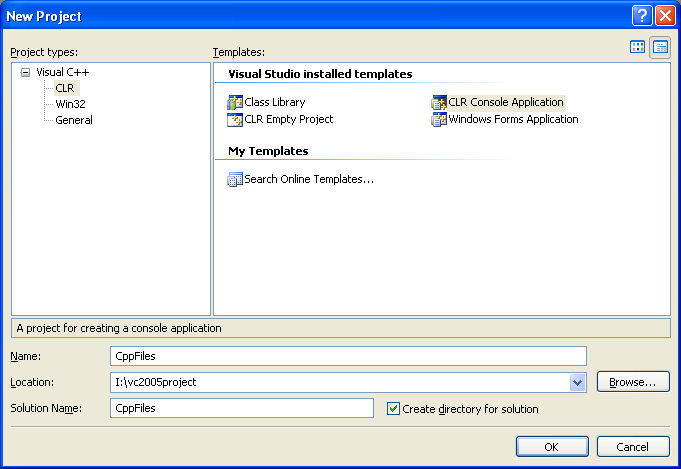
1. Create a new Visual C++ CLR Console Application project named CppFiles.
2. Because all the file and directory classes are part of System::IO, include a using declaration at the start of the program, as follows:
using namespace System::IO;

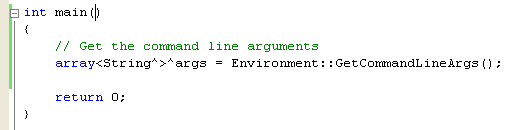
3. The user will use the command line to give options and a path to list, so edit the definition of the main() function to include the command-line argument parameters, just as you did in the CppReader exercise by adding the following code and deleting the main()’s managed array arguments.
// Get the command line arguments
array<String^>^args = Environment::GetCommandLineArgs();
4. The user can call the program with a path or with options plus a path. Add the following code to the main() function:
// Check for required arguments
if (args->Length < 2)
{
Console::WriteLine(L"Usage: CppFiles [options] [path]");
return 0;
}

The array of command-line arguments includes everything on the command line, so the first item will always be the program name. Therefore, we always want at least two arguments if we want the user to include a path. If the user has specified options, we need to find out what they are. Each option is specified by a single letter, and the set of options chosen is represented by a string of option letters. The options supported in this simple program are s for the size, d for the last modification date, and a for attributes. It doesn’t matter what order options are given in, so sa and as would both print the size and attributes.
5. Here’s the code to check the arguments and save the path and the options that the user has specified:
String^ options = nullptr;
String^ path = nullptr;
bool bGotOptions = false;
// Split out the arguments
if (args->Length == 3)
{
bGotOptions = true;
options = gcnew String(args[1]);
path = gcnew String(args[2]);
}
else if (args->Length == 2)
path = gcnew String(args[1]);
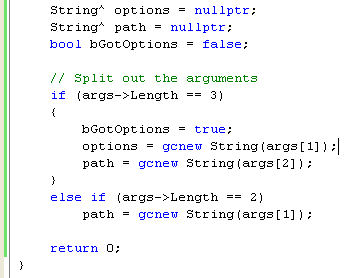 |
If there are three command-line arguments, interpret the first one as an option string.
6. Check which options the user has selected by using the following code:
bool bSize = false;
bool bDate = false;
bool bAtts = false;
// If we have options, check them. The default is to list
// the name only
// Possible options are:
// v verbose listing, gives name, size & access time
// s list size
// d list last access date
// a list attributes
if (bGotOptions)
{
options = options->ToLower();
if (options->IndexOf('v') != -1)
{
bSize = true;
bDate = true;
bAtts = true;
}
else
{
if (options->IndexOf('s') != -1) bSize = true;
if (options->IndexOf('d') != -1) bDate = true;
if (options->IndexOf('a') != -1) bAtts = true;
}
}

Three Boolean variables represent the option choices. If v for verbose has been entered, all options are set. Otherwise, the individual option letters are checked and the corresponding bool variables are set accordingly.
7. Determine whether the path that has been entered is a file or a directory. Here’s the code to do so:
// Check whether the user has entered a file or a directory
bool bItsAFile = false;
bool bItsADirectory = false;
FileInfo^ fi = gcnew FileInfo(path);
DirectoryInfo^ di = gcnew DirectoryInfo(path);
if (fi->Exists)
bItsAFile = true;
else if (di->Exists)
bItsADirectory = true;
if (!bItsAFile && !bItsADirectory)
{
Console::WriteLine(L"No such file or directory");
return(-1);
}

It isn’t as straightforward as you might expect to check whether a file or a directory has been entered. You have to use the Exists property of the FileInfo and DirectoryInfo classes to check whether the path you have is a file or a directory. If it’s a file, Exists will return true for FileInfo and false for DirectoryInfo, and vice versa if it’s a directory. Either bItsAFile or bItsADirectory might be set. If you end up with neither set, the path specified on the command line cannot be found; the application displays a message and exits, returning -1 as an error code.
Part 1 | Part 2 | Part 3 | Part 4 | Part 5 | Part 6 | Part 7