< Reading & Writing XML 3 | Main | Reading & Writing XML 5 >
Reading and Writing XML 4
What we have in this page?
Writing XML Using XmlTextWriter
If you’ve read about XML, you’re probably aware that the W3C XML 1 specification describes the serialized form of XML, the way that XML appears when rendered as text, complete with angle brackets, start tags and end tags, and namespace and XML declarations. If you’ve got some data that you want to write as XML, it isn’t hard to do it manually, but the .NET Framework provides you with the XmlTextWriter class to help with a lot of the formatting chores, such as keeping track of indentation and inserting namespace information everywhere it’s needed. Again, XmlTextWriter represents a writer that provides a fast, non-cached, forward-only way of generating streams or files containing XML data that conforms to the W3C Extensible Markup Language (XML) 1.0 and the Namespaces in XML recommendations. The following tables list the members exposed by the XmlTextWriter type.
| |||||||||||||||||||||||||||||||||||||||


| Public Methods | |
| Name | Description |
| Symbol | |
| Close | Overridden. Closes this stream and the underlying stream. |
| Create | Overloaded. Creates a new XmlWriter instance. (Inherited from XmlWriter.) |
| Equals | Overloaded. Determines whether two Object instances are equal. (Inherited from Object.) |
| Flush | Overridden. Flushes whatever is in the buffer to the underlying streams and also flushes the underlying stream. |
| GetHashCode | Serves as a hash function for a particular type. GetHashCode is suitable for use in hashing algorithms and data structures like a hash table. (Inherited from Object.) |
| GetType | Gets the Type of the current instance. (Inherited from Object.) |
| LookupPrefix | Overridden. Returns the closest prefix defined in the current namespace scope for the namespace URI. |
| ReferenceEquals | Determines whether the specified Object instances are the same instance. (Inherited from Object.) |
| ToString | Returns a String that represents the current Object. (Inherited from Object.) |
| WriteAttributes | When overridden in a derived class, writes out all the attributes found at the current position in the XmlReader. (Inherited from XmlWriter.) |
| WriteAttributeString | Overloaded. When overridden in a derived class, writes an attribute with the specified value. (Inherited from XmlWriter.) |
| WriteBase64 | Overridden. Encodes the specified binary bytes as base64 and writes out the resulting text. |
| WriteBinHex | Overridden. Encodes the specified binary bytes as binhex and writes out the resulting text. |
| WriteCData | Overridden. Writes out a <![CDATA[...]]> block containing the specified text. |
| WriteCharEntity | Overridden. Forces the generation of a character entity for the specified Unicode character value. |
| WriteChars | Overridden. Writes text one buffer at a time. |
| WriteComment | Overridden. Writes out a comment <!--...--> containing the specified text. |
| WriteDocType | Overridden. Writes the DOCTYPE declaration with the specified name and optional attributes. |
| WriteElementString | Overloaded. When overridden in a derived class, writes an element containing a string value. (Inherited from XmlWriter.) |
| WriteEndAttribute | Overridden. Closes the previous WriteStartAttribute call. |
| WriteEndDocument | Overridden. Closes any open elements or attributes and puts the writer back in the Start state. |
| WriteEndElement | Overridden. Closes one element and pops the corresponding namespace scope. |
| WriteEntityRef | Overridden. Writes out an entity reference as &name;. |
| WriteFullEndElement | Overridden. Closes one element and pops the corresponding namespace scope. |
| WriteName | Overridden. Writes out the specified name, ensuring it is a valid name according to the W3C XML 1.0 recommendation (http://www.w3.org/TR/1998/REC-xml-19980210#NT-Name). |
| WriteNmToken | Overridden. Writes out the specified name, ensuring it is a valid NmToken according to the W3C XML 1.0 recommendation (http://www.w3.org/TR/1998/REC-xml-19980210#NT-Name). |
| WriteNode | Overloaded. Copies everything from the source object to the current writer instance. (Inherited from XmlWriter.) |
| WriteProcessingInstruction | Overridden. Writes out a processing instruction with a space between the name and text as follows: <?name text?>. |
| WriteQualifiedName | Overridden. Writes out the namespace-qualified name. This method looks up the prefix that is in scope for the given namespace. |
| WriteRaw | Overloaded. Overridden. Writes raw markup manually. |
| WriteStartAttribute | Overloaded. Writes the start of an attribute. |
| WriteStartDocument | Overloaded. Overridden. Writes the XML declaration with the version "1.0". |
| WriteStartElement | Overloaded. Writes the specified start tag. |
| WriteString | Overridden. Writes the given text content. |
| WriteSurrogateCharEntity | Overridden. Generates and writes the surrogate character entity for the surrogate character pair. |
| WriteValue | Overloaded. Writes a single simple-typed value. (Inherited from XmlWriter.) |
| WriteWhitespace | Overridden. Writes out the given white space. |
|
Table 12. | |
| Protected Methods | |
| Name | Description |
| Symbol | |
| Dispose | Releases the unmanaged resources used by the XmlWriter and optionally releases the managed resources. (Inherited from XmlWriter.) |
| Finalize | Allows an Object to attempt to free resources and perform other cleanup operations before the Object is reclaimed by garbage collection. (Inherited from Object.) |
| MemberwiseClone | Creates a shallow copy of the current Object. (Inherited from Object.) |
|
Table 13. | |

The state of the writer tells you what the writer is doing at the point where you query the property. It will report one of the values from the WriteState enumeration, such as Start (no write methods have been called yet), Closed, Attribute (it’s writing an attribute), or Content (it’s writing element content).
| Method | Description |
| Close | Closes the writer and the underlying stream. |
| Flush | Flushes whatever is in the buffer. |
| LookupPrefix | Returns the current namespace prefix, if any. |
| WriteAttributes | Writes out a set of attributes. |
| WriteAttributeString | Writes an attribute with a specified value. |
| WriteBase64, WriteBinHex | Encodes binary bytes as Base64 or BinHex, and writes the text. |
| WriteCData | Writes text as a CDATA section. |
| WriteCharEntity | Writes a Unicode character as a hexadecimal character entity. |
| WriteChars | Writes text one buffer at a time. |
| WriteComment | Writes text as an XML comment. |
| WriteDocType | Writes a DOCTYPE declaration. |
| WriteEntityRef | Writes an entity reference. |
| WriteFullEndElement | Writes a full end element tag. |
| WriteName | Writes a name, making sure it’s a valid XML name. |
| WriteProcessingInstruction | Writes an XML processing instruction. |
| WriteQualifiedName | Writes an XML qualified name. |
| WriteRaw | Writes raw markup manually. |
| WriteStartAttribute, WriteEndAttribute | Writes the start and end of an attribute. |
| WriteStartDocument, WriteEndDocument | Writes the start and end of a document. |
| WriteStartElement, WriteEndElement | Writes the start and end of an element. |
| WriteString | Writes text. |
| WriteWhitespace | Writes white space. |
|
Table 14. | |
As you can see from the preceding table, to write elements, attributes, and documents, you need to call a start and an end function. When using XmlTextWriter, you don’t simply write an element; you write the start tag, then write its content, and then write the end tag. Therefore, you have to keep track of where you are in the document to ensure that you call the correct end functions at the correct time.
The following exercise shows you how to write a simple XML document using XmlTextWriter and uses most of the major member functions of the class.
1. Start a new Visual C++ CLR Console Application project named CppXmlWriter.

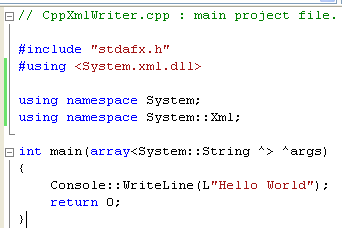
2. Add the following two lines to the top of CppXmlWriter.cpp. These lines reference the XML DLL and help you access the namespace members.
#using <System.xml.dll>
using namespace System::Xml;
 |
3. You’re going to supply the name of the XML document to write when you run the program from the command line, so change the declaration of the main() function to include the command-line argument parameters, as shown below. Take note that this is slightly different from the previous exercises however it serves the same purpose, getting input from the command line.
// Get the command line arguments
args = Environment::GetCommandLineArgs();

Part 1 | Part 2 | Part 3 | Part 4 | Part 5 | Part 6 | Part 7