< C++ .NET Arrays & Collections 8 | Main | C++ .NET Arrays & Collections 10 >
More On Arrays and Collections 9
What we have in this page?
Other .NET Collection Classes
The System::Collections and System::Collections::Specialized namespaces contain a number of very useful collection classes that can be used in C++ programs. Some of the most commonly used ones are listed in the following table. |
| Class | Description |
| ArrayList | A dynamically growable array |
| Hashtable | A collection that stores elements by key |
| Queue | Stores a list of elements and accesses them in the same order they were stored |
| SortedList | A collection that extends Hashtable, allowing you to retrieve elements by index as well as by key |
| Stack | Accesses a list of elements from the top only |
| StringCollection | Stores a list of strings and retrieves them by index (defined in System::Collections::Specialized) |
| StringDictionary | A Hashtable with the key strongly typed to be a String (defined in System::Collections::Specialized) |
|
Table 1 | |
The ArrayList Class
The ArrayList class, defined in the System::Collections namespace, is a dynamically growable (and shrinkable) array. It implements the IList interface using an array whose size is dynamically increased as required. The syntax is:
[SerializableAttribute]
[ComVisibleAttribute(true)]
public ref class ArrayList : IList, ICollection, IEnumerable, ICloneable
By default, instances of this class are resizable and writable, but the class provides two static methods that let you create read-only and fixed-size ArrayLists. The following exercise shows you how to create an ArrayList and manipulate it.
1. Open Visual C++/Studio, and create a new CLR Console Application project named ArrayList.
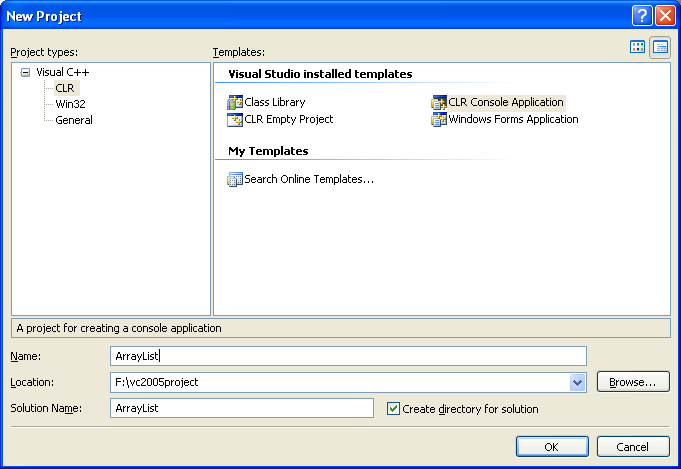
2. Open the ArrayList.cpp source file and try the following example that shows how to create and initialize an ArrayList and how to print out its values.
// ArrayList.cpp : main project file.
#include "stdafx.h"
using namespace System;
using namespace System::Collections;
void PrintValues(IEnumerable^ myList);
int main(array<System::String ^> ^args)
{
// Creates and initializes a new ArrayList.
Console::WriteLine("Creating and initializing a new ArrayList...");
Console::WriteLine();
ArrayList^ myAL = gcnew ArrayList;
myAL->Add("Hello");
myAL->Add("Dirty");
myAL->Add("Programming");
myAL->Add("World!");
// Displays the properties and values of the .
Console::WriteLine("myAL ArrayList:");
Console::WriteLine(" Count: {0}", myAL->Count);
Console::WriteLine(" Capacity: {0}", myAL->Capacity);
Console::Write(" Values:");
PrintValues(myAL);
return 0;
}
void PrintValues(IEnumerable^ myList)
{
IEnumerator^ myEnum = myList->GetEnumerator();
while (myEnum->MoveNext())
{
Object^ obj = safe_cast<Object^>(myEnum->Current);
Console::Write(" {0}", obj);
}
Console::WriteLine();
}
Output:

The ArrayList is not guaranteed to be sorted. You must sort the ArrayList prior to performing operations (such as BinarySearch) that require the ArrayList to be sorted. The capacity of a ArrayList is the number of elements the ArrayList can hold. The default initial capacity for an ArrayList is 0. As elements are added to a ArrayList, the capacity is automatically increased as required through reallocation. The capacity can be decreased by calling TrimToSize or by setting the Capacity property explicitly. Elements in this collection can be accessed using an integer index. Indexes in this collection are zero-based. ArrayList accepts a null reference (Nothing in Visual Basic) as a valid value and allows duplicate elements. Public static (Shared in Visual Basic) members of this type are thread safe. Any instance members are not guaranteed to be thread safe.
An ArrayList can support multiple readers concurrently, as long as the collection is not modified. To guarantee the thread safety of the ArrayList, all operations must be done through the wrapper returned by the Synchronized method. Enumerating through a collection is intrinsically not a thread safe procedure. Even when a collection is synchronized, other threads can still modify the collection, which causes the enumerator to throw an exception. To guarantee thread safety during enumeration, you can either lock the collection during the entire enumeration or catch the exceptions resulting from changes made by other threads.
Other ArrayList Operations
The ArrayList class implements the same interfaces as the System::Array class discussed earlier in this module, which means that it provides much of the same functionality.
-
The IList interface provides the Add, Clear, Contains, IndexOf, Insert, Remove, and RemoveAt methods, plus the Item, IsFixedSize, and IsReadOnly properties.
-
The ICollection interface provides the CopyTo method, plus the Count, IsSynchronized, and SyncRoot properties.
-
The IEnumerable interface provides the GetEnumerator method.
-
The ICloneable interface provides the Clone method.
These interfaces are used to specify common functionality for the collection classes. Once you know how the interface methods work, it becomes easier to use other collection classes. The following tables list the members exposed by the ArrayList type.
| Public Constructors | |
| Symbol | |
| Name | Description |
| ArrayList | Overloaded. Initializes a new instance of the ArrayList class. |
|
Table 2 | |

| Public Properties | |
| Symbol | |
| Name | Description |
| Capacity | Gets or sets the number of elements that the ArrayList can contain. |
| Count | Gets the number of elements actually contained in the ArrayList. |
| IsFixedSize | Gets a value indicating whether the ArrayList has a fixed size. |
| IsReadOnly | Gets a value indicating whether the ArrayList is read-only. |
| IsSynchronized | Gets a value indicating whether access to the ArrayList is synchronized (thread safe). |
| Item | Gets or sets the element at the specified index. |
| SyncRoot | Gets an object that can be used to synchronize access to the ArrayList. |
|
Table 3 | |

| Public Methods | |
| Symbol | |
| Name | Description |
| Adapter | Creates an ArrayList wrapper for a specific IList. |
| Add | Adds an object to the end of the ArrayList. |
| AddRange | Adds the elements of an ICollection to the end of the ArrayList. |
| BinarySearch | Overloaded. Uses a binary search algorithm to locate a specific element in the sorted ArrayList or a portion of it. |
| Clear | Removes all elements from the ArrayList. |
| Clone | Creates a shallow copy of the ArrayList. |
| Contains | Determines whether an element is in the ArrayList. |
| CopyTo | Overloaded. Copies the ArrayList or a portion of it to a one-dimensional array. |
| Equals | Overloaded. Determines whether two Object instances are equal. (Inherited from Object.) |
| FixedSize | Overloaded. Returns a list wrapper with a fixed size, where elements are allowed to be modified, but not added or removed. |
| GetEnumerator | Overloaded. Returns an enumerator that iterates through the ArrayList. |
| GetHashCode | Serves as a hash function for a particular type. GetHashCode is suitable for use in hashing algorithms and data structures like a hash table. (Inherited from Object.) |
| GetRange | Returns an ArrayList which represents a subset of the elements in the source ArrayList. |
| GetType | Gets the Type of the current instance. (Inherited from Object.) |
| IndexOf | Overloaded. Returns the zero-based index of the first occurrence of a value in the ArrayList or in a portion of it. |
| Insert | Inserts an element into the ArrayList at the specified index. |
| InsertRange | Inserts the elements of a collection into the ArrayList at the specified index. |
| LastIndexOf | Overloaded. Returns the zero-based index of the last occurrence of a value in the ArrayList or in a portion of it. |
| ReadOnly | Overloaded. Returns a list wrapper that is read-only. |
| ReferenceEquals | Determines whether the specified Object instances are the same instance. (Inherited from Object.) |
| Remove | Removes the first occurrence of a specific object from the ArrayList. |
| RemoveAt | Removes the element at the specified index of the ArrayList. |
| RemoveRange | Removes a range of elements from the ArrayList. |
| Repeat | Returns an ArrayList whose elements are copies of the specified value. |
| Reverse | Overloaded. Reverses the order of the elements in the ArrayList or a portion of it. |
| SetRange | Copies the elements of a collection over a range of elements in the ArrayList. |
| Sort | Overloaded. Sorts the elements in the ArrayList or a portion of it. |
| Synchronized | Overloaded. Returns a list wrapper that is synchronized (thread safe). |
| ToArray | Overloaded. Copies the elements of the ArrayList to a new array. |
| ToString | Returns a String that represents the current Object. (Inherited from Object.) |
| TrimToSize | Sets the capacity to the actual number of elements in the ArrayList. |
|
Table 4 | |
| Protected Methods | |
| Symbol | |
| Name | Description |
| Finalize | Allows an Object to attempt to free resources and perform other cleanup operations before the Object is reclaimed by garbage collection. (Inherited from Object.) |
| MemberwiseClone | Creates a shallow copy of the current Object. (Inherited from Object.) |
|
Table 5 | |

Note: You may find that in C++ .Net the dot (.) is replaced by scope operator (::). The following code example shows how to add elements to the ArrayList.
// SortedList.cpp : main project file.
#include "stdafx.h"
using namespace System;
using namespace System::Collections;
void PrintValues(IEnumerable^ myList, char mySeparator);
int main(array<System::String ^> ^args)
{
// Creates and initializes a new ArrayList.
ArrayList^ myAL = gcnew ArrayList;
myAL->Add("The");
myAL->Add("quick");
myAL->Add("brown");
myAL->Add("fox");
// Creates and initializes a new Queue.
Queue^ myQueue = gcnew Queue;
myQueue->Enqueue("jumped");
myQueue->Enqueue("over");
myQueue->Enqueue("the");
myQueue->Enqueue("lazy");
myQueue->Enqueue("dog");
// Displays the ArrayList and the Queue.
Console::WriteLine("The ArrayList initially contains:");
PrintValues(myAL, ' ');
Console::WriteLine();
Console::WriteLine("The Queue initially contains:");
PrintValues(myQueue, ' ');
Console::WriteLine();
// Copies the Queue elements to the end of the ArrayList.
myAL->AddRange(myQueue);
// Displays the ArrayList.
Console::WriteLine("The ArrayList now contains:");
PrintValues(myAL, ' ');
Console::WriteLine();
return 0;
}
void PrintValues(IEnumerable^ myList, char mySeparator)
{
IEnumerator^ myEnum = myList->GetEnumerator();
while (myEnum->MoveNext())
{
Object^ obj = safe_cast<Object^>(myEnum->Current);
Console::Write("{0} {1}", mySeparator, obj);
}
Console::WriteLine();
}
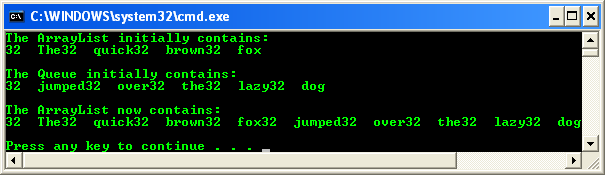
Output:
Part 1 | Part 2 | part 3 | Part 4 | Part 5 | Part 6